
Image2Studio
Examples

gpt-image-2

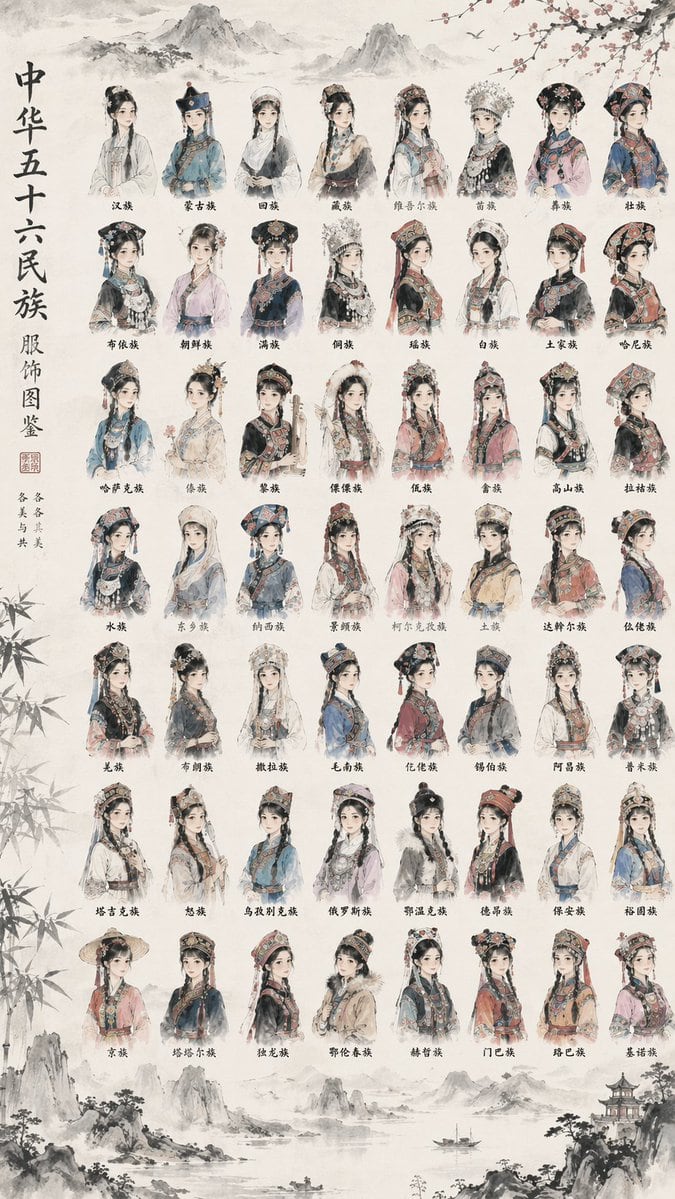
Illustrated Reference Chart

Ready-to-edit illustrated reference chart image prompt.

Ready-to-edit illustrated reference chart image prompt.
Prompt

{ "type": "illustrated reference chart", "art_style": "{argument name=\"art style\" default=\"traditional Chinese ink wash painting, delicate brushwork, soft watercolor tones, vintage aged paper texture\"}", "background_elements": "faded landscape painting at the top and bottom featuring distant mountains, a small boat on water, a traditional pavilion, bamboo leaves framing the left edge, and plum blossom branches at the top right", "layout": { "left_sidebar": { "main_title": "{argument name=\"main title\" default=\"中华五十六民族 服饰图鉴\"}", "subtitle": "各美其美 美美与共", "decorations": "red seal stamp" }, "center_grid": { "description": "{argument name=\"subject description\" default=\"half-body portraits of young women wearing distinct, highly detailed traditional ethnic clothing and elaborate headdresses\"}", "rows": 7, "columns": 8, "total_items": 56, "labels": [ "汉族", "蒙古族", "回族", "藏族", "维吾尔族", "苗族", "彝族", "壮族", "布依族", "朝鲜族", "满族", "侗族", "瑶族", "白族", "土家族", "哈尼族", "哈萨克族", "傣族", "黎族", "傈僳族", "佤族", "畲族", "高山族", "拉祜族", "水族", "东乡族", "纳西族", "景颇族", "柯尔克孜族", "土族", "达斡尔族", "仫佬族", "羌族", "布朗族", "撒拉族", "毛南族", "仡佬族", "锡伯族", "阿昌族", "普米族", "塔吉克族", "怒族", "乌孜别克族", "俄罗斯族", "鄂温克族", "德昂族", "保安族", "裕固族", "京族", "塔塔尔族", "独龙族", "鄂伦春族", "赫哲族", "门巴族", "珞巴族", "基诺族" ] } } }

Prompt structure
  • Modelgpt-image-2
  • Use caseavatar
  • Styleeditorial, watercolor
  • Aspect ratioFlexible
Best used for
  • Use caseavatar
  • Styleeditorial, watercolor
  • Recommended specs1:1, 4:5, 16:9, or 9:16
  • ModelGPT Image 2
How to customize

Use this Illustrated Reference Chart prompt as a base. Replace the subject, product details, environment, lighting, brand colors, and output ratio while keeping the avatar intent and editorial, watercolor direction stable.

Editable variables
  • SubjectReplace the product, person, scene, interface, or object being generated.
  • Use caseKeep or rewrite the destination as avatar, ad creative, cover image, poster, or ecommerce hero.
  • FrameChoose 1:1, 4:5, 16:9, or 9:16 based on the final placement.
  • Brand cuesAdd colors, materials, props, text-safe space, and the platform where the image will be used.
Recommended specs

Choose the frame for the destination first, then use 1K, 2K, or 4K based on output quality needs. Product images and posters usually benefit from higher resolution.

Pre-generation checklist
  • CheckSubject, lighting, composition, and frame are specific enough to review.
  • CheckText-safe space is included when the image will carry a headline or ad copy.
  • CheckResolution, credit cost, and final destination are checked before generation.
Why this prompt works

Illustrated Reference Chart works because it starts from the image job, then controls subject, composition, lighting, style, and frame. It is best for avatar while keeping the editorial, watercolor direction stable.

Common questions
  • Can I use it directly?Yes. Replace the subject, brand cues, and frame, then generate in Image2Studio.
  • Which ratio should I use?Choose 1:1, 4:5, 16:9, or 9:16 based on the destination.




