
Image2Studio
Examples

gpt-image-2

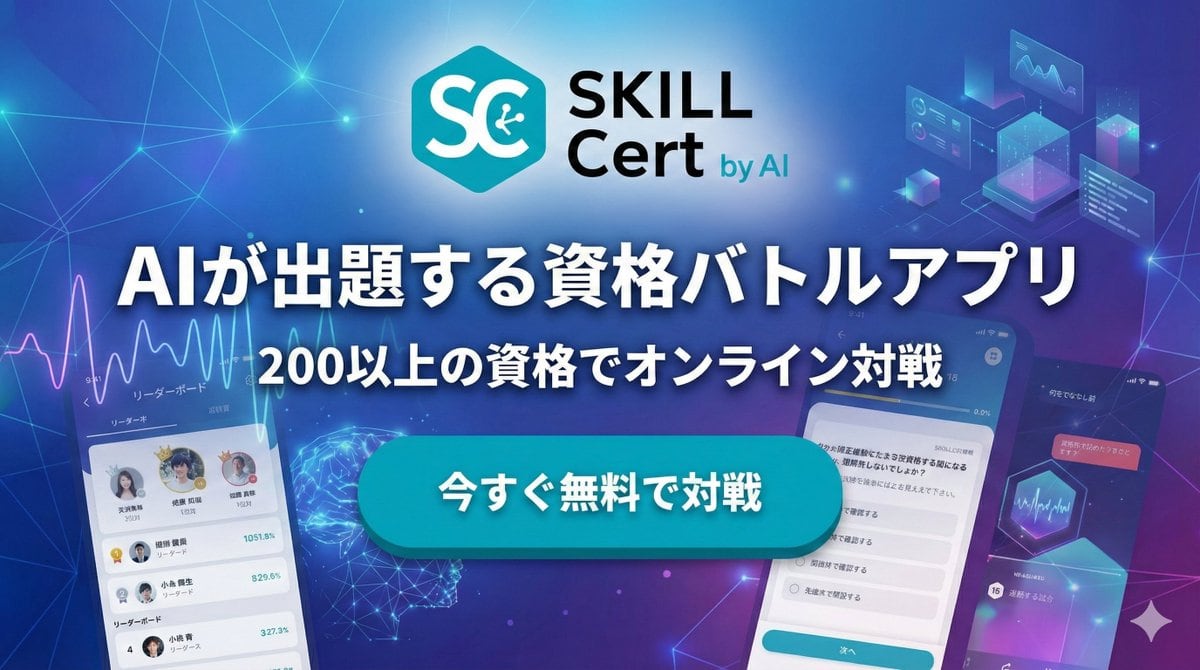
Create A Polished Japanese Tech Advertising Banner

Create a polished Japanese tech advertising banner for a mobile app, widescreen 16:9, with a futuristic blue-to-purple gradient background filled with glowing network lines, connection no...

Create a polished Japanese tech advertising banner for a mobile app, widescreen 16:9, with a futuristic blue-to-purple gradient background filled with glowing network lines, connection no...
Prompt

Create a polished Japanese tech advertising banner for a mobile app, widescreen 16:9, with a futuristic blue-to-purple gradient background filled with glowing network lines, connection nodes, soft lens flares, and subtle digital particles. At the top center, place a modern app logo: a cyan hexagon icon with large white letters “SC” and a small circuit symbol inside the C, followed by the brand text “SKILL Cert by AI” in a clean sans-serif font, with “SKILL” large and black, “Cert” below it in black, and “by AI” smaller in cyan. Center the composition around a bold Japanese headline in very large white text with a dark navy outline and soft drop shadow: {argument name="headline text" default="AIが出題する資格バトルアプリ"}. Directly below, add a second line of medium-large white Japanese text with the same outline and shadow: {argument name="subheadline text" default="200以上の資格でオンライン対戦"}. In the middle foreground, place one large glossy rounded rectangular call-to-action button in bright cyan with subtle gradient, bevel, and shadow, containing bold white Japanese text: {argument name="button text" default="今すぐ無料で対戦"}. Show exactly 3 smartphone mockups arranged around the center: 1 on the lower left, tilted slightly right, showing a leaderboard app screen with a line graph at the top, small profile avatars, ranking rows, and Japanese UI labels; 1 large phone on the lower right, tilted slightly left, showing a multiple-choice quiz screen with Japanese question text and radio-button answers plus a cyan bottom button; 1 smaller phone on the far right edge, angled inward, showing a darker dashboard-style screen with charts and Japanese text. Add exactly 4 floating UI graphic clusters in the background: 1 analytics line-chart panel near the upper left, 1 holographic cube/dashboard cluster near the upper right, 1 glowing wireframe brain or neural sphere near the lower left-center behind the button, and 1 hexagon chart/card element near the right-center. Use a sleek AI, SaaS, and edtech marketing aesthetic, high contrast, crisp typography, layered depth, neon glow accents, and premium app-promo lighting.

Prompt structure
  • Modelgpt-image-2
  • Use caseapp-ui-mockup
  • Stylecyberpunk, photorealistic, minimal, luxury
  • Aspect ratioFlexible
Best used for
  • Use caseapp-ui-mockup
  • Stylecyberpunk, photorealistic, minimal, luxury
  • Recommended specs1:1, 4:5, 16:9, or 9:16
  • ModelGPT Image 2
How to customize

Use this Create A Polished Japanese Tech Advertising Banner prompt as a base. Replace the subject, product details, environment, lighting, brand colors, and output ratio while keeping the app-ui-mockup intent and cyberpunk, photorealistic, minimal, luxury direction stable.

Editable variables
  • SubjectReplace the product, person, scene, interface, or object being generated.
  • Use caseKeep or rewrite the destination as app ui mockup, ad creative, cover image, poster, or ecommerce hero.
  • FrameChoose 1:1, 4:5, 16:9, or 9:16 based on the final placement.
  • Brand cuesAdd colors, materials, props, text-safe space, and the platform where the image will be used.
Recommended specs

Choose the frame for the destination first, then use 1K, 2K, or 4K based on output quality needs. Product images and posters usually benefit from higher resolution.

Pre-generation checklist
  • CheckSubject, lighting, composition, and frame are specific enough to review.
  • CheckText-safe space is included when the image will carry a headline or ad copy.
  • CheckResolution, credit cost, and final destination are checked before generation.
Why this prompt works

Create A Polished Japanese Tech Advertising Banner works because it starts from the image job, then controls subject, composition, lighting, style, and frame. It is best for app ui mockup while keeping the cyberpunk, photorealistic, minimal, luxury direction stable.

Common questions
  • Can I use it directly?Yes. Replace the subject, brand cues, and frame, then generate in Image2Studio.
  • Which ratio should I use?Choose 1:1, 4:5, 16:9, or 9:16 based on the destination.




