
Image2Studio
Examples

gpt-image-2

Create A Retro Cinematic Personal-brand Poster In A Distressed 1970s Pro

Create a retro cinematic personal-brand poster in a distressed 1970s propaganda-meets-film-advertising style, landscape orientation, with a thick worn black border and heavy paper grain,...

Create a retro cinematic personal-brand poster in a distressed 1970s propaganda-meets-film-advertising style, landscape orientation, with a thick worn black border and heavy paper grain,...
Prompt

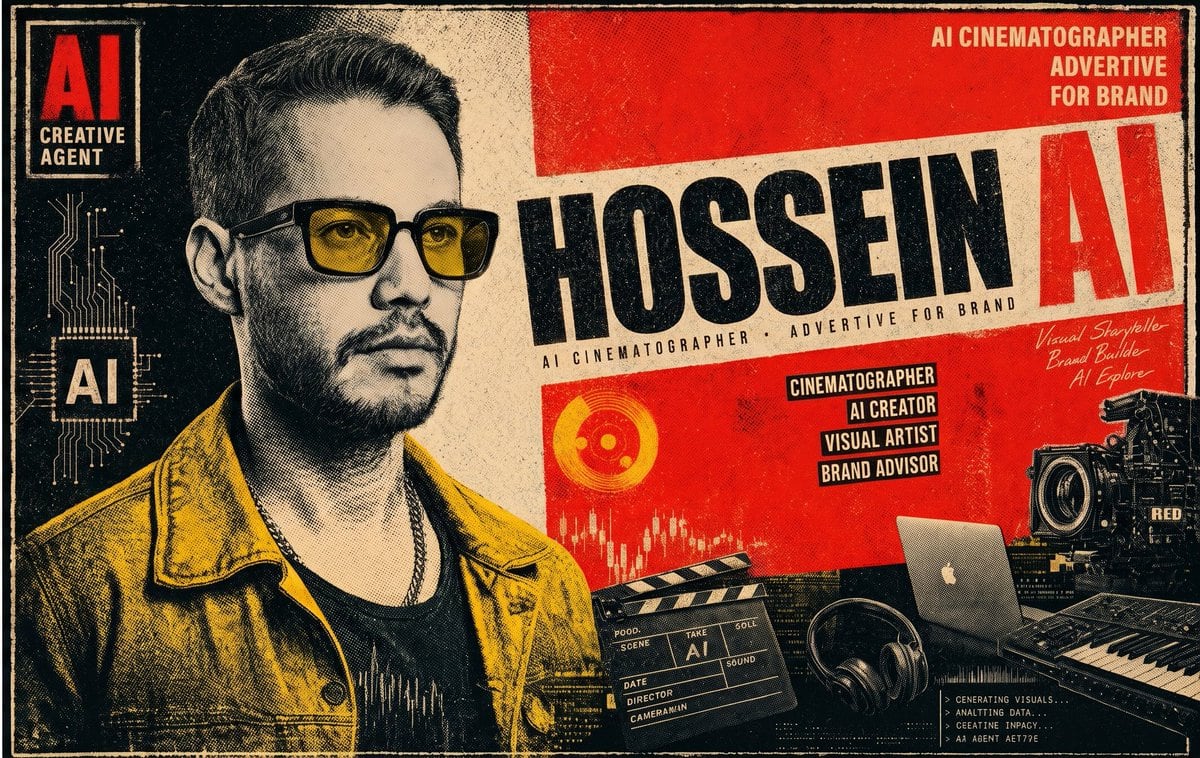
Create a retro cinematic personal-brand poster in a distressed 1970s propaganda-meets-film-advertising style, landscape orientation, with a thick worn black border and heavy paper grain, ink bleed, halftone texture, scuffed edges, and aged print imperfections. Use a bold limited palette of deep black, warm cream, saturated poster red, and mustard yellow. The composition is a single unified poster with a large cropped portrait of {argument name="character name" default="HOSSEIN"} on the left half, shown from chest up, wearing dark sunglasses, a dark shirt, a chain necklace, and a mustard yellow jacket, with short dark hair styled up; the face is intentionally obscured by a centered rectangular block in muted taupe-gray, creating an editorial anonymized look. On the far left, place a vertical black panel containing 2 stacked “AI” blocks and 1 subtitle: top block reads “AI”, beneath it the subtitle reads “CREATIVE AGENT”, lower down another large “AI” sits over a gold circuit-board graphic. Across the center-right, place the main diagonal cream title band with huge black condensed lettering for the name {argument name="main name text" default="HOSSEIN"} and an oversized red “AI” at the far right of the band. Beneath the large name, add a small stretched subtitle line reading “AI CINEMATOGRAPHER · ADVERTIVE FOR BRAND”. In the top-right corner, add a 3-line stacked headline reading {argument name="top right headline" default="AI CINEMATOGRAPHER ADVERTIVE FOR BRAND"} in bold cream text on red. On the red field below the title band, include exactly 4 stacked black label boxes with cream text: “CINEMATOGRAPHER”, “AI CREATOR”, “VISUAL ARTIST”, and “BRAND ADVISOR”. Near the right side, add a handwritten white script note with exactly 3 lines: “Visual Storyteller”, “Brand Builder”, and “AI Explore”. In the lower area, arrange exactly 6 creative-tech objects: 1 circular orange graphic icon, 1 white audio waveform/equalizer graphic, 1 black film clapperboard labeled with “AI”, 1 open silver laptop, 1 pair of black headphones, and 1 large professional cinema camera body with visible “RED” marking; also include the edge of a music keyboard/controller at the bottom right. In the bottom-right corner, place a small dark terminal-style text block with tiny white monospace lines suggesting AI-generated visuals and analytics. Keep the whole design bold, gritty, and highly graphic, like a premium personal branding poster for an AI creative director and visual storyteller.

Prompt structure
  • Modelgpt-image-2
  • Use casesocial-media-post
  • Stylecinematic, editorial, luxury, photorealistic
  • Aspect ratioFlexible
Best used for
  • Use casesocial-media-post
  • Stylecinematic, editorial, luxury, photorealistic
  • Recommended specs1:1, 4:5, 16:9, or 9:16
  • ModelGPT Image 2
How to customize

Use this Create A Retro Cinematic Personal-brand Poster In A Distressed 1970s Pro prompt as a base. Replace the subject, product details, environment, lighting, brand colors, and output ratio while keeping the social-media-post intent and cinematic, editorial, luxury, photorealistic direction stable.

Editable variables
  • SubjectReplace the product, person, scene, interface, or object being generated.
  • Use caseKeep or rewrite the destination as social media post, ad creative, cover image, poster, or ecommerce hero.
  • FrameChoose 1:1, 4:5, 16:9, or 9:16 based on the final placement.
  • Brand cuesAdd colors, materials, props, text-safe space, and the platform where the image will be used.
Recommended specs

Choose the frame for the destination first, then use 1K, 2K, or 4K based on output quality needs. Product images and posters usually benefit from higher resolution.

Pre-generation checklist
  • CheckSubject, lighting, composition, and frame are specific enough to review.
  • CheckText-safe space is included when the image will carry a headline or ad copy.
  • CheckResolution, credit cost, and final destination are checked before generation.
Why this prompt works

Create A Retro Cinematic Personal-brand Poster In A Distressed 1970s Pro works because it starts from the image job, then controls subject, composition, lighting, style, and frame. It is best for social media post while keeping the cinematic, editorial, luxury, photorealistic direction stable.

Common questions
  • Can I use it directly?Yes. Replace the subject, brand cues, and frame, then generate in Image2Studio.
  • Which ratio should I use?Choose 1:1, 4:5, 16:9, or 9:16 based on the destination.




