
Image2Studio
Examples

gpt-image-2

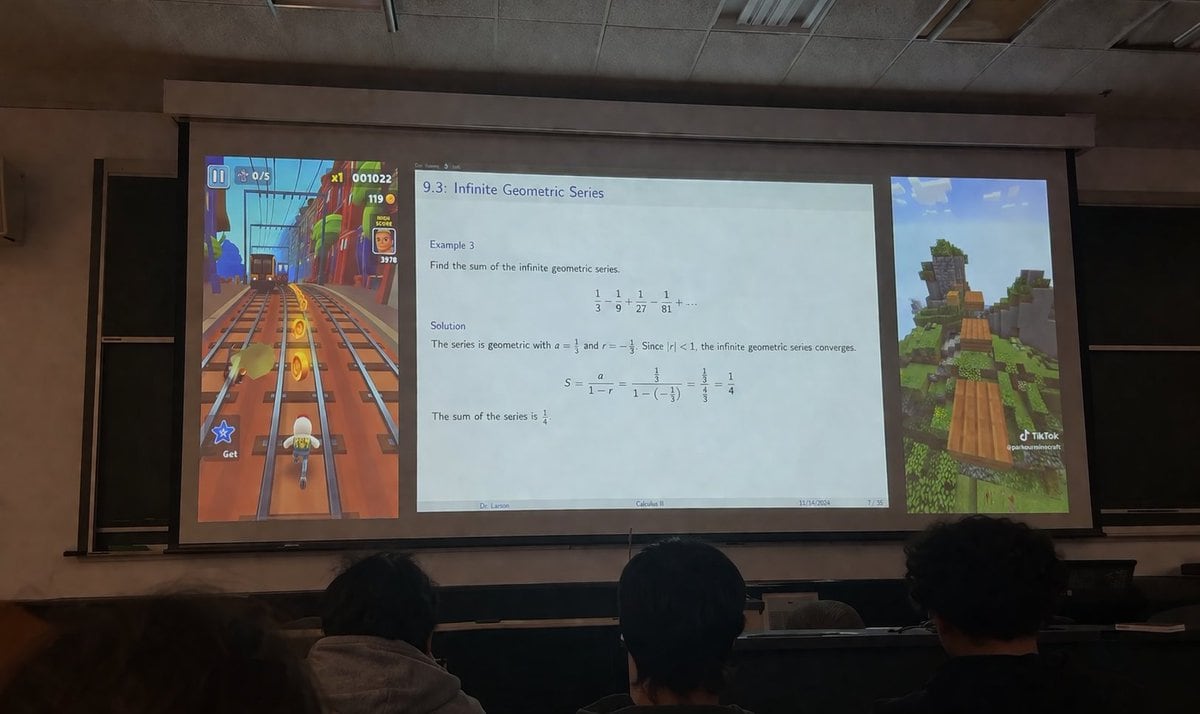
Realistic Photograph Taken From The Audience In A Dimly Lit University L

A realistic photograph taken from the audience in a dimly lit university lecture hall, looking over the backs of the heads of three students in the foreground towards a large projector sc...

A realistic photograph taken from the audience in a dimly lit university lecture hall, looking over the backs of the heads of three students in the foreground towards a large projector sc...
Prompt

A realistic photograph taken from the audience in a dimly lit university lecture hall, looking over the backs of the heads of three students in the foreground towards a large projector screen. The projector screen displays a layout split into three distinct vertical panels. The left panel shows vertical {argument name="left game" default="Subway Surfers gameplay"}, featuring a character running on train tracks collecting gold coins with UI elements like a score of "001022". The wide center panel displays an academic presentation slide titled "{argument name="slide topic" default="9.3: Infinite Geometric Series"}". The slide contains math text: "Example 3: Find the sum of the infinite geometric series. 1/3 - 1/9 + 1/27 - 1/81 + ... Solution: The series is geometric with a = 1/3 and r = -1/3. Since |r| < 1, the infinite geometric series converges. S = a / (1 - r) = (1/3) / (1 - (-1/3)) = (1/3) / (4/3) = 1/4. The sum of the series is 1/4." The slide footer reads "{argument name="professor name" default="Dr. Larson"}", "{argument name="course name" default="Calculus II"}", "11/14/2024", and "7 / 35". The right panel shows vertical {argument name="right game" default="Minecraft parkour gameplay"}, featuring floating wooden blocks over a grassy landscape with a TikTok watermark at the bottom right. The room has a drop ceiling and blackboards visible behind the screen edges.

Prompt structure
  • Modelgpt-image-2
  • Use caseapp-ui-mockup
  • Stylephotorealistic, editorial, luxury
  • Aspect ratioFlexible
Best used for
  • Use caseapp-ui-mockup
  • Stylephotorealistic, editorial, luxury
  • Recommended specs1:1, 4:5, 16:9, or 9:16
  • ModelGPT Image 2
How to customize

Use this Realistic Photograph Taken From The Audience In A Dimly Lit University L prompt as a base. Replace the subject, product details, environment, lighting, brand colors, and output ratio while keeping the app-ui-mockup intent and photorealistic, editorial, luxury direction stable.

Editable variables
  • SubjectReplace the product, person, scene, interface, or object being generated.
  • Use caseKeep or rewrite the destination as app ui mockup, ad creative, cover image, poster, or ecommerce hero.
  • FrameChoose 1:1, 4:5, 16:9, or 9:16 based on the final placement.
  • Brand cuesAdd colors, materials, props, text-safe space, and the platform where the image will be used.
Recommended specs

Choose the frame for the destination first, then use 1K, 2K, or 4K based on output quality needs. Product images and posters usually benefit from higher resolution.

Pre-generation checklist
  • CheckSubject, lighting, composition, and frame are specific enough to review.
  • CheckText-safe space is included when the image will carry a headline or ad copy.
  • CheckResolution, credit cost, and final destination are checked before generation.
Why this prompt works

Realistic Photograph Taken From The Audience In A Dimly Lit University L works because it starts from the image job, then controls subject, composition, lighting, style, and frame. It is best for app ui mockup while keeping the photorealistic, editorial, luxury direction stable.

Common questions
  • Can I use it directly?Yes. Replace the subject, brand cues, and frame, then generate in Image2Studio.
  • Which ratio should I use?Choose 1:1, 4:5, 16:9, or 9:16 based on the destination.




