
Image2Studio
Prompts

gpt-image-2

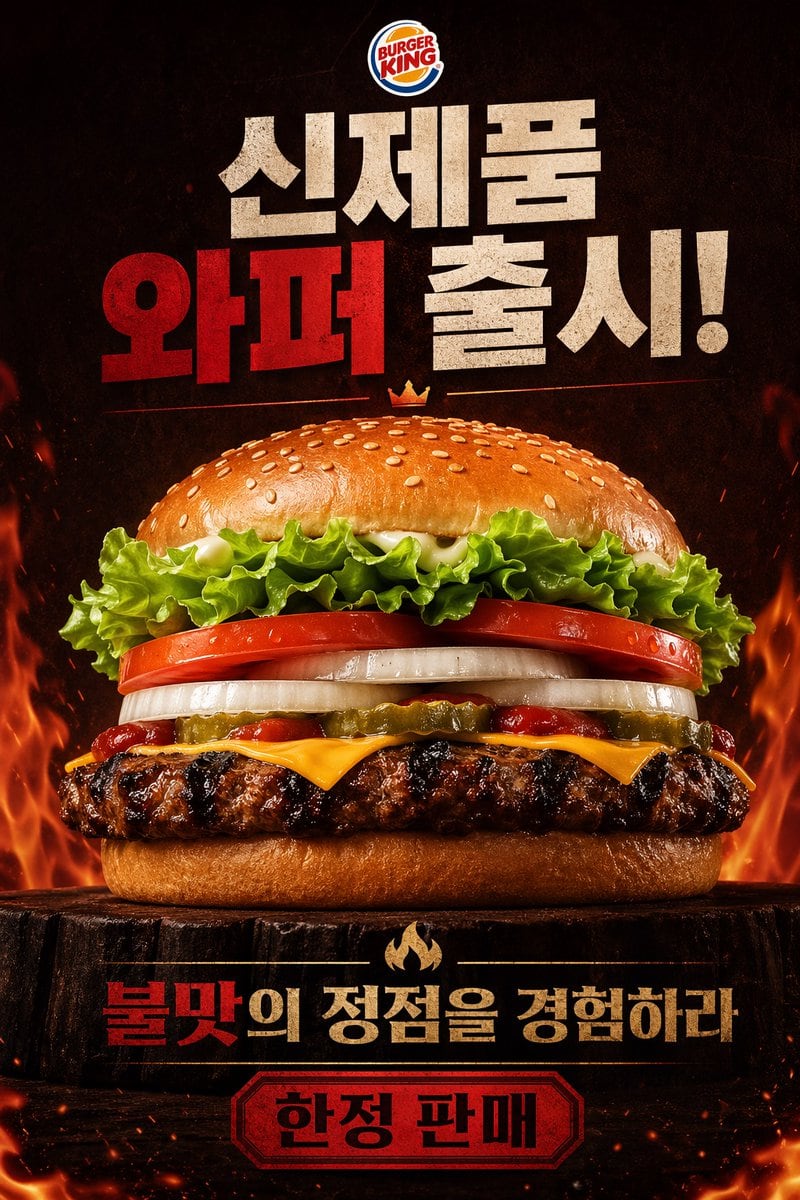
Dramatic Fast-food Poster Advertisement

A dramatic fast-food poster advertisement for Burger King, vertical composition, photorealistic studio food photography mixed with bold Korean promotional graphic design. Place the offici...

A dramatic fast-food poster advertisement for Burger King, vertical composition, photorealistic studio food photography mixed with bold Korean promotional graphic design. Place the offici...
Prompt

A dramatic fast-food poster advertisement for Burger King, vertical composition, photorealistic studio food photography mixed with bold Korean promotional graphic design. Place the official Burger King logo centered at the very top. Below it, add huge distressed block Korean headline text in a stacked layout reading "신제품 와퍼 출시!" with "와퍼" in vivid deep red and the other words in textured off-white, all on a dark smoky black background. In the center, show one massive hero burger shot from a slightly low front angle, perfectly centered and filling most of the frame. The burger has 8 clearly visible layers and elements: a glossy sesame seed top bun, curly green leaf lettuce, thick red tomato slices, thick white onion rings, sliced pickles, streaks of ketchup, melted American cheese, a flame-grilled beef patty with heavy char marks, and a soft bottom bun. Add a tiny golden crown icon floating just above the top bun. The burger sits on a dark rustic wooden stump pedestal. Surround the lower half and side edges with dramatic orange flames, glowing embers, heat sparks, and smoky atmosphere to emphasize flame grilling. Near the bottom, place a secondary Korean slogan in bold text, centered, reading "불맛의 정점을 경험하라" with "불맛" in red and the remaining words in warm beige-gold, separated above by a small flame icon. At the very bottom, add a red badge-shaped label with a dark border containing the Korean text "한정 판매" in bold black. Use a high-contrast black, red, orange, and toasted brown color palette, intense cinematic lighting, glossy food highlights, crisp ingredient texture, premium commercial advertising finish, and a fiery indulgent mood.

Prompt structure
  • Modelgpt-image-2
  • Use casefood-menu-visual
  • Stylecinematic, photorealistic, luxury, editorial
  • Aspect ratioFlexible
Best used for
  • Use casefood-menu-visual
  • Stylecinematic, photorealistic, luxury, editorial
  • Recommended specs1:1, 4:5, 16:9, or 9:16
  • ModelGPT Image 2
How to customize

Use this Dramatic Fast-food Poster Advertisement prompt as a base. Replace the subject, product details, environment, lighting, brand colors, and output ratio while keeping the food-menu-visual intent and cinematic, photorealistic, luxury, editorial direction stable.

Editable variables
  • SubjectReplace the product, person, scene, interface, or object being generated.
  • Use caseKeep or rewrite the destination as food menu visual, ad creative, cover image, poster, or ecommerce hero.
  • FrameChoose 1:1, 4:5, 16:9, or 9:16 based on the final placement.
  • Brand cuesAdd colors, materials, props, text-safe space, and the platform where the image will be used.
Recommended specs

Choose the frame for the destination first, then use 1K, 2K, or 4K based on output quality needs. Product images and posters usually benefit from higher resolution.

Pre-generation checklist
  • CheckSubject, lighting, composition, and frame are specific enough to review.
  • CheckText-safe space is included when the image will carry a headline or ad copy.
  • CheckResolution, credit cost, and final destination are checked before generation.
Why this prompt works

Dramatic Fast-food Poster Advertisement works because it starts from the image job, then controls subject, composition, lighting, style, and frame. It is best for food menu visual while keeping the cinematic, photorealistic, luxury, editorial direction stable.

Common questions
  • Can I use it directly?Yes. Replace the subject, brand cues, and frame, then generate in Image2Studio.
  • Which ratio should I use?Choose 1:1, 4:5, 16:9, or 9:16 based on the destination.




