
Image2Studio
Examples

gpt-image-2

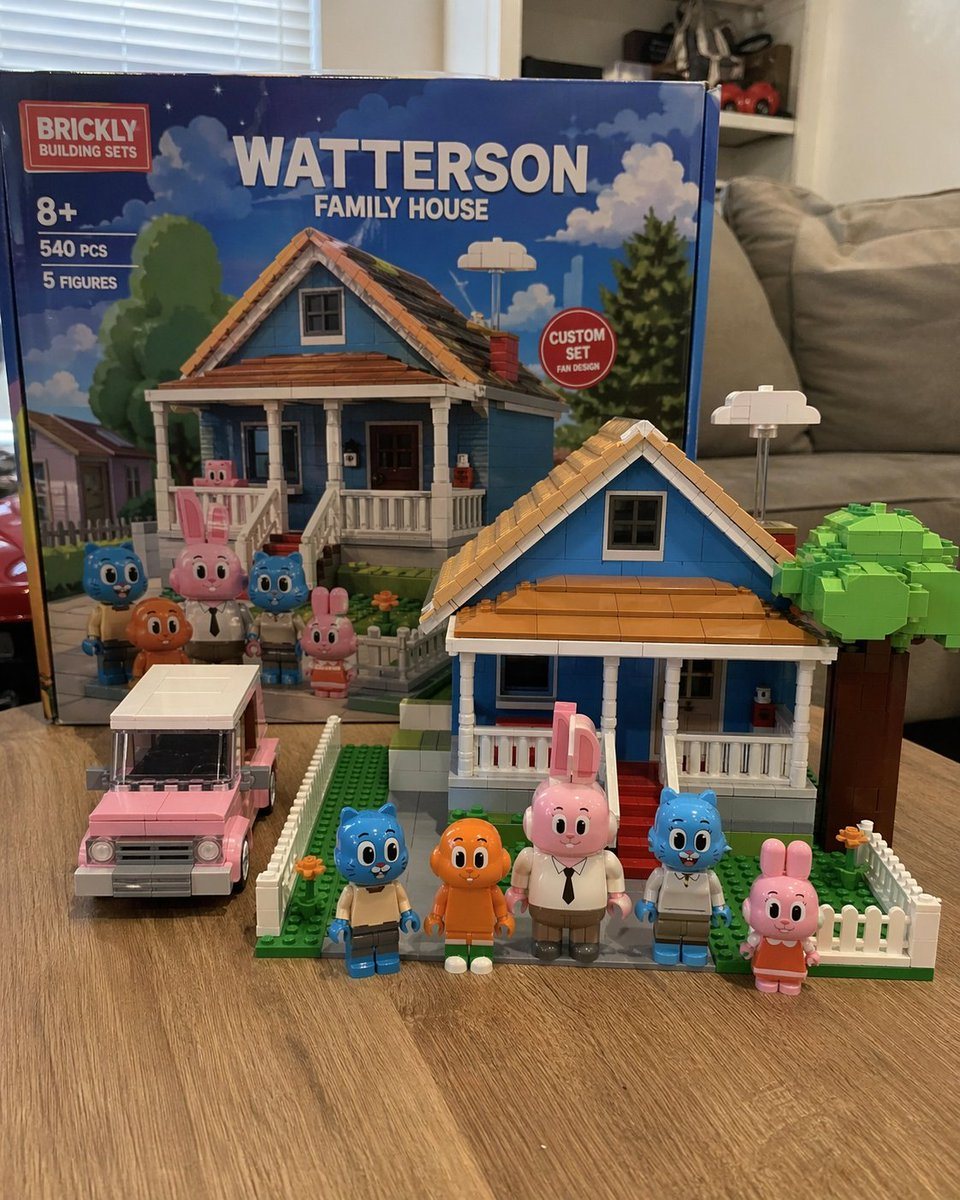
Custom Building Block Set Photography

Generates a photorealistic image of a custom toy building set with its box, assembled house, vehicle, and minifigures on a table.

Generates a photorealistic image of a custom toy building set with its box, assembled house, vehicle, and minifigures on a table.
Prompt

A photorealistic amateur photograph of a custom building block set resting on a light wood grain table in a living room. In the background stands a large product box with a red logo reading "{argument name="brand name" default="BRICKLY"} BUILDING SETS". The box features text reading "8+", "540 PCS", "5 FIGURES", and the main large title "{argument name="set title" default="WATTERSON FAMILY HOUSE"}". A red circular badge on the box reads "CUSTOM SET FAN DESIGN", and the box art depicts the house and characters under a blue sky. In the foreground sits the fully assembled block model of a {argument name="house color" default="blue"} two-story suburban house with a brown roof, white porch, red steps, a white picket fence, and a blocky green tree. To the left of the house is a built block model of a {argument name="car color" default="pink"} station wagon. Standing in a row in front of the house are exactly 5 custom block minifigures: a blue cat in tan pants, an orange fish with legs, a tall pink rabbit in a white shirt and tie, a blue cat in a white shirt, and a small pink rabbit in an orange dress. The background is a slightly blurred living room with a grey sofa and white blinds.

Prompt structure
  • Modelgpt-image-2
  • Use casebrand-identity
  • Stylephotorealistic
  • Aspect ratioFlexible
Best used for
  • Use casebrand-identity
  • Stylephotorealistic
  • Recommended specs1:1, 4:5, 16:9, or 9:16
  • ModelGPT Image 2
How to customize

Use this Custom Building Block Set Photography prompt as a base. Replace the subject, product details, environment, lighting, brand colors, and output ratio while keeping the brand-identity intent and photorealistic direction stable.

Editable variables
  • SubjectReplace the product, person, scene, interface, or object being generated.
  • Use caseKeep or rewrite the destination as brand identity, ad creative, cover image, poster, or ecommerce hero.
  • FrameChoose 1:1, 4:5, 16:9, or 9:16 based on the final placement.
  • Brand cuesAdd colors, materials, props, text-safe space, and the platform where the image will be used.
Recommended specs

Choose the frame for the destination first, then use 1K, 2K, or 4K based on output quality needs. Product images and posters usually benefit from higher resolution.

Pre-generation checklist
  • CheckSubject, lighting, composition, and frame are specific enough to review.
  • CheckText-safe space is included when the image will carry a headline or ad copy.
  • CheckResolution, credit cost, and final destination are checked before generation.
Why this prompt works

Custom Building Block Set Photography works because it starts from the image job, then controls subject, composition, lighting, style, and frame. It is best for brand identity while keeping the photorealistic direction stable.

Common questions
  • Can I use it directly?Yes. Replace the subject, brand cues, and frame, then generate in Image2Studio.
  • Which ratio should I use?Choose 1:1, 4:5, 16:9, or 9:16 based on the destination.




