
Image2Studio
Examples

gpt-image-2

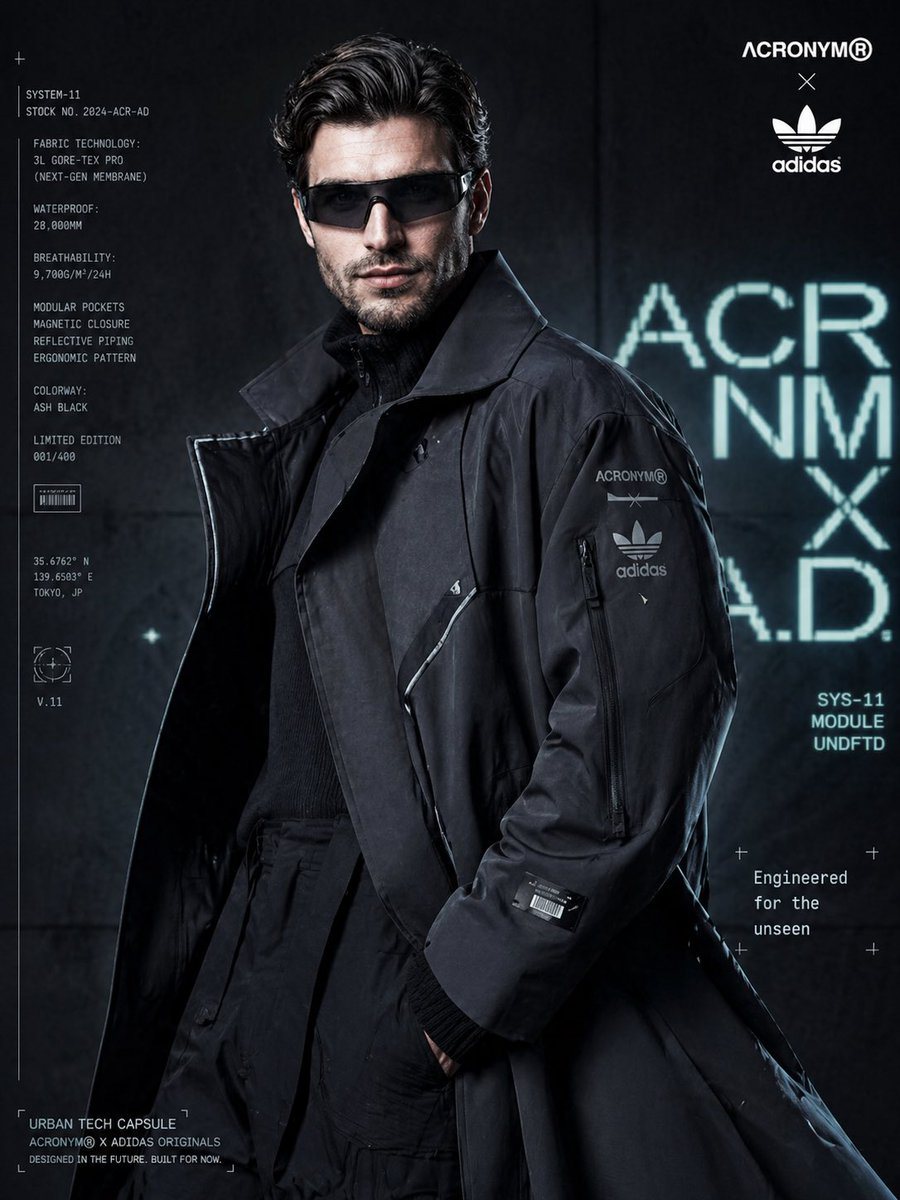
Cyberpunk Fashion Campaign Poster

A highly detailed prompt for a futuristic techwear fashion advertisement, including specific branding and layout instructions.

A highly detailed prompt for a futuristic techwear fashion advertisement, including specific branding and layout instructions.
Prompt

Ultra-realistic luxury fashion campaign poster featuring a young male model with textured wavy hair, sharp jawline, and minimal beard, wearing slim futuristic visor glasses. He stands in a composed yet powerful pose, slightly turned, eyes locked with the camera. Outfit: oversized matte-finish charcoal techwear trench coat with layered panels, magnetic closures, and subtle reflective piping. Inner layer includes a high-neck tactical knit and structured cargo trousers, creating a futuristic urban silhouette. Branding elements: subtle co-branded identity of {argument name="brands" default="Acronym × Adidas Originals"} placed minimally on coat sleeve and top corner of composition. Add small futuristic patches, barcodes, and geometric tech symbols for a clean cyber aesthetic. Composition: medium shot, slightly low angle for dominance, coat flowing and occupying most of the frame with strong structure and depth. Model positioned slightly off-center. Background: dark gradient concrete wall with neon cyan and white holographic-style typography behind the subject, slightly defocused for depth. Lighting: cinematic high-contrast lighting with cool cyan and teal tones, combined with a sharp white rim light outlining the coat edges. Subtle reflections enhance the fabric’s technical texture. HDR, ultra-sharp focus, premium editorial finish. Typography layout: • Top right: co-branded logos • Left vertical block: technical product specs text • Right side: minimal tagline “{argument name="tagline" default="Engineered for the unseen"}” • Bottom: “{argument name="label" default="Urban Tech Capsule"}” label Style: futuristic streetwear campaign, cyberpunk editorial, ultra-detailed, 8k resolution, shallow depth of field, soft film grain, clean yet bold composition, modern UI-inspired overlays

Prompt structure
  • Modelgpt-image-2
  • Use casecampaign-poster
  • Stylecyberpunk, editorial, minimal, photorealistic
  • Aspect ratioFlexible
Best used for
  • Use casecampaign-poster
  • Stylecyberpunk, editorial, minimal, photorealistic
  • Recommended specs1:1, 4:5, 16:9, or 9:16
  • ModelGPT Image 2
How to customize

Use this Cyberpunk Fashion Campaign Poster prompt as a base. Replace the subject, product details, environment, lighting, brand colors, and output ratio while keeping the campaign-poster intent and cyberpunk, editorial, minimal, photorealistic direction stable.

Editable variables
  • SubjectReplace the product, person, scene, interface, or object being generated.
  • Use caseKeep or rewrite the destination as campaign poster, ad creative, cover image, poster, or ecommerce hero.
  • FrameChoose 1:1, 4:5, 16:9, or 9:16 based on the final placement.
  • Brand cuesAdd colors, materials, props, text-safe space, and the platform where the image will be used.
Recommended specs

Choose the frame for the destination first, then use 1K, 2K, or 4K based on output quality needs. Product images and posters usually benefit from higher resolution.

Pre-generation checklist
  • CheckSubject, lighting, composition, and frame are specific enough to review.
  • CheckText-safe space is included when the image will carry a headline or ad copy.
  • CheckResolution, credit cost, and final destination are checked before generation.
Why this prompt works

Cyberpunk Fashion Campaign Poster works because it starts from the image job, then controls subject, composition, lighting, style, and frame. It is best for campaign poster while keeping the cyberpunk, editorial, minimal, photorealistic direction stable.

Common questions
  • Can I use it directly?Yes. Replace the subject, brand cues, and frame, then generate in Image2Studio.
  • Which ratio should I use?Choose 1:1, 4:5, 16:9, or 9:16 based on the destination.




