Image2Studio
Examples

gpt-image-2

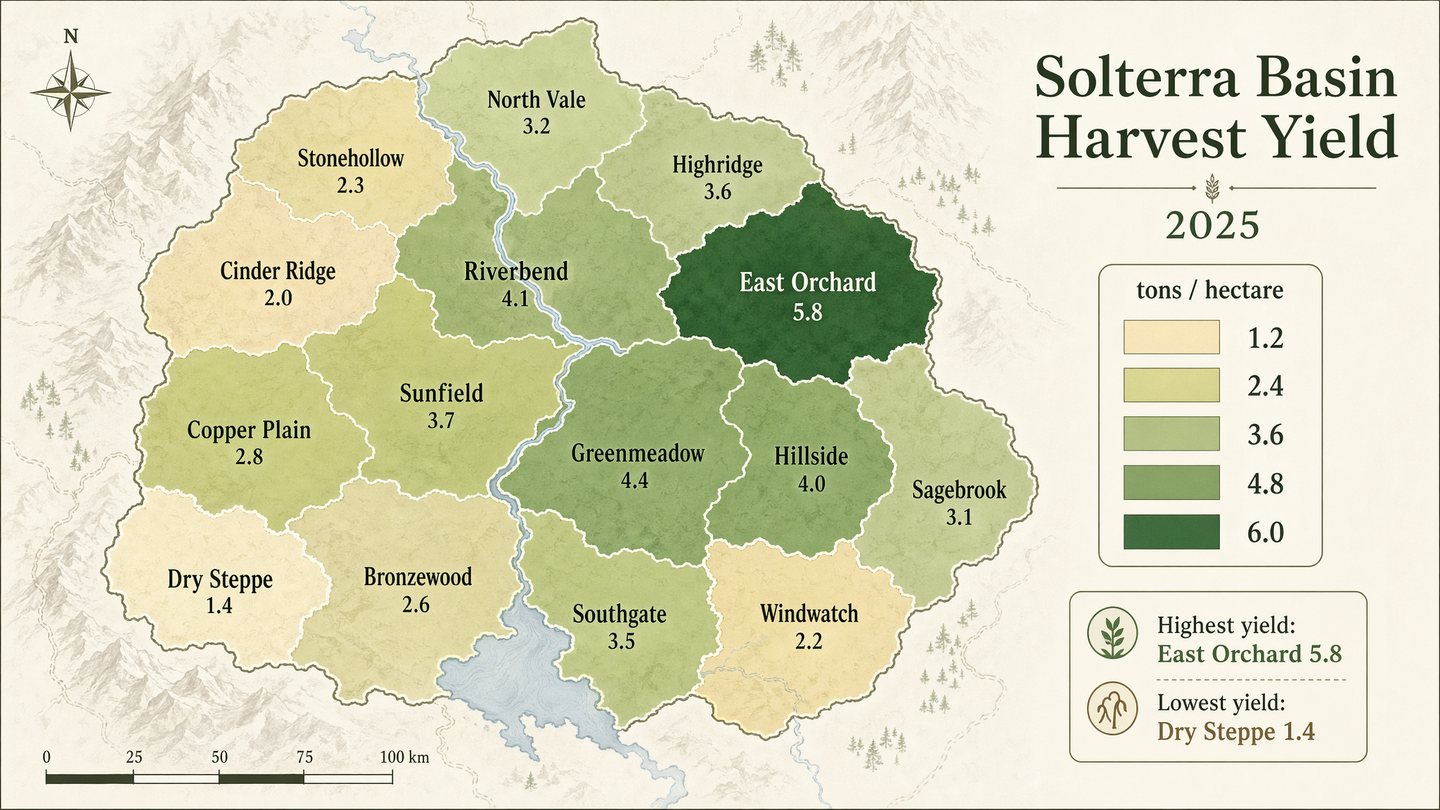
Geographic Choropleth Yield Map

Social Media Post prompt for infographics, ready to edit and generate in Image2Studio.

Social Media Post prompt for infographics, ready to edit and generate in Image2Studio.
Prompt

Produce a polished geographic choropleth map infographic of a fictional agricultural region called the Solterra Basin, showing harvest yield by district. Use a minimalist cartographic style on an off-white background with muted terrain hints and a sequential palette from pale sand to deep green. The map should include 14 clearly separated districts with clean borders, crisp labels, and a right-side legend. Include in-image text: "Solterra Basin Harvest Yield", "2025", and legend title "tons / hectare". Label districts with names such as "North Vale", "Riverbend", "Copper Plain", "East Orchard", and "Cinder Ridge". Include legend values "1.2", "2.4", "3.6", "4.8", and "6.0". Add a compact annotation box reading "Highest yield: East Orchard 5.8" and "Lowest yield: Dry Steppe 1.4". Prioritize clean typography, accurate map-like geometry, balanced composition, subtle cartographic detail, and publication-grade infographic clarity.

Prompt structure
  • Modelgpt-image-2
  • Use casesocial-media-post
  • Styleminimal
  • Aspect ratiowide
Best used for
  • Use casesocial-media-post
  • Styleminimal
  • Recommended specswide
  • ModelGPT Image 2
How to customize

Use this Geographic Choropleth Yield Map prompt as a base. Replace the subject, product details, environment, lighting, brand colors, and output ratio while keeping the social-media-post intent and minimal direction stable.

Editable variables
  • SubjectReplace the product, person, scene, interface, or object being generated.
  • Use caseKeep or rewrite the destination as social media post, ad creative, cover image, poster, or ecommerce hero.
  • Framewide
  • Brand cuesAdd colors, materials, props, text-safe space, and the platform where the image will be used.
Recommended specs

Choose the frame for the destination first, then use 1K, 2K, or 4K based on output quality needs. Product images and posters usually benefit from higher resolution.

Pre-generation checklist
  • CheckSubject, lighting, composition, and frame are specific enough to review.
  • CheckText-safe space is included when the image will carry a headline or ad copy.
  • CheckResolution, credit cost, and final destination are checked before generation.
Why this prompt works

Geographic Choropleth Yield Map works because it starts from the image job, then controls subject, composition, lighting, style, and frame. It is best for social media post while keeping the minimal direction stable.

Common questions
  • Can I use it directly?Yes. Replace the subject, brand cues, and frame, then generate in Image2Studio.
  • Which ratio should I use?wide