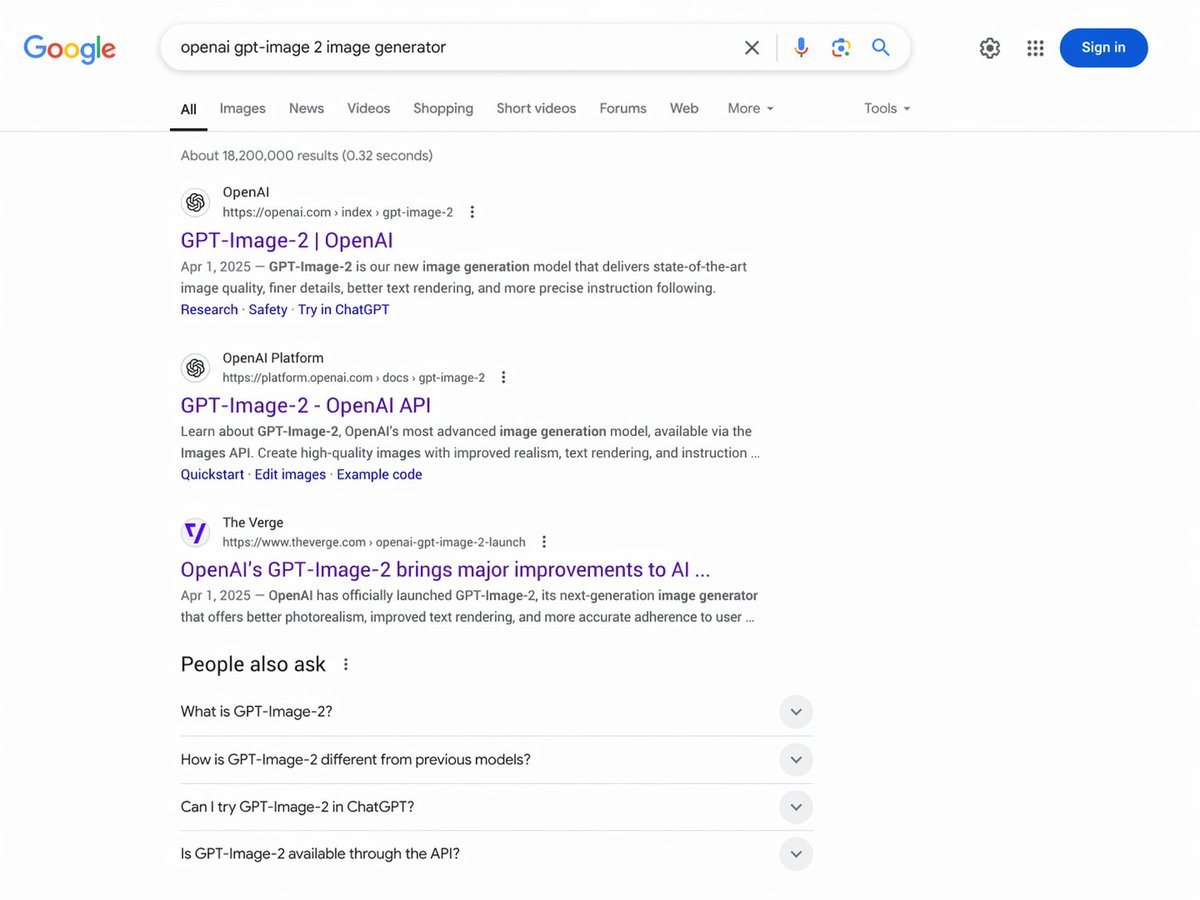
Prompt{
"type": "web browser screenshot",
"interface": "Google search results page",
"header": {
"logo": "Google",
"search_bar": {
"query": "{argument name=\"search query\" default=\"openai gpt-image 2 image generator\"}",
"icons": ["clear", "microphone", "camera", "search"]
},
"right_actions": ["settings gear", "apps grid", "blue Sign in button"]
},
"navigation_tabs": ["All", "Images", "News", "Videos", "Shopping", "Short videos", "Forums", "Web", "More", "Tools"],
"results_stats": "About 18,200,000 results (0.32 seconds)",
"search_results": {
"count": 3,
"items": [
{
"source": "OpenAI",
"url": "https://openai.com > index > gpt-image-2",
"title": "{argument name=\"result 1 title\" default=\"GPT-Image-2 | OpenAI\"}",
"snippet": "{argument name=\"date\" default=\"Apr 1, 2025\"} — GPT-Image-2 is our new image generation model that delivers state-of-the-art image quality, finer details, better text rendering, and more precise instruction following.",
"sitelinks": ["Research", "Safety", "Try in ChatGPT"]
},
{
"source": "OpenAI Platform",
"url": "https://platform.openai.com > docs > gpt-image-2",
"title": "GPT-Image-2 - OpenAI API",
"snippet": "Learn about GPT-Image-2, OpenAI's most advanced image generation model, available via the Images API. Create high-quality images with improved realism, text rendering, and instruction ...",
"sitelinks": ["Quickstart", "Edit images", "Example code"]
},
{
"source": "The Verge",
"url": "https://www.theverge.com > openai-gpt-image-2-launch",
"title": "OpenAI's GPT-Image-2 brings major improvements to AI ...",
"snippet": "Apr 1, 2025 — OpenAI has officially launched GPT-Image-2, its next-generation image generator that offers better photorealism, improved text rendering, and more accurate adherence to user ..."
}
]
},
"people_also_ask": {
"title": "People also ask",
"count": 4,
"questions": [
"What is GPT-Image-2?",
"How is GPT-Image-2 different from previous models?",
"Can I try GPT-Image-2 in ChatGPT?",
"Is GPT-Image-2 available through the API?"
]
}
}
How to customizeUse this Web Browser Screenshot prompt as a base. Replace the subject, product details, environment, lighting, brand colors, and output ratio while keeping the app-ui-mockup intent and photorealistic direction stable.
Why this prompt worksWeb Browser Screenshot works because it starts from the image job, then controls subject, composition, lighting, style, and frame. It is best for app ui mockup while keeping the photorealistic direction stable.