
Image2Studio
Examples

gpt-image-2

Clean Screenshot-like Image

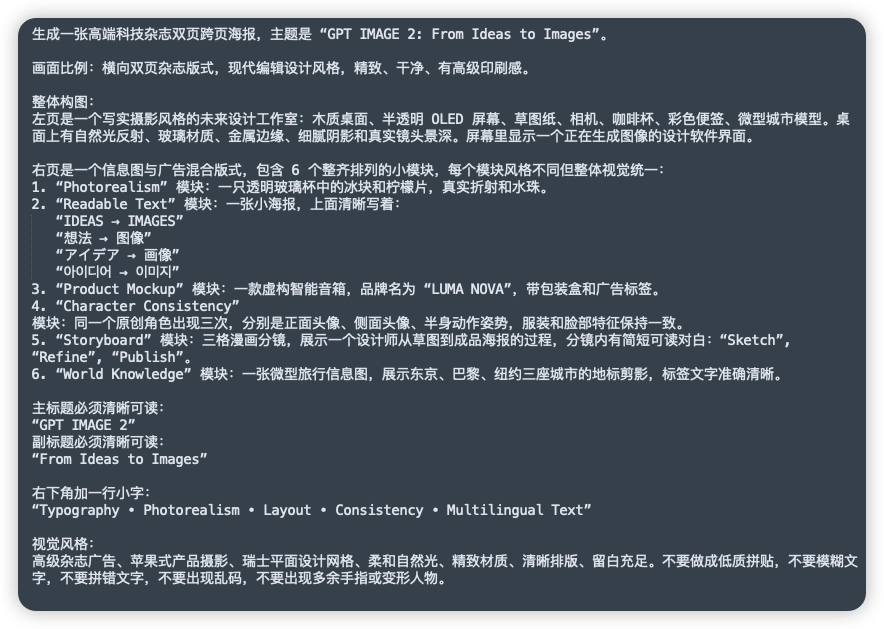
A clean screenshot-like image showing a dark charcoal rounded-rectangle panel filled with dense simplified Chinese prompt text in white sans-serif font, presented as a text document or no...

A clean screenshot-like image showing a dark charcoal rounded-rectangle panel filled with dense simplified Chinese prompt text in white sans-serif font, presented as a text document or no...
Prompt

A clean screenshot-like image showing a dark charcoal rounded-rectangle panel filled with dense simplified Chinese prompt text in white sans-serif font, presented as a text document or note on a flat dark background. The composition is a single full-frame panel with generous padding and subtle shadow, like a modern UI card. At the top is a sentence describing the creation of a high-end technology magazine double-page spread poster, with the English title in quotation marks: “GPT IMAGE 2: From Ideas to Images”. Below it are multiple left-aligned paragraphs of Chinese text with consistent line spacing, describing layout ratio, modern editorial design style, and a detailed two-page composition. In the middle section, there is a numbered list with exactly 6 items labeled 1 through 6, each item naming a module in English inside quotation marks followed by Chinese explanations. The 6 module names are exactly: “Photorealism”, “Readable Text”, “Product Mockup”, “Character Consistency”, “Storyboard”, and “World Knowledge”. Under item 2, include 5 separate quoted multilingual text lines as subitems, exactly these: “IDEAS → IMAGES”, “想法 → 图像”, “アイデア → 画像”, “아이디어 → 이미지”, and “فكرة → صورة”. Later in the text, add a section specifying the main title and subtitle as clearly readable quoted English lines: “GPT IMAGE 2” and “From Ideas to Images”. Near the lower portion, add another Chinese line introducing a small caption at the bottom right, followed by the exact quoted English caption: “Typography • Photorealism • Layout • Consistency • Multilingual Text”. At the bottom, include a final Chinese paragraph about visual style requirements such as premium ad feel, Apple-style product photography, Swiss graphic design, soft natural light, refined materials, clear layout, ample whitespace, and avoiding low-quality textures, blurry text, gibberish, or deformed fingers. The text should appear crisp and fully legible, with realistic screen-capture fidelity, high contrast, subtle anti-aliased edges, no illustrations, no icons, no photos, no extra interface chrome beyond the single dark card, and an overall polished editorial-tech presentation.

Prompt structure
  • Modelgpt-image-2
  • Use caseproduct-hero-shot
  • Styleeditorial, photorealistic, luxury, minimal
  • Aspect ratioFlexible
Best used for
  • Use caseproduct-hero-shot
  • Styleeditorial, photorealistic, luxury, minimal
  • Recommended specs1:1, 4:5, 16:9, or 9:16
  • ModelGPT Image 2
How to customize

Use this Clean Screenshot-like Image prompt as a base. Replace the subject, product details, environment, lighting, brand colors, and output ratio while keeping the product-hero-shot intent and editorial, photorealistic, luxury, minimal direction stable.

Editable variables
  • SubjectReplace the product, person, scene, interface, or object being generated.
  • Use caseKeep or rewrite the destination as product hero shot, ad creative, cover image, poster, or ecommerce hero.
  • FrameChoose 1:1, 4:5, 16:9, or 9:16 based on the final placement.
  • Brand cuesAdd colors, materials, props, text-safe space, and the platform where the image will be used.
Recommended specs

Choose the frame for the destination first, then use 1K, 2K, or 4K based on output quality needs. Product images and posters usually benefit from higher resolution.

Pre-generation checklist
  • CheckSubject, lighting, composition, and frame are specific enough to review.
  • CheckText-safe space is included when the image will carry a headline or ad copy.
  • CheckResolution, credit cost, and final destination are checked before generation.
Why this prompt works

Clean Screenshot-like Image works because it starts from the image job, then controls subject, composition, lighting, style, and frame. It is best for product hero shot while keeping the editorial, photorealistic, luxury, minimal direction stable.

Common questions
  • Can I use it directly?Yes. Replace the subject, brand cues, and frame, then generate in Image2Studio.
  • Which ratio should I use?Choose 1:1, 4:5, 16:9, or 9:16 based on the destination.




