
Image2Studio
Examples

gpt-image-2

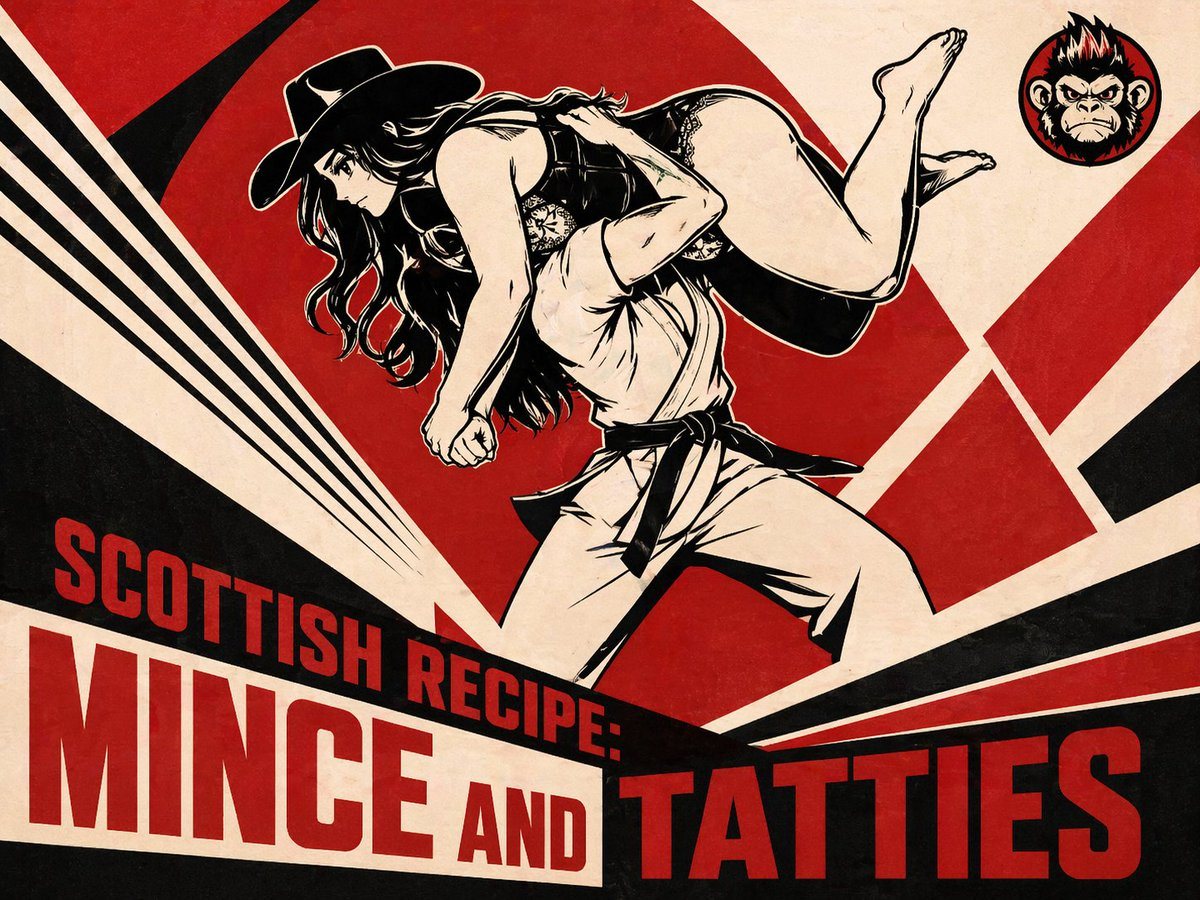
Bold Retro Propaganda-style Poster Illustration

A bold retro propaganda-style poster illustration with a limited palette of red, black, and warm cream on a lightly aged paper texture. The composition features a dynamic anime-inspired a...

A bold retro propaganda-style poster illustration with a limited palette of red, black, and warm cream on a lightly aged paper texture. The composition features a dynamic anime-inspired a...
Prompt

A bold retro propaganda-style poster illustration with a limited palette of red, black, and warm cream on a lightly aged paper texture. The composition features a dynamic anime-inspired action scene in the center: a martial artist in a white gi with a black belt carries a long-haired woman over one shoulder in a fireman's carry or wrestling throw pose. The fighter is shown from the knees up in a powerful wide stance, facing left, with the woman draped horizontally across the shoulders, her bare legs lifted and bent, her long dark hair flowing downward, and a black wide-brim cowboy hat still on her head. Render both figures in high-contrast inked line art with thick black shadows and sharp graphic contours, mixing manga character design with vintage screen-printed poster energy. Behind them, fill the background with aggressive geometric rays and wedges: 6 major red and black angular shapes radiating outward across the cream backdrop, creating a sense of impact and motion. In the top right corner, add 1 circular emblem containing a fierce gorilla or ape head icon with red accents. Across the lower third, place large bold condensed block typography integrated into the composition: the smaller line reads “SCOTTISH RECIPE:” and the huge main title reads “MINCE AND TATTIES”. Make the text red on cream and cream on black in layered diagonal banner panels, with the words occupying 3 text groupings total: “SCOTTISH RECIPE:”, “MINCE AND”, and “TATTIES”. Emphasize dramatic diagonal layout, posterized shadows, distressed print texture, and the feeling of a vintage Soviet constructivist or pulp exploitation food poster fused with martial arts manga aesthetics.

Prompt structure
  • Modelgpt-image-2
  • Use caseapp-ui-mockup
  • Styleanime, editorial, cinematic, 3d-render
  • Aspect ratioFlexible
Best used for
  • Use caseapp-ui-mockup
  • Styleanime, editorial, cinematic, 3d-render
  • Recommended specs1:1, 4:5, 16:9, or 9:16
  • ModelGPT Image 2
How to customize

Use this Bold Retro Propaganda-style Poster Illustration prompt as a base. Replace the subject, product details, environment, lighting, brand colors, and output ratio while keeping the app-ui-mockup intent and anime, editorial, cinematic, 3d-render direction stable.

Editable variables
  • SubjectReplace the product, person, scene, interface, or object being generated.
  • Use caseKeep or rewrite the destination as app ui mockup, ad creative, cover image, poster, or ecommerce hero.
  • FrameChoose 1:1, 4:5, 16:9, or 9:16 based on the final placement.
  • Brand cuesAdd colors, materials, props, text-safe space, and the platform where the image will be used.
Recommended specs

Choose the frame for the destination first, then use 1K, 2K, or 4K based on output quality needs. Product images and posters usually benefit from higher resolution.

Pre-generation checklist
  • CheckSubject, lighting, composition, and frame are specific enough to review.
  • CheckText-safe space is included when the image will carry a headline or ad copy.
  • CheckResolution, credit cost, and final destination are checked before generation.
Why this prompt works

Bold Retro Propaganda-style Poster Illustration works because it starts from the image job, then controls subject, composition, lighting, style, and frame. It is best for app ui mockup while keeping the anime, editorial, cinematic, 3d-render direction stable.

Common questions
  • Can I use it directly?Yes. Replace the subject, brand cues, and frame, then generate in Image2Studio.
  • Which ratio should I use?Choose 1:1, 4:5, 16:9, or 9:16 based on the destination.




