
Image2Studio
Examples

gpt-image-2

Polished Japanese Mobile Game Promotional Graphic In A Soft Pastel Kawai

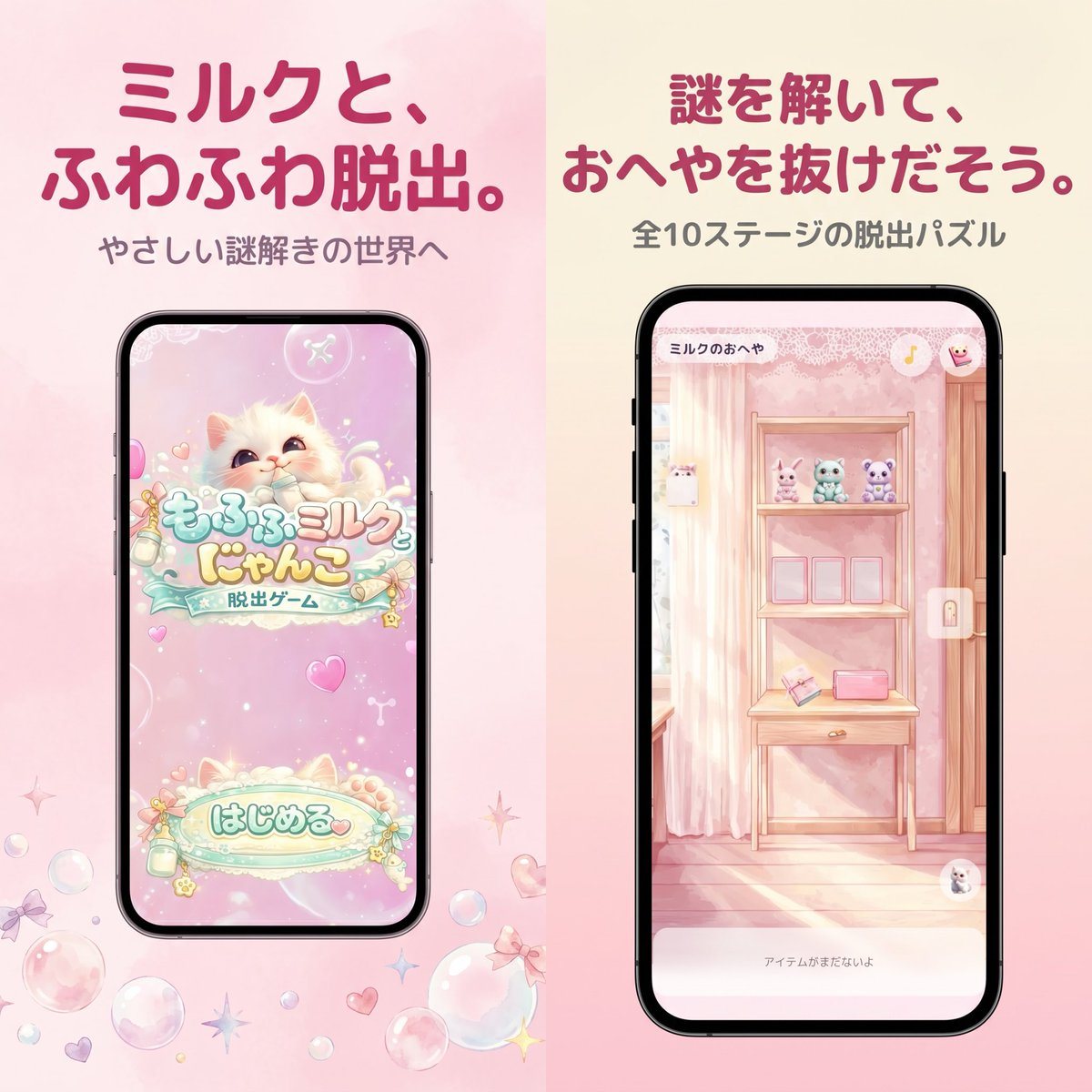
A polished Japanese mobile game promotional graphic in a soft pastel kawaii style, formatted as a square split-screen advertisement with 2 vertical panels side by side. The left half has...

A polished Japanese mobile game promotional graphic in a soft pastel kawaii style, formatted as a square split-screen advertisement with 2 vertical panels side by side. The left half has...
Prompt

A polished Japanese mobile game promotional graphic in a soft pastel kawaii style, formatted as a square split-screen advertisement with 2 vertical panels side by side. The left half has a pale blush pink watercolor background, and the right half has a warm cream-to-pink gradient background. At the top of the left panel, place a large bold rounded Japanese headline in dark rose pink reading {argument name="left headline text" default="ミルクと、ふわふわ脱出。"}, with a smaller gray subtitle below reading {argument name="left subtitle text" default="やさしい謎解きの世界へ"}. Centered below is a black-framed modern smartphone mockup showing the title screen of a cute pastel escape game: a fluffy cream-colored kitten with big watery eyes on a sparkly pink background, decorative bubbles and hearts, a logo in Japanese reading もふもふミルク にゃんこ with a smaller ribbon-like subtitle 脱出ゲーム, and a large rounded start button near the bottom reading はじめる. Around the phone on the pink background, scatter translucent soap bubbles, tiny bows, hearts, and star-shaped sparkles near the lower area. In the right panel, place a large bold rounded Japanese headline in dark rose pink reading {argument name="right headline text" default="謎を解いて、おへやを抜けだそう。"}, with a smaller gray subtitle below reading {argument name="right subtitle text" default="全10ステージの脱出パズル"}. Centered below is a second black-framed smartphone mockup showing in-game play: a dreamy pastel pink room with striped wallpaper, a wooden shelf unit or vanity table, 3 small plush animals lined up on the top shelf, 3 empty square frames or slots on the middle shelf, and 2 small objects on the lower shelf including a pink rectangular item and an angled card-like object. Add a tiny top-left room title inside the phone UI reading ミルクのおへや, a small circular icon at top right, a vertical lock icon on the right edge, and a pale bottom text bar reading アイテムがまだないよ. The entire composition should feel like an App Store screenshot for a gentle puzzle game, with soft lighting, pastel pinks and creams, rounded typography, clean spacing, and a cute feminine aesthetic.

Prompt structure
  • Modelgpt-image-2
  • Use caseapp-ui-mockup
  • Styleanime, minimal, watercolor
  • Aspect ratioFlexible
Best used for
  • Use caseapp-ui-mockup
  • Styleanime, minimal, watercolor
  • Recommended specs1:1, 4:5, 16:9, or 9:16
  • ModelGPT Image 2
How to customize

Use this Polished Japanese Mobile Game Promotional Graphic In A Soft Pastel Kawai prompt as a base. Replace the subject, product details, environment, lighting, brand colors, and output ratio while keeping the app-ui-mockup intent and anime, minimal, watercolor direction stable.

Editable variables
  • SubjectReplace the product, person, scene, interface, or object being generated.
  • Use caseKeep or rewrite the destination as app ui mockup, ad creative, cover image, poster, or ecommerce hero.
  • FrameChoose 1:1, 4:5, 16:9, or 9:16 based on the final placement.
  • Brand cuesAdd colors, materials, props, text-safe space, and the platform where the image will be used.
Recommended specs

Choose the frame for the destination first, then use 1K, 2K, or 4K based on output quality needs. Product images and posters usually benefit from higher resolution.

Pre-generation checklist
  • CheckSubject, lighting, composition, and frame are specific enough to review.
  • CheckText-safe space is included when the image will carry a headline or ad copy.
  • CheckResolution, credit cost, and final destination are checked before generation.
Why this prompt works

Polished Japanese Mobile Game Promotional Graphic In A Soft Pastel Kawai works because it starts from the image job, then controls subject, composition, lighting, style, and frame. It is best for app ui mockup while keeping the anime, minimal, watercolor direction stable.

Common questions
  • Can I use it directly?Yes. Replace the subject, brand cues, and frame, then generate in Image2Studio.
  • Which ratio should I use?Choose 1:1, 4:5, 16:9, or 9:16 based on the destination.




