
Image2Studio
Examples

gpt-image-2

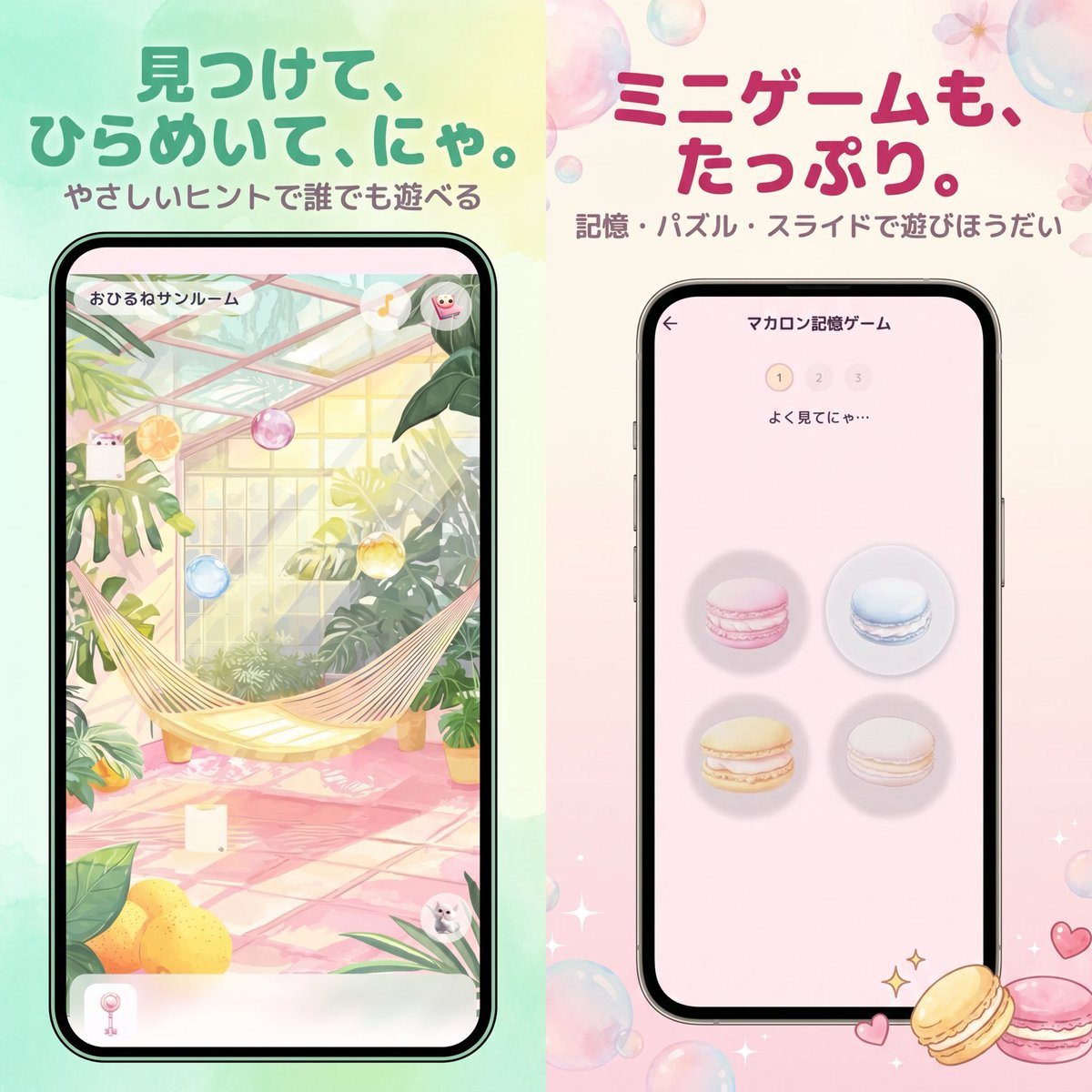
Create A Cute Japanese Mobile Game Advertisement Poster Split Vertically

Create a cute Japanese mobile game advertisement poster split vertically into 2 equal halves, with a soft pastel watercolor background and glossy translucent bubbles scattered around the...

Create a cute Japanese mobile game advertisement poster split vertically into 2 equal halves, with a soft pastel watercolor background and glossy translucent bubbles scattered around the...
Prompt

Create a cute Japanese mobile game advertisement poster split vertically into 2 equal halves, with a soft pastel watercolor background and glossy translucent bubbles scattered around the canvas. The left half has a mint green to pale yellow wash, and the right half has a cream to blush pink wash. At the top left, place a large rounded Japanese headline in bold teal green: {argument name="left headline text" default="見つけて、ひらめいて、にゃ。"}, with a smaller subtitle beneath it in muted brown-gray: {argument name="left subtitle text" default="やさしいヒントで誰でも遊べる"}. At the top right, place a large rounded Japanese headline in bold raspberry pink: {argument name="right headline text" default="ミニゲームも、たっぷり。"}, with a smaller subtitle beneath it in muted mauve-gray: {argument name="right subtitle text" default="記憶・パズル・スライドで遊びほうだい"}. Centered in each half is a black-bezel smartphone mockup shown straight-on. The left phone displays a hidden-object style game screen inside a bright greenhouse sunroom with lush tropical plants, a cream hammock stretched diagonally across the middle, pink tiled floor, warm sunlight through glass panels, hanging pastel glass orbs, lemons in the lower left foreground, and tiny cute character accents hidden in the scene; a Japanese room title appears at the top inside the phone UI: {argument name="left game screen title" default="おひるねサンルーム"}. The right phone displays a memory minigame screen on a pale pink interface with a back arrow, a centered Japanese title at the top reading "マカロン記憶ゲーム", a 3-step indicator showing 1 highlighted and 2 and 3 faded, small instruction text "よく見てにゃ…", and exactly 4 macarons arranged in a 2 by 2 grid: pink top left, blue top right, yellow bottom left, white bottom right, each on a soft circular shadow. Add small sparkling star icons and two decorative macarons at the bottom right outside the phone, plus tiny heart doodles nearby. The overall style is polished app-promo key art, kawaii, airy, elegant, soft-focus, with rounded typography, gentle gradients, subtle floral details, and a premium casual game advertisement look.

Prompt structure
  • Modelgpt-image-2
  • Use caseapp-ui-mockup
  • Stylecinematic, luxury, anime, watercolor
  • Aspect ratioFlexible
Best used for
  • Use caseapp-ui-mockup
  • Stylecinematic, luxury, anime, watercolor
  • Recommended specs1:1, 4:5, 16:9, or 9:16
  • ModelGPT Image 2
How to customize

Use this Create A Cute Japanese Mobile Game Advertisement Poster Split Vertically prompt as a base. Replace the subject, product details, environment, lighting, brand colors, and output ratio while keeping the app-ui-mockup intent and cinematic, luxury, anime, watercolor direction stable.

Editable variables
  • SubjectReplace the product, person, scene, interface, or object being generated.
  • Use caseKeep or rewrite the destination as app ui mockup, ad creative, cover image, poster, or ecommerce hero.
  • FrameChoose 1:1, 4:5, 16:9, or 9:16 based on the final placement.
  • Brand cuesAdd colors, materials, props, text-safe space, and the platform where the image will be used.
Recommended specs

Choose the frame for the destination first, then use 1K, 2K, or 4K based on output quality needs. Product images and posters usually benefit from higher resolution.

Pre-generation checklist
  • CheckSubject, lighting, composition, and frame are specific enough to review.
  • CheckText-safe space is included when the image will carry a headline or ad copy.
  • CheckResolution, credit cost, and final destination are checked before generation.
Why this prompt works

Create A Cute Japanese Mobile Game Advertisement Poster Split Vertically works because it starts from the image job, then controls subject, composition, lighting, style, and frame. It is best for app ui mockup while keeping the cinematic, luxury, anime, watercolor direction stable.

Common questions
  • Can I use it directly?Yes. Replace the subject, brand cues, and frame, then generate in Image2Studio.
  • Which ratio should I use?Choose 1:1, 4:5, 16:9, or 9:16 based on the destination.




