
Image2Studio
Examples

gpt-image-2

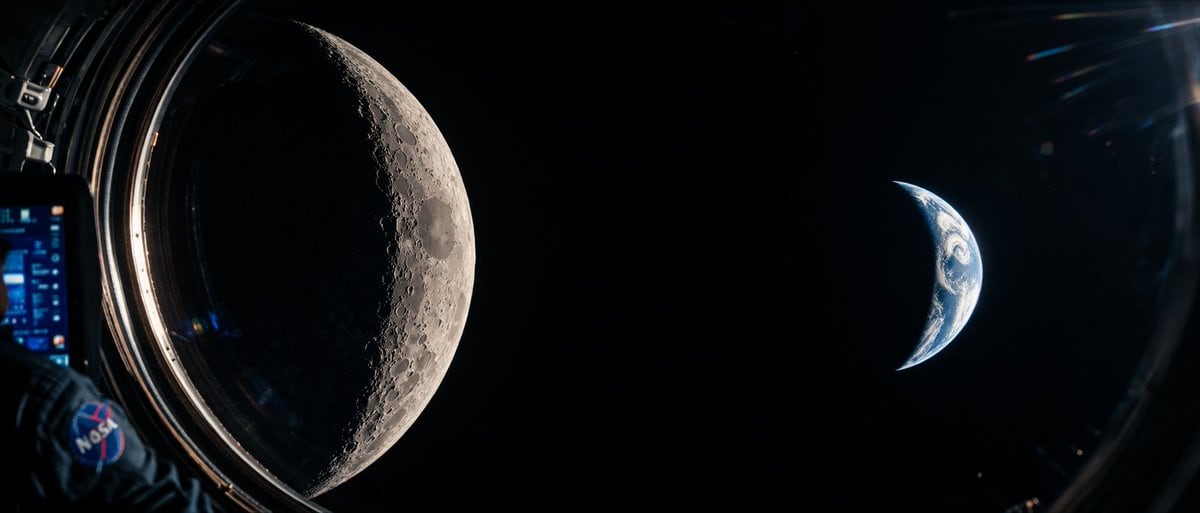
Cinematic Photorealistic Wide-angle Shot From

A cinematic, photorealistic wide-angle shot from inside a spacecraft looking out a circular window into the deep blackness of space. On the left side of the frame, a massive, highly detai...

A cinematic, photorealistic wide-angle shot from inside a spacecraft looking out a circular window into the deep blackness of space. On the left side of the frame, a massive, highly detai...
Prompt

A cinematic, photorealistic wide-angle shot from inside a spacecraft looking out a circular window into the deep blackness of space. On the left side of the frame, a {argument name="celestial body left" default="massive, highly detailed crescent Moon"} dominates the view, showcasing intricate craters and rugged terrain illuminated by harsh sunlight. On the right side, a smaller {argument name="celestial body right" default="crescent Earth"} glows with blue oceans and white atmospheric clouds. In the immediate foreground on the far left, an {argument name="foreground element" default="astronaut's arm wearing a dark blue spacesuit"} is visible, featuring a prominent {argument name="patch logo" default="NASA"} patch on the shoulder. The astronaut is holding a digital tablet with a glowing blue, complex user interface. The edge of the spacecraft window frames the scene, with subtle lens flares and reflections on the glass adding to the immersive, sci-fi documentary aesthetic. High contrast, hyper-realistic textures, 8k resolution.

Prompt structure
  • Modelgpt-image-2
  • Use caseapp-ui-mockup
  • Stylephotorealistic, cinematic, cyberpunk
  • Aspect ratioFlexible
Best used for
  • Use caseapp-ui-mockup
  • Stylephotorealistic, cinematic, cyberpunk
  • Recommended specs1:1, 4:5, 16:9, or 9:16
  • ModelGPT Image 2
How to customize

Use this Cinematic Photorealistic Wide-angle Shot From prompt as a base. Replace the subject, product details, environment, lighting, brand colors, and output ratio while keeping the app-ui-mockup intent and photorealistic, cinematic, cyberpunk direction stable.

Editable variables
  • SubjectReplace the product, person, scene, interface, or object being generated.
  • Use caseKeep or rewrite the destination as app ui mockup, ad creative, cover image, poster, or ecommerce hero.
  • FrameChoose 1:1, 4:5, 16:9, or 9:16 based on the final placement.
  • Brand cuesAdd colors, materials, props, text-safe space, and the platform where the image will be used.
Recommended specs

Choose the frame for the destination first, then use 1K, 2K, or 4K based on output quality needs. Product images and posters usually benefit from higher resolution.

Pre-generation checklist
  • CheckSubject, lighting, composition, and frame are specific enough to review.
  • CheckText-safe space is included when the image will carry a headline or ad copy.
  • CheckResolution, credit cost, and final destination are checked before generation.
Why this prompt works

Cinematic Photorealistic Wide-angle Shot From works because it starts from the image job, then controls subject, composition, lighting, style, and frame. It is best for app ui mockup while keeping the photorealistic, cinematic, cyberpunk direction stable.

Common questions
  • Can I use it directly?Yes. Replace the subject, brand cues, and frame, then generate in Image2Studio.
  • Which ratio should I use?Choose 1:1, 4:5, 16:9, or 9:16 based on the destination.




