
Image2Studio
Prompts

gpt-image-2

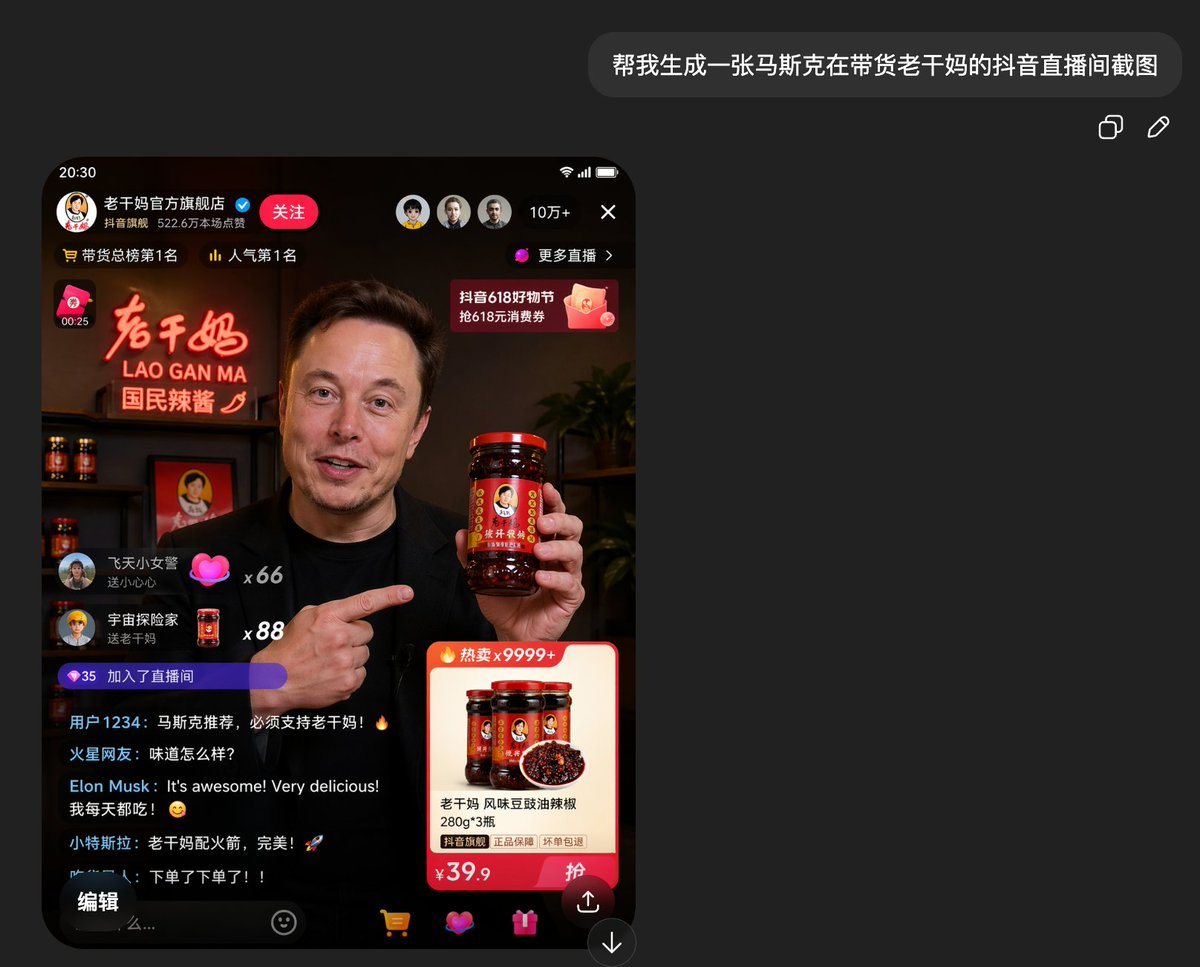
Realistic Smartphone Screenshot Mockup Of A Chinese Short-video Livestre

A realistic smartphone screenshot mockup of a Chinese short-video livestream shopping interface in dark mode, shown on a charcoal black app background. At the top right of the overall can...

A realistic smartphone screenshot mockup of a Chinese short-video livestream shopping interface in dark mode, shown on a charcoal black app background. At the top right of the overall can...
Prompt

A realistic smartphone screenshot mockup of a Chinese short-video livestream shopping interface in dark mode, shown on a charcoal black app background. At the top right of the overall canvas, place a rounded dark chat bubble containing the Chinese text {argument name="request text" default="帮我生成一张马斯克在带货老干妈的抖音直播间截图"}, with 2 small interface icons to its right for copy and edit. In the lower left area, display a tall iPhone-style livestream screen with a black bezel, rounded corners, and the time 20:30. The livestream is from Lao Gan Ma’s official flagship store, with a Chinese profile name line, a blue verification badge, a red follow button, and a top status row showing 3 circular avatars, a viewer count of 10万+, a close icon, and a button labeled 更多直播. Add ranking text near the top such as 带货总榜第1名 and 人气第1名. The main video shows {argument name="host identity" default="Elon Musk"} in a dim warm studio resembling a premium product livestream set, wearing a black shirt, holding a large jar of Lao Gan Ma chili sauce in his right hand and pointing at it with his left hand. His face is intentionally blurred with a rectangular mosaic blur. Behind him, include a glowing red-orange neon sign reading 老干妈 / LAO GAN MA / 国民辣酱, shelves with several sauce jars, a framed portrait logo, and a dark leafy plant on the right. Overlay typical livestream UI elements: on the left side, 2 floating gift/comment callouts with usernames and counts x66 and x88; below them a purple pill showing 35 and 加入了直播间. Add a scrolling comment area with 5 visible chat lines, including Chinese usernames and one line from {argument name="comment name" default="Elon Musk"} saying in English, "It's awesome! Very delicious!" followed by a Chinese line meaning he buys it every day. At the upper right of the video area, add a pink-red promo banner mentioning 抖音618好物节 and 618元消费券. In the lower right, place a product card with a hot-sale label 热卖x9999+, showing 3 jars of Lao Gan Ma and a bowl of chili condiment, product title text for 老干妈 风味豆豉油辣椒 280g*3瓶, small guarantee tags, and a large price ¥39.9 with a red purchase button. At the bottom of the phone screen, include 5 navigation/action areas: an edit-style button on the left, a text input hint, a shopping cart icon, a heart/gift icon pair, and a share arrow icon. Overall style: ultra-realistic app screenshot, believable Chinese ecommerce livestream UI, high detail, cinematic warm lighting in the video feed, clean modern mobile interface, visually convincing social commerce capture.

Prompt structure
  • Modelgpt-image-2
  • Use caseapp-ui-mockup
  • Stylephotorealistic, cinematic, minimal, cyberpunk
  • Aspect ratioFlexible
Best used for
  • Use caseapp-ui-mockup
  • Stylephotorealistic, cinematic, minimal, cyberpunk
  • Recommended specs1:1, 4:5, 16:9, or 9:16
  • ModelGPT Image 2
How to customize

Use this Realistic Smartphone Screenshot Mockup Of A Chinese Short-video Livestre prompt as a base. Replace the subject, product details, environment, lighting, brand colors, and output ratio while keeping the app-ui-mockup intent and photorealistic, cinematic, minimal, cyberpunk direction stable.

Editable variables
  • SubjectReplace the product, person, scene, interface, or object being generated.
  • Use caseKeep or rewrite the destination as app ui mockup, ad creative, cover image, poster, or ecommerce hero.
  • FrameChoose 1:1, 4:5, 16:9, or 9:16 based on the final placement.
  • Brand cuesAdd colors, materials, props, text-safe space, and the platform where the image will be used.
Recommended specs

Choose the frame for the destination first, then use 1K, 2K, or 4K based on output quality needs. Product images and posters usually benefit from higher resolution.

Pre-generation checklist
  • CheckSubject, lighting, composition, and frame are specific enough to review.
  • CheckText-safe space is included when the image will carry a headline or ad copy.
  • CheckResolution, credit cost, and final destination are checked before generation.
Why this prompt works

Realistic Smartphone Screenshot Mockup Of A Chinese Short-video Livestre works because it starts from the image job, then controls subject, composition, lighting, style, and frame. It is best for app ui mockup while keeping the photorealistic, cinematic, minimal, cyberpunk direction stable.

Common questions
  • Can I use it directly?Yes. Replace the subject, brand cues, and frame, then generate in Image2Studio.
  • Which ratio should I use?Choose 1:1, 4:5, 16:9, or 9:16 based on the destination.




