
Image2Studio
Prompts

gpt-image-2

First-person Voxel Game Screenshot

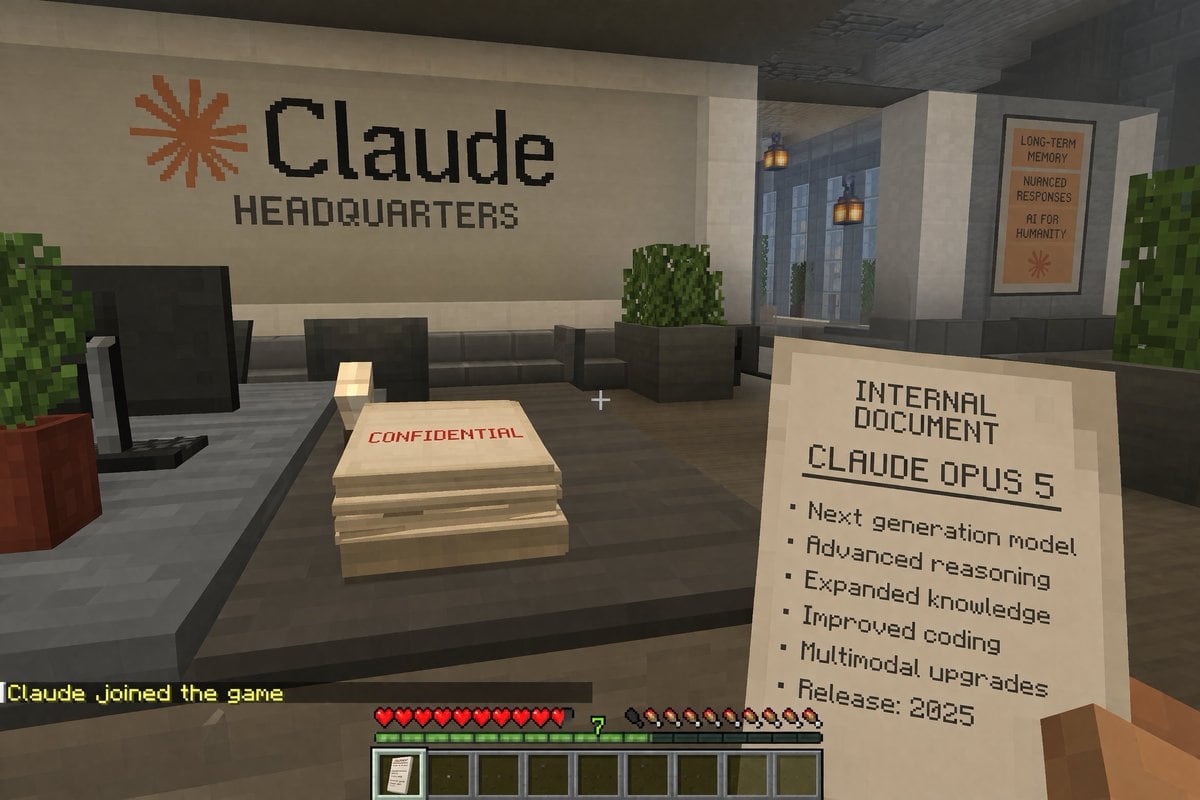
A first-person voxel game screenshot. The player's blocky right hand holds a paper reading 'INTERNAL DOCUMENT', 'CLAUDE OPUS 5', and a 6-item bulleted list ending with 'Release: 2025'. A...

A first-person voxel game screenshot. The player's blocky right hand holds a paper reading 'INTERNAL DOCUMENT', 'CLAUDE OPUS 5', and a 6-item bulleted list ending with 'Release: 2025'. A...
Prompt

A first-person voxel game screenshot. The player's blocky right hand holds a paper reading 'INTERNAL DOCUMENT', '{argument name="document title" default="CLAUDE OPUS 5"}', and a 6-item bulleted list ending with 'Release: 2025'. A white crosshair sits center screen. Ahead is a dark gray desk holding a black monitor and a paper stack marked 'CONFIDENTIAL' in red. The back white wall displays an orange asterisk and black text '{argument name="company name" default="Claude"}' above 'HEADQUARTERS'. A right hallway shows hanging lanterns and a poster reading 'LONG-TERM MEMORY', 'NUANCED RESPONSES', 'AI FOR HUMANITY'. The bottom HUD features yellow chat text '{argument name="chat message" default="Claude joined the game"}', 10 red hearts, a green experience bar with '7', 10 hunger drumsticks, and a 9-slot hotbar with a document icon in the first slot.

Prompt structure
  • Modelgpt-image-2
  • Use caseapp-ui-mockup
  • Styleprompt-defined style
  • Aspect ratioFlexible
Best used for
  • Use caseapp-ui-mockup
  • Styleprompt-defined style
  • Recommended specs1:1, 4:5, 16:9, or 9:16
  • ModelGPT Image 2
How to customize

Use this First-person Voxel Game Screenshot prompt as a base. Replace the subject, product details, environment, lighting, brand colors, and output ratio while keeping the app-ui-mockup intent and the visual style direction stable.

Editable variables
  • SubjectReplace the product, person, scene, interface, or object being generated.
  • Use caseKeep or rewrite the destination as app ui mockup, ad creative, cover image, poster, or ecommerce hero.
  • FrameChoose 1:1, 4:5, 16:9, or 9:16 based on the final placement.
  • Brand cuesAdd colors, materials, props, text-safe space, and the platform where the image will be used.
Recommended specs

Choose the frame for the destination first, then use 1K, 2K, or 4K based on output quality needs. Product images and posters usually benefit from higher resolution.

Pre-generation checklist
  • CheckSubject, lighting, composition, and frame are specific enough to review.
  • CheckText-safe space is included when the image will carry a headline or ad copy.
  • CheckResolution, credit cost, and final destination are checked before generation.
Why this prompt works

First-person Voxel Game Screenshot works because it starts from the image job, then controls subject, composition, lighting, style, and frame. It is best for app ui mockup while keeping the prompt-defined style direction stable.

Common questions
  • Can I use it directly?Yes. Replace the subject, brand cues, and frame, then generate in Image2Studio.
  • Which ratio should I use?Choose 1:1, 4:5, 16:9, or 9:16 based on the destination.




