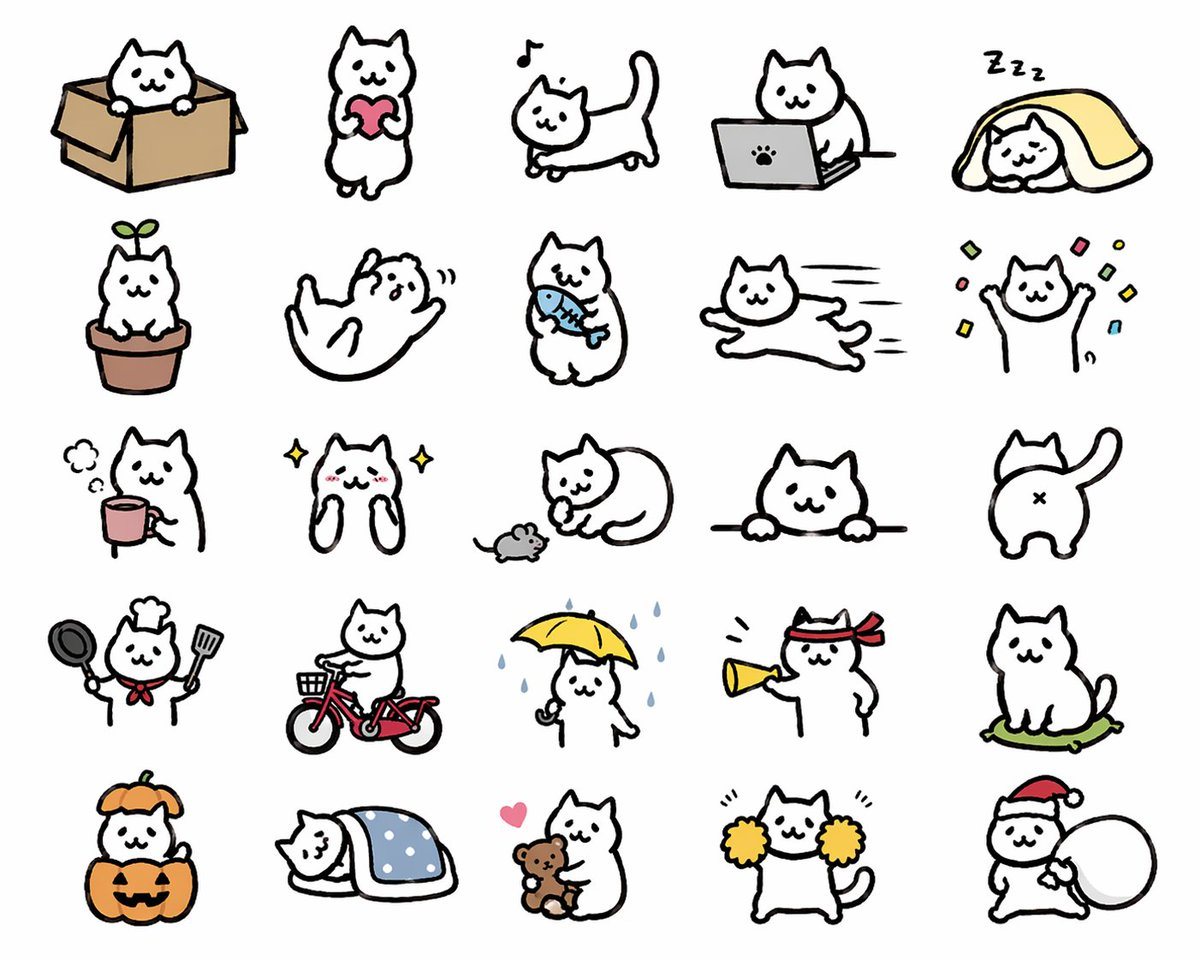
Prompt{"type":"cute sticker sheet illustration","style":"simple hand-drawn kawaii cat doodles, thick black outlines, minimal flat colors, white cat character, clean light gray background, LINE sticker style, playful and expressive","subject":{"character":"a chubby white cartoon cat with tiny dot eyes, small smiling mouth, triangular ears, rounded body, short limbs, and a consistent simple mascot design"},"layout":{"grid":{"rows":5,"columns":5,"count":25},"sections":[{"title":"row 1","position":"top","count":5,"labels":["cat sitting in a cardboard box","cat standing and holding a pink heart","cat walking with a musical note above its head","cat using a gray laptop with a paw-print logo","cat sleeping under a yellow blanket with Zzz marks"]},{"title":"row 2","position":"upper middle","count":5,"labels":["cat sitting in a flowerpot with a green sprout on its head","cat rolling on its back playfully","cat standing and holding a blue fish","cat running stretched out at high speed","cat raising both paws with colorful confetti around it"]},{"title":"row 3","position":"middle","count":5,"labels":["cat beside a pink mug with steam","sparkly happy cat with blushing cheeks and paws up near its face","cat curled around a small gray mouse","cat peeking over a horizontal ledge with both paws visible","rear view of cat with tail raised and X-shaped butt mark"]},{"title":"row 4","position":"lower middle","count":5,"labels":["cat dressed as a chef holding a frying pan and spatula with a red neckerchief and chef hat","cat riding a red bicycle with a front basket","cat standing in rain holding a yellow umbrella with blue raindrops falling","cat wearing a red hachimaki headband and shouting through a yellow megaphone","cat sitting on a green cushion"]},{"title":"row 5","position":"bottom","count":5,"labels":["cat inside a jack-o'-lantern pumpkin costume with an orange hood","cat sleeping under a blue polka-dot blanket","cat hugging a brown teddy bear with a pink heart nearby","cat cheering with yellow pom-poms","cat wearing a Santa hat and carrying a large white sack"]}],"spacing":"evenly spaced icons with generous margins, no borders, no text"},"color_palette":{"background":"{argument name=\"background color\" default=\"light gray\"}","accent_colors":["pink","yellow","blue","red","orange","green","brown","gray"]},"quality":"clean sticker-sheet composition, consistent proportions across all 25 poses, charming and commercially usable for messaging stickers","size":"1024x1024"}
How to customizeUse this Cute Sticker Sheet Illustration prompt as a base. Replace the subject, product details, environment, lighting, brand colors, and output ratio while keeping the avatar intent and minimal, editorial, anime, watercolor direction stable.
Why this prompt worksCute Sticker Sheet Illustration works because it starts from the image job, then controls subject, composition, lighting, style, and frame. It is best for avatar while keeping the minimal, editorial, anime, watercolor direction stable.