
Image2Studio
Prompts

gpt-image-2

Subject & Composition

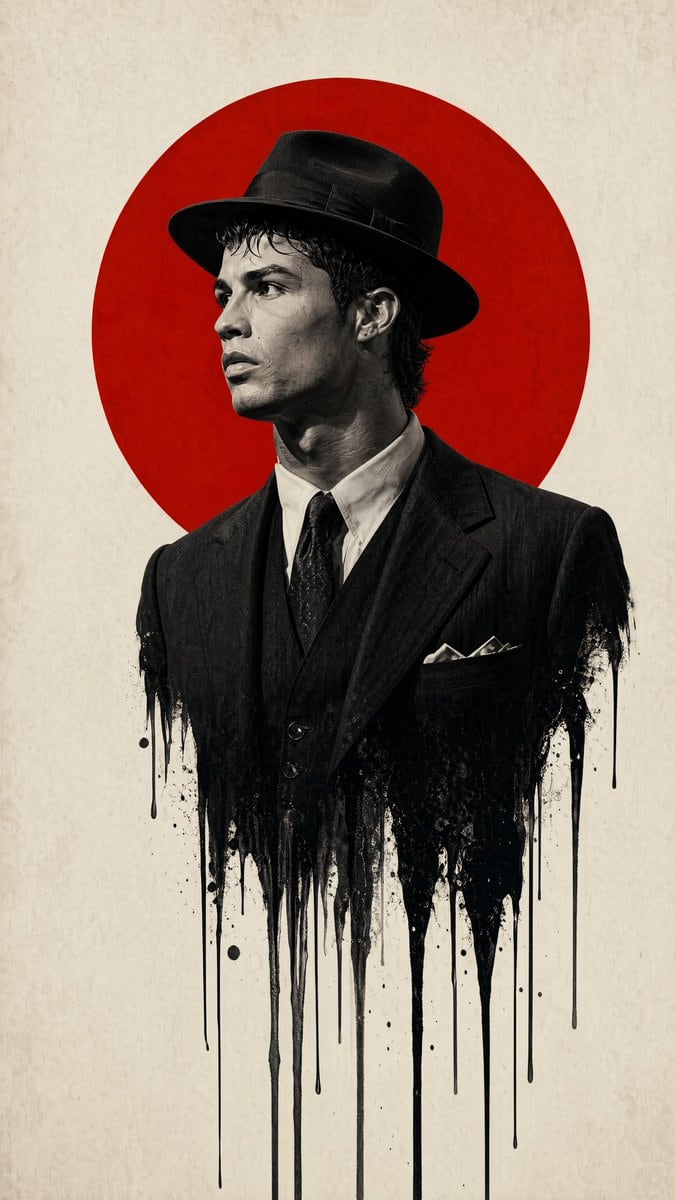
Subject & Composition:\n\nCentral Figure: A sharp profile view of a man wearing a classic 1940s fedora and a formal suit.\n\nMelting Effect: The lower half of the man's torso should disso...

Subject & Composition:\n\nCentral Figure: A sharp profile view of a man wearing a classic 1940s fedora and a formal suit.\n\nMelting Effect: The lower half of the man's torso should disso...
Prompt

Subject & Composition:\n\nCentral Figure: A {argument name="subject profile" default="sharp profile view of a man wearing a classic 1940s fedora and a formal suit"}.\n\nMelting Effect: The lower half of the man's torso should dissolve or \"drip\" into long, vertical black ink streaks and splatters, creating a surreal, liquid-bleed effect against the background.\n\nGraphic Element: A large, {argument name="background shape" default="solid vibrant red circle"} is positioned directly behind the man's head and shoulders, creating a \"halo\" or \"rising sun\" motif that anchors the composition.\n\nStyle & Color Palette:\n\nColor Scheme: A strict {argument name="color scheme" default="minimalist palette of True Red, Deep Black, and Off-White/Cream"}.\n\nPhotography Style: High-contrast, black and white film noir photography for the subject. The texture should look like a high-resolution fashion editorial with a shallow depth of field.\n\nBackground: A clean, slightly textured off-white paper or canvas background to give it a premium, physical poster feel.\n\nTechnical Details:\n\nLighting: Strong \"Rembrandt\" lighting to define the facial contours, emphasizing the bridge of the nose and the jawline with deep shadows.\n\nAtmosphere: Somber, intellectual, and high-stakes. The design should feel modern yet period-accurate to the mid-20th century.\n\nFraming: Vertical poster orientation (A-frame), with significant negative space on the left and right to emphasize the central vertical axis.\n\nAspect ratio is 9:16

Prompt structure
  • Modelgpt-image-2
  • Use caseavatar
  • Styleminimal, photorealistic, cinematic, editorial
  • Aspect ratioFlexible
Best used for
  • Use caseavatar
  • Styleminimal, photorealistic, cinematic, editorial
  • Recommended specs1:1, 4:5, 16:9, or 9:16
  • ModelGPT Image 2
How to customize

Use this Subject & Composition prompt as a base. Replace the subject, product details, environment, lighting, brand colors, and output ratio while keeping the avatar intent and minimal, photorealistic, cinematic, editorial direction stable.

Editable variables
  • SubjectReplace the product, person, scene, interface, or object being generated.
  • Use caseKeep or rewrite the destination as avatar, ad creative, cover image, poster, or ecommerce hero.
  • FrameChoose 1:1, 4:5, 16:9, or 9:16 based on the final placement.
  • Brand cuesAdd colors, materials, props, text-safe space, and the platform where the image will be used.
Recommended specs

Choose the frame for the destination first, then use 1K, 2K, or 4K based on output quality needs. Product images and posters usually benefit from higher resolution.

Pre-generation checklist
  • CheckSubject, lighting, composition, and frame are specific enough to review.
  • CheckText-safe space is included when the image will carry a headline or ad copy.
  • CheckResolution, credit cost, and final destination are checked before generation.
Why this prompt works

Subject & Composition works because it starts from the image job, then controls subject, composition, lighting, style, and frame. It is best for avatar while keeping the minimal, photorealistic, cinematic, editorial direction stable.

Common questions
  • Can I use it directly?Yes. Replace the subject, brand cues, and frame, then generate in Image2Studio.
  • Which ratio should I use?Choose 1:1, 4:5, 16:9, or 9:16 based on the destination.




