
Image2Studio
Examples

gpt-image-2

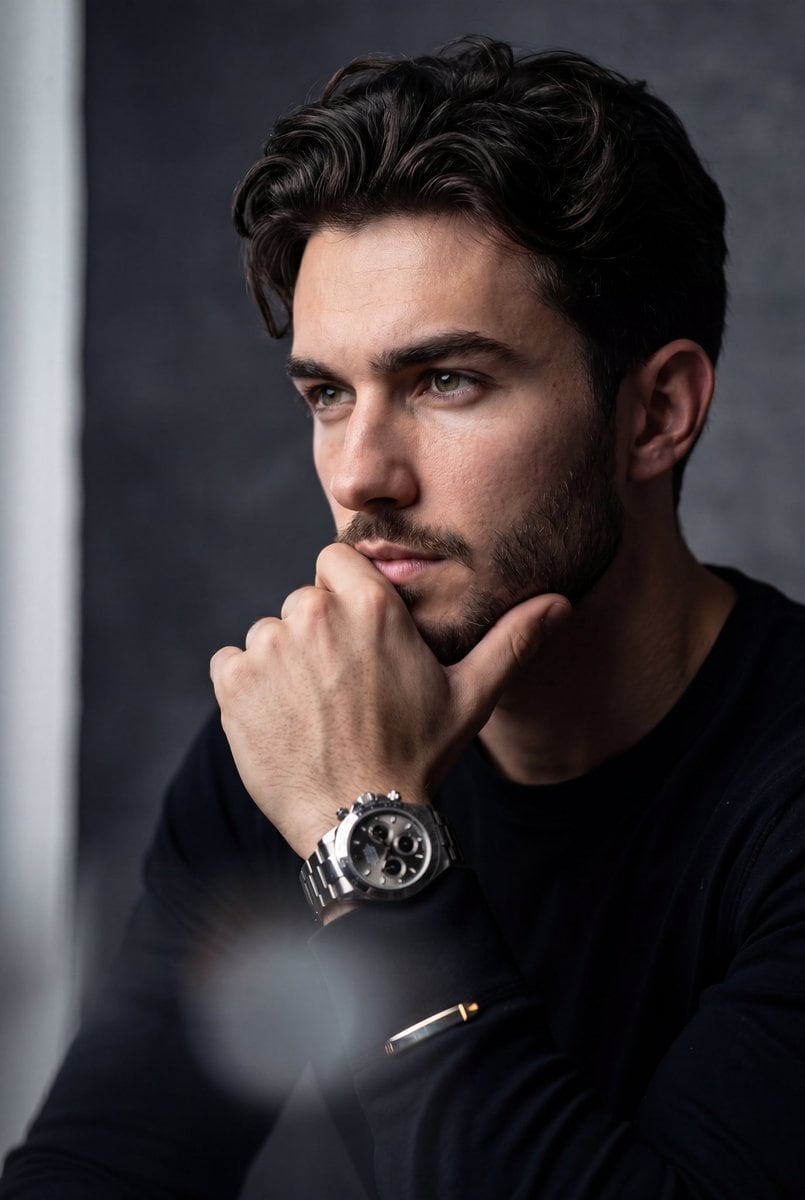
Hyper-realistic Cinematic Medium Close-up Portrait Of The Uploaded Perso

A hyper-realistic, cinematic medium close-up portrait of the uploaded person. The subject is positioned with their torso angled slightly forward, but their head is turned to the side, loo...

A hyper-realistic, cinematic medium close-up portrait of the uploaded person. The subject is positioned with their torso angled slightly forward, but their head is turned to the side, loo...
Prompt

A hyper-realistic, cinematic medium close-up portrait of the uploaded person. The subject is positioned with their torso angled slightly forward, but their head is turned to the side, looking off-camera to the left with a deeply contemplative, serious, and stoic expression. One hand is raised, resting gently against the chin and lower lip in a classic "thinking" gesture, fingers softly curled. On the wrist is a {argument name="accessory" default="prominent, luxurious metallic chronograph watch"} with complex dial details. The subject is wearing a {argument name="outfit" default="sleek, dark black long-sleeved shirt or suit jacket"} that blends into the shadows, with metallic cuff accents catching the light. Background: A minimalist, moody, {argument name="background" default="textured charcoal-grey gradient backdrop"}, featuring a soft, faint vertical strip of light on the far left edge. Camera Angle & Photography: Eye-level angle, amazing high-end commercial portrait photography. Lighting, Editing & Effects: Dramatic chiaroscuro side-lighting illuminating the right side of the subject's face while casting deep, rich shadows on the left. The image features a shallow depth of field with sharp focus on the visible eye and the luxury watch. There is a distinct, heavy foreground blur (a hazy, soft white/grey light leak effect) obscuring the very bottom and bottom-left corner of the frame to create atmospheric depth. High-contrast editing, moody cinematic color grading, and a highly polished, premium aesthetic. ar 4:5

Prompt structure
  • Modelgpt-image-2
  • Use caseavatar
  • Stylephotorealistic, cinematic, luxury
  • Aspect ratioFlexible
Best used for
  • Use caseavatar
  • Stylephotorealistic, cinematic, luxury
  • Recommended specs1:1, 4:5, 16:9, or 9:16
  • ModelGPT Image 2
How to customize

Use this Hyper-realistic Cinematic Medium Close-up Portrait Of The Uploaded Perso prompt as a base. Replace the subject, product details, environment, lighting, brand colors, and output ratio while keeping the avatar intent and photorealistic, cinematic, luxury direction stable.

Editable variables
  • SubjectReplace the product, person, scene, interface, or object being generated.
  • Use caseKeep or rewrite the destination as avatar, ad creative, cover image, poster, or ecommerce hero.
  • FrameChoose 1:1, 4:5, 16:9, or 9:16 based on the final placement.
  • Brand cuesAdd colors, materials, props, text-safe space, and the platform where the image will be used.
Recommended specs

Choose the frame for the destination first, then use 1K, 2K, or 4K based on output quality needs. Product images and posters usually benefit from higher resolution.

Pre-generation checklist
  • CheckSubject, lighting, composition, and frame are specific enough to review.
  • CheckText-safe space is included when the image will carry a headline or ad copy.
  • CheckResolution, credit cost, and final destination are checked before generation.
Why this prompt works

Hyper-realistic Cinematic Medium Close-up Portrait Of The Uploaded Perso works because it starts from the image job, then controls subject, composition, lighting, style, and frame. It is best for avatar while keeping the photorealistic, cinematic, luxury direction stable.

Common questions
  • Can I use it directly?Yes. Replace the subject, brand cues, and frame, then generate in Image2Studio.
  • Which ratio should I use?Choose 1:1, 4:5, 16:9, or 9:16 based on the destination.




