
Image2Studio
Examples

gpt-image-2

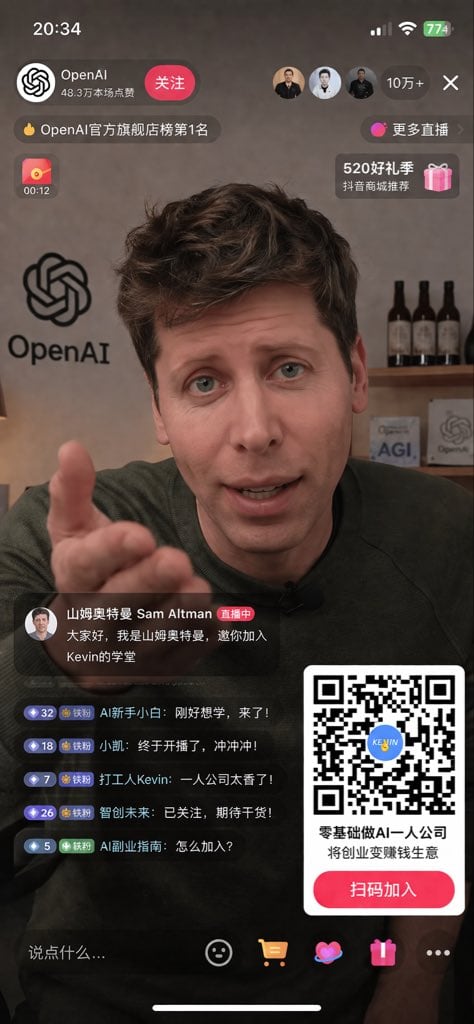
Mobile Livestream UI Mockup

Ready-to-edit mobile livestream UI mockup image prompt.

Ready-to-edit mobile livestream UI mockup image prompt.
Prompt

{ "type": "mobile livestream UI mockup", "subject": { "person": "{argument name=\"host name\" default=\"Sam Altman\"}", "action": "reaching right hand out towards the camera", "clothing": "dark green sweater" }, "background": { "setting": "office", "left_wall": "large OpenAI logo", "right_shelf": "wooden shelf with 3 dark bottles and 2 small signs reading 'AGI' and 'OpenAI'" }, "layout": { "top_bar": { "elements": ["time 20:34", "signal bars", "wifi icon", "battery 774"] }, "header": { "left_section": ["profile picture", "{argument name=\"account name\" default=\"OpenAI\"}", "48.3万本场点赞", "关注 button"], "right_section": ["3 viewer avatars", "10万+", "X close button"], "sub_tags": ["OpenAI官方旗舰店榜第1名", "更多直播"] }, "floating_widgets": { "left": "red envelope icon with 00:12", "right": "pink gift box icon with 520好礼季 抖音商城推荐" }, "bottom_left_chat": { "host_announcement": ["avatar", "山姆奥特曼 Sam Altman 直播中", "{argument name=\"host message\" default=\"大家好,我是山姆奥特曼,邀你加入Kevin的学堂\"}"], "viewer_comments_count": 5, "viewer_comments_labels": [ "AI新手小白: 刚好想学,来了!", "小凯: 终于开播了,冲冲冲!", "打工人Kevin: 一人公司太香了!", "智创未来: 已关注,期待干货!", "AI副业指南: 怎么加入?" ] }, "bottom_right_overlay": { "qr_code": "large scannable QR code with blue KEVIN logo in center", "text": "{argument name=\"qr code title\" default=\"零基础做AI一人公司 将创业变赚钱生意\"}", "button": "{argument name=\"qr code button text\" default=\"扫码加入\"}" }, "bottom_action_bar": { "input_field": "说点什么...", "icons_count": 5, "icons_labels": ["smiley face", "shopping cart", "heart", "gift box", "three dots"] } } }

Prompt structure
  • Modelgpt-image-2
  • Use caseavatar
  • Stylephotorealistic, editorial
  • Aspect ratioFlexible
Best used for
  • Use caseavatar
  • Stylephotorealistic, editorial
  • Recommended specs1:1, 4:5, 16:9, or 9:16
  • ModelGPT Image 2
How to customize

Use this Mobile Livestream UI Mockup prompt as a base. Replace the subject, product details, environment, lighting, brand colors, and output ratio while keeping the avatar intent and photorealistic, editorial direction stable.

Editable variables
  • SubjectReplace the product, person, scene, interface, or object being generated.
  • Use caseKeep or rewrite the destination as avatar, ad creative, cover image, poster, or ecommerce hero.
  • FrameChoose 1:1, 4:5, 16:9, or 9:16 based on the final placement.
  • Brand cuesAdd colors, materials, props, text-safe space, and the platform where the image will be used.
Recommended specs

Choose the frame for the destination first, then use 1K, 2K, or 4K based on output quality needs. Product images and posters usually benefit from higher resolution.

Pre-generation checklist
  • CheckSubject, lighting, composition, and frame are specific enough to review.
  • CheckText-safe space is included when the image will carry a headline or ad copy.
  • CheckResolution, credit cost, and final destination are checked before generation.
Why this prompt works

Mobile Livestream UI Mockup works because it starts from the image job, then controls subject, composition, lighting, style, and frame. It is best for avatar while keeping the photorealistic, editorial direction stable.

Common questions
  • Can I use it directly?Yes. Replace the subject, brand cues, and frame, then generate in Image2Studio.
  • Which ratio should I use?Choose 1:1, 4:5, 16:9, or 9:16 based on the destination.




