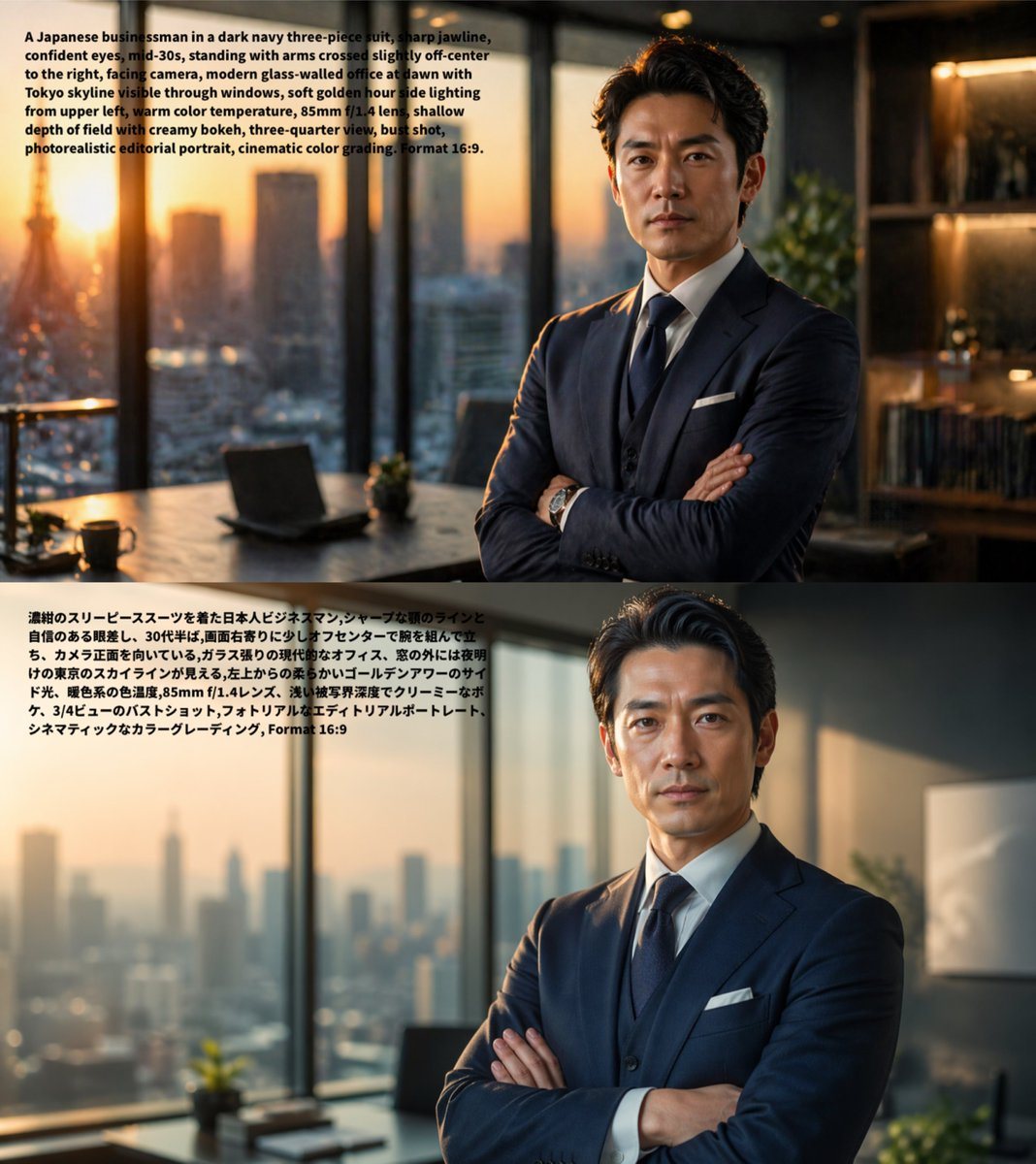
Prompt{"type":"comparison image","subject":"same photorealistic editorial portrait rendered twice from equivalent prompts in different languages","layout":{"orientation":"vertical stack","sections":[{"position":"top","count":1,"language":"English","overlay_text":"A Japanese businessman in a dark navy three-piece suit, sharp jawline, confident eyes, mid-30s, standing with arms crossed slightly off-center to the right, facing camera, modern glass-office at dawn with Tokyo skyline visible through windows, soft golden hour side lighting from upper left, warm color temperature, 85mm f/1.4 lens, shallow depth of field with creamy bokeh, three-quarter view, bust shot, photorealistic editorial portrait, cinematic color grading. Format 16:9.","image":"photorealistic portrait of {argument name=\"subject\" default=\"a Japanese businessman\"} in his mid-30s wearing a {argument name=\"suit color\" default=\"dark navy\"} three-piece suit with white shirt, dark tie, white pocket square, and wristwatch, sharp jawline, confident eyes, styled dark hair, standing with arms crossed, placed slightly right of center, facing the camera in a three-quarter bust shot inside a modern high-rise glass office at dawn, Tokyo skyline visible through floor-to-ceiling windows, desk with an open laptop and a small plant on the left, shelving and warm interior lights on the right, soft golden-hour side light from the upper left, warm color temperature, shallow depth of field, creamy bokeh, cinematic editorial realism, 85mm f/1.4 look, aspect ratio 16:9"},{"position":"bottom","count":1,"language":"Japanese","overlay_text":"濃紺のスリーピーススーツを着た日本人ビジネスマン、シャープな顎のラインと自信のある眼差し。30代半ば、両腕を胸の前で交差させ少し右寄りに立ち、カメラ正面を向いている。ガラス張りの現代的なオフィス、窓の外には夜明けの東京のスカイラインが見える。左上からの柔らかいゴールデンアワーのサイド光、暖色系の色温度、85mm f/1.4レンズ、浅い被写界深度でクリーミーなボケ、3/4ビューのバストショット、フォトリアルなエディトリアルポートレート、シネマティックなカラーグレーディング、Format 16:9","image":"the same composition and styling as the top image, nearly identical photorealistic editorial portrait, preserving the businessman, office setting, dawn skyline, crossed arms, lighting, lens look, shallow depth of field, and cinematic grading to demonstrate minimal visual difference between English and Japanese prompts"}],"background":"each section fills half the canvas, no divider line, text block in the upper-left area of each panel","count_total_sections":2},"style":"clean social-media comparison graphic showing prompt text directly on top of generated images","intent":"demonstrate that GPT-image-2 produces very similar results from English and Japanese prompts"}
Prompt structure- Modelgpt-image-2
- Use caseavatar
- Stylephotorealistic, editorial, cinematic, minimal
- Aspect ratioFlexible
Best used for- Use caseavatar
- Stylephotorealistic, editorial, cinematic, minimal
- Recommended specs1:1, 4:5, 16:9, or 9:16
- ModelGPT Image 2
How to customizeUse this Comparison Image prompt as a base. Replace the subject, product details, environment, lighting, brand colors, and output ratio while keeping the avatar intent and photorealistic, editorial, cinematic, minimal direction stable.
Editable variables- SubjectReplace the product, person, scene, interface, or object being generated.
- Use caseKeep or rewrite the destination as avatar, ad creative, cover image, poster, or ecommerce hero.
- FrameChoose 1:1, 4:5, 16:9, or 9:16 based on the final placement.
- Brand cuesAdd colors, materials, props, text-safe space, and the platform where the image will be used.
Recommended specsChoose the frame for the destination first, then use 1K, 2K, or 4K based on output quality needs. Product images and posters usually benefit from higher resolution.
Pre-generation checklist- CheckSubject, lighting, composition, and frame are specific enough to review.
- CheckText-safe space is included when the image will carry a headline or ad copy.
- CheckResolution, credit cost, and final destination are checked before generation.
Why this prompt worksComparison Image works because it starts from the image job, then controls subject, composition, lighting, style, and frame. It is best for avatar while keeping the photorealistic, editorial, cinematic, minimal direction stable.
Common questions- Can I use it directly?Yes. Replace the subject, brand cues, and frame, then generate in Image2Studio.
- Which ratio should I use?Choose 1:1, 4:5, 16:9, or 9:16 based on the destination.