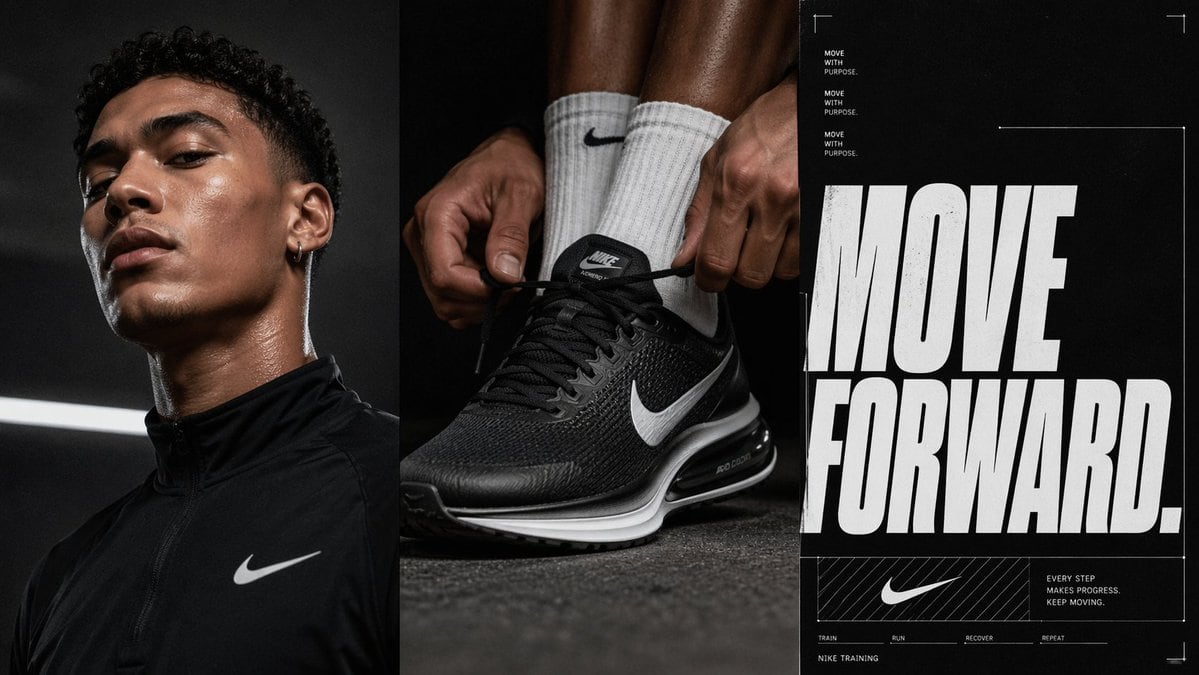
Prompt{"type":"triptych sports advertising poster","brand_style":"premium athletic campaign inspired by Nike studio advertising","subject":{"left_panel":{"type":"athlete portrait","gender_presentation":"masculine","visible_count":1,"skin_tone":"deep brown","hair":"short tight curls","wardrobe":"black zip-up performance training top with a white swoosh logo on the chest","pose":"cropped from upper chest to top of head, head turned slightly to the side","lighting":"moody studio rim light with sweat sheen on neck and jaw, dark background with a single diagonal white light bar behind"},"center_panel":{"type":"product action close-up","visible_count":1,"focus":"black Nike running shoe with white swoosh and visible air cushioning","styling":"white ribbed crew sock with black swoosh","hands_count":2,"action":"both hands tightening the shoelaces while the foot is planted on a dark textured gym floor","camera":"low-angle macro-style product shot emphasizing the shoe shape, mesh texture, laces, and sole"},"right_panel":{"type":"typographic poster","headline":"{argument name=\"headline text\" default=\"MOVE FORWARD.\"}","small_text_count":8,"small_text":["MOVE WITH PURPOSE.","MOVE WITH PURPOSE.","MOVE WITH PURPOSE.","EVERY STEP MAKES PROGRESS. KEEP MOVING.","TRAIN","RUN","RECOVER","REPEAT"],"brand_line":"NIKE TRAINING","logo_count":1,"style":"oversized distressed white condensed sans-serif headline on black background, small utility text, thin white framing lines and corner crop marks, lower boxed logo area with diagonal hatch pattern"}},"layout":{"panel_count":3,"orientation":"vertical triptych","panel_widths":"three equal tall panels","gutter":"narrow dark dividers","overall_composition":"left athlete portrait, center shoe-lacing close-up, right motivational typography block"},"art_direction":{"palette":"black, charcoal, white, subtle warm brown skin tones","mood":"focused, determined, high-performance, cinematic","lighting":"low-key dramatic studio lighting with crisp highlights and deep shadows","texture":"sweat sheen, mesh shoe fabric, rubber sole, matte poster grain","finish":"editorial commercial sports campaign, ultra-detailed, sharp, realistic"}}
Prompt structure- Modelgpt-image-2
- Use caseavatar
- Stylephotorealistic, cinematic, editorial, luxury
- Aspect ratioFlexible
Best used for- Use caseavatar
- Stylephotorealistic, cinematic, editorial, luxury
- Recommended specs1:1, 4:5, 16:9, or 9:16
- ModelGPT Image 2
How to customizeUse this Triptych Sports Advertising Poster prompt as a base. Replace the subject, product details, environment, lighting, brand colors, and output ratio while keeping the avatar intent and photorealistic, cinematic, editorial, luxury direction stable.
Editable variables- SubjectReplace the product, person, scene, interface, or object being generated.
- Use caseKeep or rewrite the destination as avatar, ad creative, cover image, poster, or ecommerce hero.
- FrameChoose 1:1, 4:5, 16:9, or 9:16 based on the final placement.
- Brand cuesAdd colors, materials, props, text-safe space, and the platform where the image will be used.
Recommended specsChoose the frame for the destination first, then use 1K, 2K, or 4K based on output quality needs. Product images and posters usually benefit from higher resolution.
Pre-generation checklist- CheckSubject, lighting, composition, and frame are specific enough to review.
- CheckText-safe space is included when the image will carry a headline or ad copy.
- CheckResolution, credit cost, and final destination are checked before generation.
Why this prompt worksTriptych Sports Advertising Poster works because it starts from the image job, then controls subject, composition, lighting, style, and frame. It is best for avatar while keeping the photorealistic, cinematic, editorial, luxury direction stable.
Common questions- Can I use it directly?Yes. Replace the subject, brand cues, and frame, then generate in Image2Studio.
- Which ratio should I use?Choose 1:1, 4:5, 16:9, or 9:16 based on the destination.