
Image2Studio
Examples

gpt-image-2

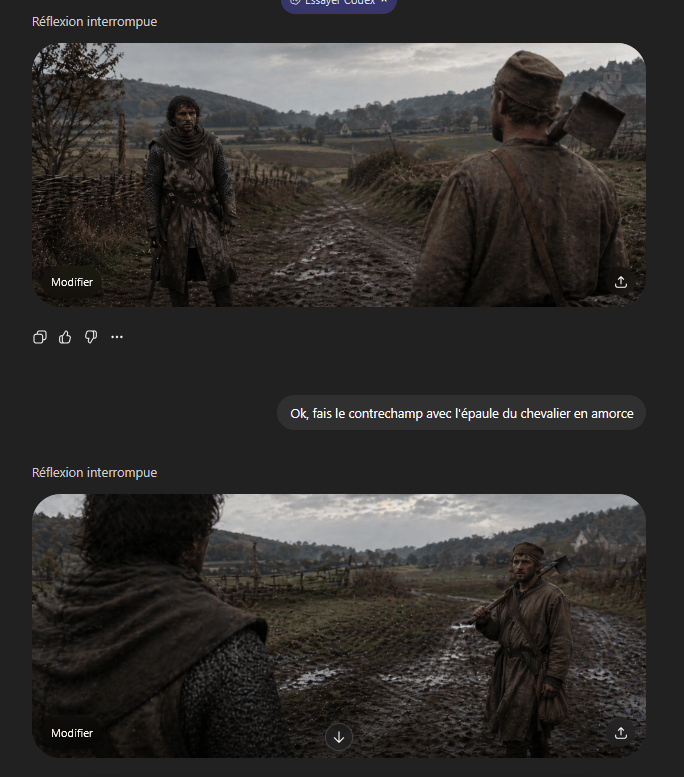
Cinematic Medieval Shot-reverse-shot Pair Presented As A Gritty Historic

A cinematic medieval shot-reverse-shot pair presented as a gritty historical film still in an ultrawide 21:9 aspect ratio, overcast natural light, muted earth tones, damp autumn atmospher...

A cinematic medieval shot-reverse-shot pair presented as a gritty historical film still in an ultrawide 21:9 aspect ratio, overcast natural light, muted earth tones, damp autumn atmospher...
Prompt

A cinematic medieval shot-reverse-shot pair presented as a gritty historical film still in an ultrawide 21:9 aspect ratio, overcast natural light, muted earth tones, damp autumn atmosphere, realistic muddy textures, shallow depth of field, and strong foreground shoulder framing. Set the scene on a rutted muddy country road running through a rural valley with rough wooden wattle fences on both sides, low rolling hills covered with sparse trees in the distance, open fields, and a small pale stone farmhouse or chapel on the far right hillside. The two characters face each other on the road. One is a weary medieval peasant man in a dirty brown tunic and cap, average build, carrying a wood-handled axe resting on his shoulder with a leather strap across his chest. The other is a knight or armed traveler in dark weathered chainmail and a worn hooded surcoat, standing still with a guarded posture. Create this as a grammar-of-cinema countershot demonstration: first frame shows the {argument name="foreground character" default="peasant man with axe"} from behind in the right foreground, his shoulder and back occupying the near right side of the frame, while the {argument name="background character" default="knight in chainmail"} stands full figure in the left midground facing camera on the muddy road; second frame reverses the angle and shows the knight’s shoulder and hooded back blurred in the left foreground while the peasant stands in the right midground holding the axe on his shoulder. Keep both shots consistent in location, weather, costume continuity, lens feel, and character spacing, with subdued dramatic realism and a tense conversational standoff.

Prompt structure
  • Modelgpt-image-2
  • Use caseavatar
  • Stylephotorealistic, cinematic
  • Aspect ratioFlexible
Best used for
  • Use caseavatar
  • Stylephotorealistic, cinematic
  • Recommended specs1:1, 4:5, 16:9, or 9:16
  • ModelGPT Image 2
How to customize

Use this Cinematic Medieval Shot-reverse-shot Pair Presented As A Gritty Historic prompt as a base. Replace the subject, product details, environment, lighting, brand colors, and output ratio while keeping the avatar intent and photorealistic, cinematic direction stable.

Editable variables
  • SubjectReplace the product, person, scene, interface, or object being generated.
  • Use caseKeep or rewrite the destination as avatar, ad creative, cover image, poster, or ecommerce hero.
  • FrameChoose 1:1, 4:5, 16:9, or 9:16 based on the final placement.
  • Brand cuesAdd colors, materials, props, text-safe space, and the platform where the image will be used.
Recommended specs

Choose the frame for the destination first, then use 1K, 2K, or 4K based on output quality needs. Product images and posters usually benefit from higher resolution.

Pre-generation checklist
  • CheckSubject, lighting, composition, and frame are specific enough to review.
  • CheckText-safe space is included when the image will carry a headline or ad copy.
  • CheckResolution, credit cost, and final destination are checked before generation.
Why this prompt works

Cinematic Medieval Shot-reverse-shot Pair Presented As A Gritty Historic works because it starts from the image job, then controls subject, composition, lighting, style, and frame. It is best for avatar while keeping the photorealistic, cinematic direction stable.

Common questions
  • Can I use it directly?Yes. Replace the subject, brand cues, and frame, then generate in Image2Studio.
  • Which ratio should I use?Choose 1:1, 4:5, 16:9, or 9:16 based on the destination.




