
Image2Studio
Examples

gpt-image-2

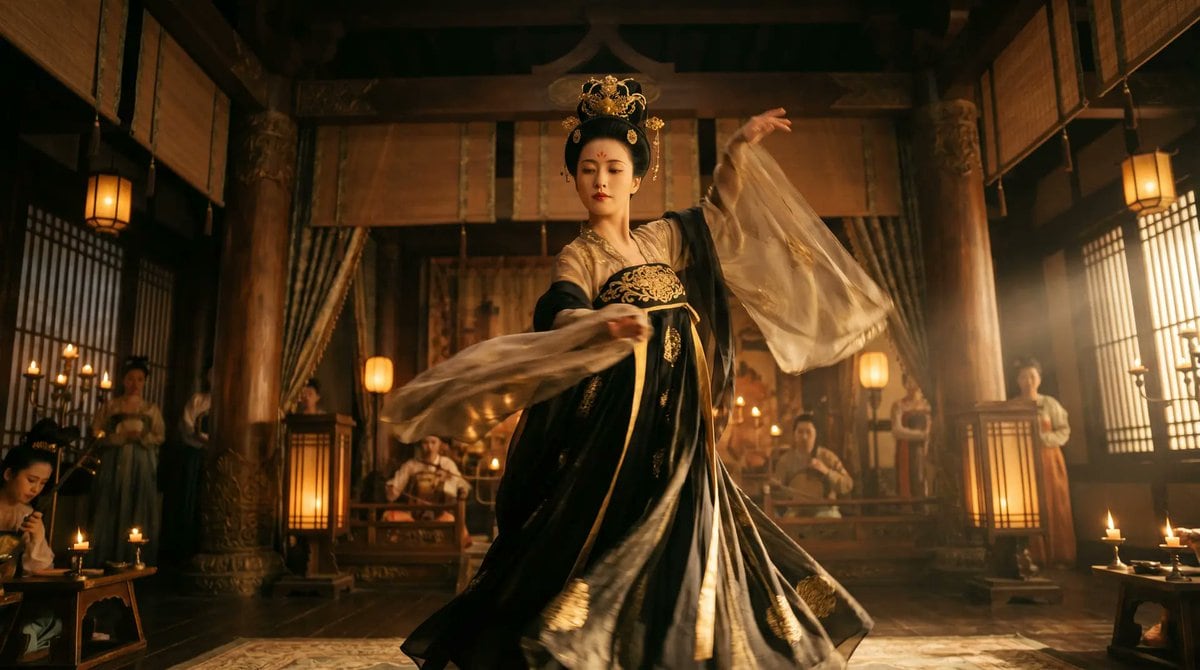
Cinematic Ultra-realistic Tang Dynasty Court Dancer Performing

A cinematic, ultra-realistic Tang Dynasty court dancer performing inside a grand ancient Chinese palace hall at night. A beautiful woman stands center frame in a dynamic mid-dance pose, h...

A cinematic, ultra-realistic Tang Dynasty court dancer performing inside a grand ancient Chinese palace hall at night. A beautiful woman stands center frame in a dynamic mid-dance pose, h...
Prompt

A cinematic, ultra-realistic {argument name="dynasty period" default="Tang Dynasty"} court dancer performing inside a grand ancient Chinese palace hall at night. A beautiful woman stands center frame in a dynamic mid-dance pose, her body turning as one arm lifts high and the other sweeps across her torso, with 2 long sheer sleeves of translucent silk trailing outward in a dramatic arc and the hem of her robe fanning around her feet. She wears an elegant {argument name="costume colors" default="black and gold"} silk dance costume with intricate embroidery, a fitted bodice with ornate gold patterning across the chest, layered flowing skirts, dark outer fabric with subtle metallic shimmer, pale inner sleeves, and delicate golden accessories. Her hair is styled in a formal updo with an ornate {argument name="headpiece style" default="golden phoenix crown"}, refined makeup, and a regal historical appearance. The scene is shot from a low-angle, slightly wide lens for an immersive cinematic perspective. The palace interior features 4 large red-brown wooden pillars in the foreground and midground, glowing floor lanterns, candle stands, carved architectural beams, draped curtains behind the dancer, lattice windows on both sides, and warm amber practical lights throughout. In the softly blurred background, show 6 secondary figures total: 2 seated musicians at center rear and 4 attendants standing near the sides. Lighting is dramatic and filmic, with warm golden highlights, soft shadows, subtle haze and volumetric light entering from the right side, realistic skin and fabric textures, shallow depth of field, slight motion blur on the sleeves, rich contrast, and a luxurious historical atmosphere. Widescreen {argument name="aspect ratio" default="16:9"} composition, centered subject, highly detailed and photorealistic.

Prompt structure
  • Modelgpt-image-2
  • Use caseavatar
  • Stylephotorealistic, cinematic, luxury
  • Aspect ratioFlexible
Best used for
  • Use caseavatar
  • Stylephotorealistic, cinematic, luxury
  • Recommended specs1:1, 4:5, 16:9, or 9:16
  • ModelGPT Image 2
How to customize

Use this Cinematic Ultra-realistic Tang Dynasty Court Dancer Performing prompt as a base. Replace the subject, product details, environment, lighting, brand colors, and output ratio while keeping the avatar intent and photorealistic, cinematic, luxury direction stable.

Editable variables
  • SubjectReplace the product, person, scene, interface, or object being generated.
  • Use caseKeep or rewrite the destination as avatar, ad creative, cover image, poster, or ecommerce hero.
  • FrameChoose 1:1, 4:5, 16:9, or 9:16 based on the final placement.
  • Brand cuesAdd colors, materials, props, text-safe space, and the platform where the image will be used.
Recommended specs

Choose the frame for the destination first, then use 1K, 2K, or 4K based on output quality needs. Product images and posters usually benefit from higher resolution.

Pre-generation checklist
  • CheckSubject, lighting, composition, and frame are specific enough to review.
  • CheckText-safe space is included when the image will carry a headline or ad copy.
  • CheckResolution, credit cost, and final destination are checked before generation.
Why this prompt works

Cinematic Ultra-realistic Tang Dynasty Court Dancer Performing works because it starts from the image job, then controls subject, composition, lighting, style, and frame. It is best for avatar while keeping the photorealistic, cinematic, luxury direction stable.

Common questions
  • Can I use it directly?Yes. Replace the subject, brand cues, and frame, then generate in Image2Studio.
  • Which ratio should I use?Choose 1:1, 4:5, 16:9, or 9:16 based on the destination.




