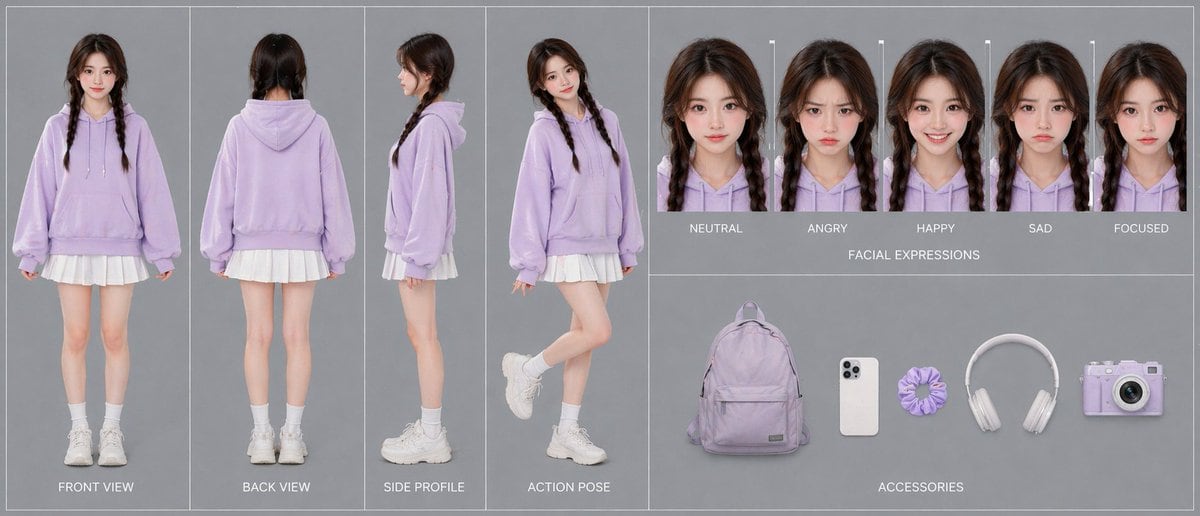
Prompt{"type":"character reference sheet","style":"clean studio fashion turnaround board, photorealistic, soft commercial lighting, minimalist gray background, high-resolution consistency sheet for AI video character design","character":{"gender_presentation":"young woman","age_appearance":"late teens to early 20s","identity":"same person shown consistently across all panels","hair":{"color":"dark brown","style":"center-parted twin braids falling over the front of the shoulders","texture":"slightly wavy with soft volume at the crown"},"outfit":{"top":"oversized pastel lavender hoodie with drawstrings and front kangaroo pocket","bottom":"short white pleated skirt visible below the hoodie hem","socks":"white mid-calf socks","shoes":"chunky white sneakers"}},"layout":{"background":"uniform light gray studio backdrop with thin white divider lines separating panels","sections":[{"title":"body views","position":"left half","count":4,"labels":["FRONT VIEW","BACK VIEW","SIDE PROFILE","ACTION POSE"],"details":"full-body character shown in 4 separate vertical panels; front view standing straight with arms relaxed, back view standing straight, side profile facing left, action pose in three-quarter view with one leg bent upward behind her and a playful casual stance"},{"title":"FACIAL EXPRESSIONS","position":"upper right","count":5,"labels":["NEUTRAL","ANGRY","HAPPY","SAD","FOCUSED"],"details":"5 tightly cropped head-and-shoulders portraits of the same character in the same lavender hoodie, evenly spaced in a row, each with the same hairstyle and lighting, subtle expression changes only"},{"title":"ACCESSORIES","position":"lower right","count":5,"labels":["backpack","smartphone","scrunchie","headphones","camera"],"details":"5 isolated items laid out horizontally with soft shadows: a pastel lavender backpack, a white smartphone with triple rear cameras, a lavender scrunchie, white over-ear headphones, and a pastel lavender compact camera"}],"composition":"wide horizontal board, left section dedicated to full-body turnaround, upper-right strip for expression lineup, lower-right strip for accessories","text_style":"small uppercase white sans-serif labels centered beneath or near each item"},"color_palette":{"dominant":["pastel lavender","white","cool gray"],"accent":["soft skin tones","dark brown hair"]},"quality":"polished catalog-style presentation, accurate proportions, consistent facial features and clothing details across all panels"}
How to customizeUse this Character Reference Sheet prompt as a base. Replace the subject, product details, environment, lighting, brand colors, and output ratio while keeping the avatar intent and photorealistic, editorial, minimal direction stable.
Why this prompt worksCharacter Reference Sheet works because it starts from the image job, then controls subject, composition, lighting, style, and frame. It is best for avatar while keeping the photorealistic, editorial, minimal direction stable.