
Image2Studio
Examples

gpt-image-2

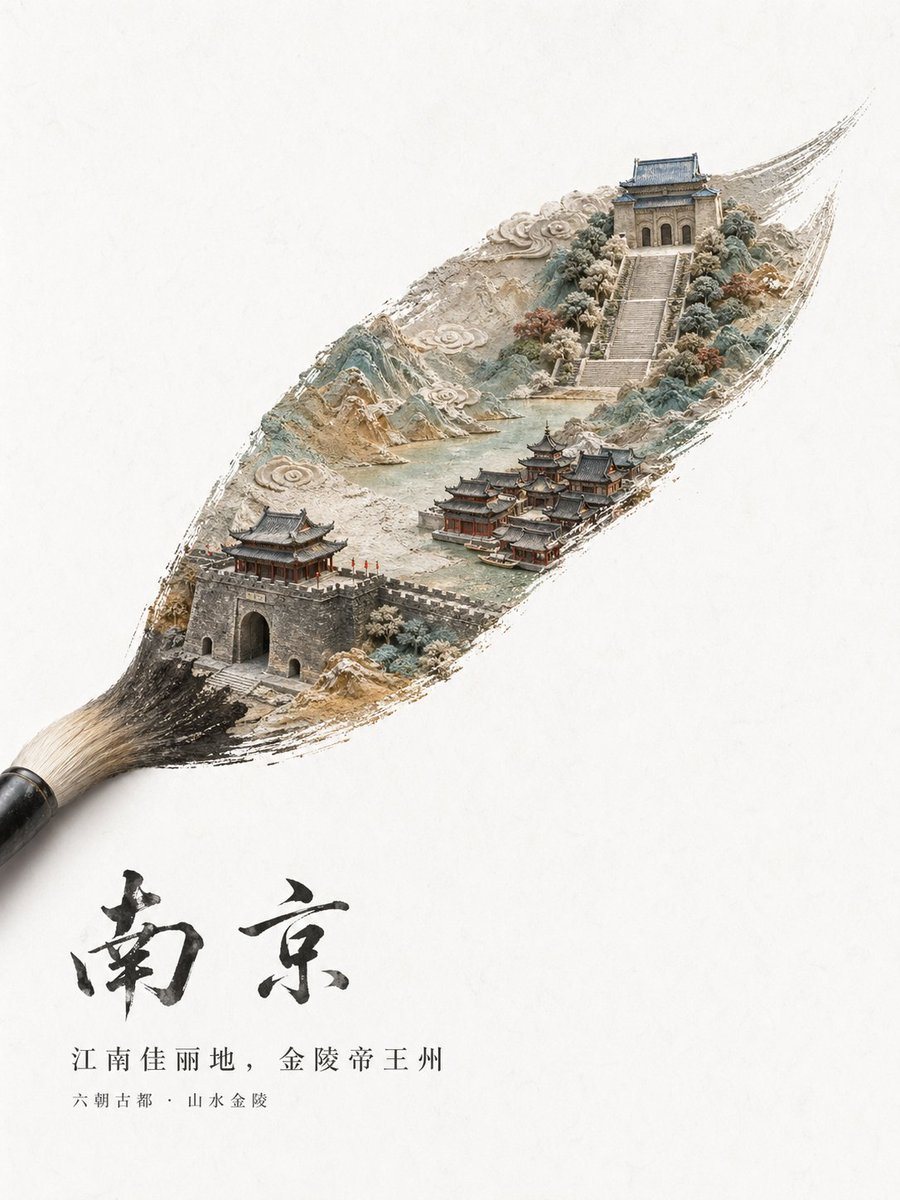
Minimalist High-end Chinese City Tourism Poster On An Off-white Textured

A minimalist high-end Chinese city tourism poster on an off-white textured paper background with vast negative space. A traditional calligraphy brush enters from the lower left corner, an...

A minimalist high-end Chinese city tourism poster on an off-white textured paper background with vast negative space. A traditional calligraphy brush enters from the lower left corner, an...
Prompt

A minimalist high-end Chinese city tourism poster on an off-white textured paper background with vast negative space. A traditional calligraphy brush enters from the lower left corner, and its single sweeping brushstroke transforms into a detailed miniature landscape of {argument name="city name" default="南京"}. Inside the elongated ink-brush shape, create a delicate diorama-like ancient Chinese city scene with layered mountains, stylized swirling clouds, pale green water, stone walls, and classical architecture. In the lower left of the brushstroke, show 1 fortified city gate with gray brick walls and a traditional roof, with tiny red flags along the battlements. In the lower middle-right, show a compact cluster of 6 traditional waterside buildings with dark tiled roofs and red wooden structures. In the upper right, show 1 grand stairway rising through trees to 1 monumental ancient gate tower with blue-gray roof tiles. Use a refined palette of ink black, stone gray, muted teal, pale jade, beige, and soft earthy reds, with a handcrafted blend of ink wash painting, paper sculpture relief, and ultra-detailed miniature model aesthetics. The brushstroke edges should look dry-brushed and organic, as if the city is painted into existence. Place large expressive black Chinese calligraphy below the brushstroke reading {argument name="main calligraphy" default="南京"}. Beneath it, add 2 lines of smaller printed Chinese text: first line {argument name="tagline text" default="江南佳丽地,金陵帝王州"}, second line {argument name="subtitle text" default="六朝古都·山水金陵"}. Overall composition should feel poetic, elegant, premium, cultural, and suitable for a luxury city branding or tourism promotion poster.

Prompt structure
  • Modelgpt-image-2
  • Use casebrand-identity
  • Styleluxury, minimal, isometric, watercolor
  • Aspect ratioFlexible
Best used for
  • Use casebrand-identity
  • Styleluxury, minimal, isometric, watercolor
  • Recommended specs1:1, 4:5, 16:9, or 9:16
  • ModelGPT Image 2
How to customize

Use this Minimalist High-end Chinese City Tourism Poster On An Off-white Textured prompt as a base. Replace the subject, product details, environment, lighting, brand colors, and output ratio while keeping the brand-identity intent and luxury, minimal, isometric, watercolor direction stable.

Editable variables
  • SubjectReplace the product, person, scene, interface, or object being generated.
  • Use caseKeep or rewrite the destination as brand identity, ad creative, cover image, poster, or ecommerce hero.
  • FrameChoose 1:1, 4:5, 16:9, or 9:16 based on the final placement.
  • Brand cuesAdd colors, materials, props, text-safe space, and the platform where the image will be used.
Recommended specs

Choose the frame for the destination first, then use 1K, 2K, or 4K based on output quality needs. Product images and posters usually benefit from higher resolution.

Pre-generation checklist
  • CheckSubject, lighting, composition, and frame are specific enough to review.
  • CheckText-safe space is included when the image will carry a headline or ad copy.
  • CheckResolution, credit cost, and final destination are checked before generation.
Why this prompt works

Minimalist High-end Chinese City Tourism Poster On An Off-white Textured works because it starts from the image job, then controls subject, composition, lighting, style, and frame. It is best for brand identity while keeping the luxury, minimal, isometric, watercolor direction stable.

Common questions
  • Can I use it directly?Yes. Replace the subject, brand cues, and frame, then generate in Image2Studio.
  • Which ratio should I use?Choose 1:1, 4:5, 16:9, or 9:16 based on the destination.




