
Image2Studio
Examples

gpt-image-2

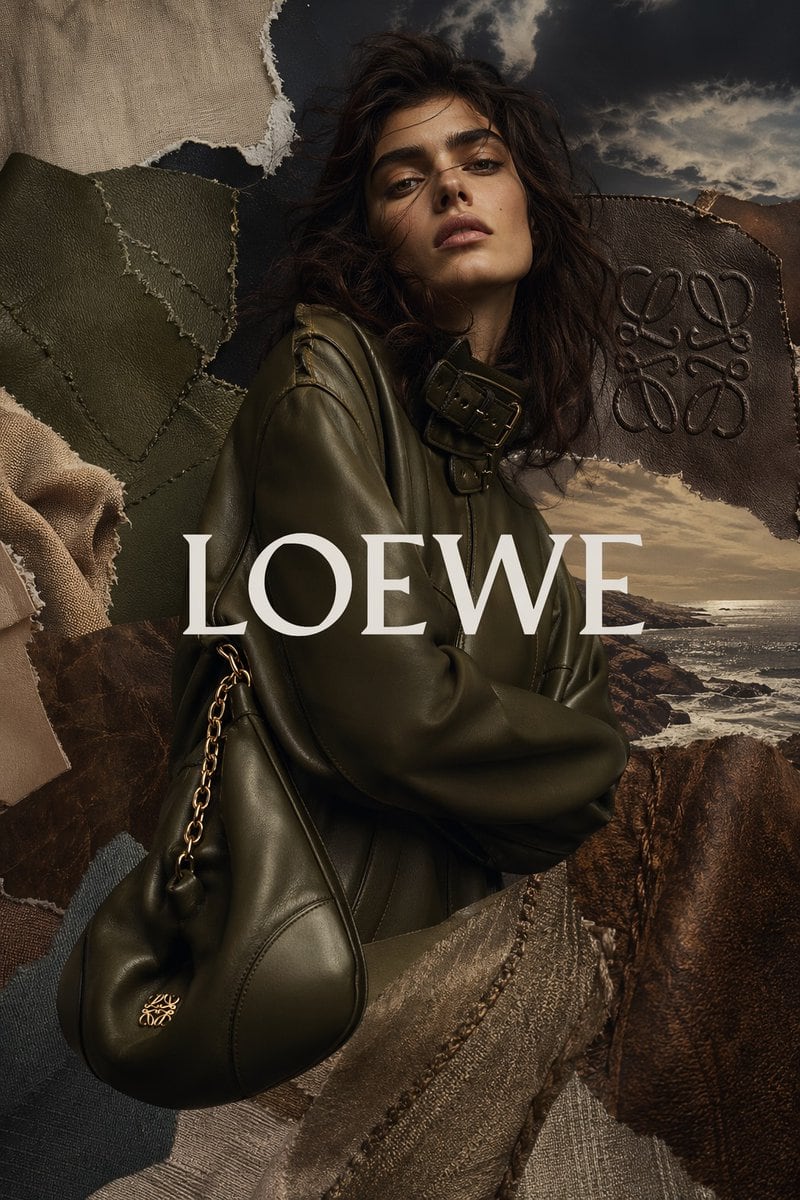
High-fashion Luxury Editorial Advertisement In A Vertical Format

A high-fashion luxury editorial advertisement in a vertical format, featuring a mysterious female model from mid-torso up, centered and slightly turned to the side, wearing an oversized d...

A high-fashion luxury editorial advertisement in a vertical format, featuring a mysterious female model from mid-torso up, centered and slightly turned to the side, wearing an oversized d...
Prompt

A high-fashion luxury editorial advertisement in a vertical format, featuring a mysterious female model from mid-torso up, centered and slightly turned to the side, wearing an oversized dark olive leather jacket with a high collar and prominent buckle strap detail near the neck. Her face is obscured by a soft rectangular blur, while her dark wavy shoulder-length hair remains visible and voluminous. She carries a slouchy black leather shoulder bag with a gold chain strap and a small gold logo near the bottom corner. Place the large serif brand name {argument name="brand text" default="LOEWE"} across the center in elegant white uppercase letters, overlaying the figure. Build the entire composition as a tactile collage made of torn and layered fabric and leather swatches: exactly 8 visible material fragments surrounding and partially overlapping the subject, including beige linen at the top left, olive stitched leather panels on the left, soft beige fabric at the lower left edge, dark brown embossed leather with a monogram motif at the upper right, rocky coastline photography at the right and lower right, a textured taupe stitched textile across the lower center, a dark denim-like fragment at the lower left, and a deep brown leather panel at the bottom right. In the background, reveal a dramatic coastal landscape with rocks, ocean waves, and a moody cloudy sky lit like late afternoon or sunset. Use rich earthy tones, muted olive, dark brown, taupe, black, and warm highlights. The overall look should feel premium, cinematic, moody, artisanal, and minimalist, like a luxury fashion campaign combining leather craftsmanship, collage art direction, and editorial photography.

Prompt structure
  • Modelgpt-image-2
  • Use casebrand-identity
  • Styleluxury, photorealistic, cinematic, editorial
  • Aspect ratioFlexible
Best used for
  • Use casebrand-identity
  • Styleluxury, photorealistic, cinematic, editorial
  • Recommended specs1:1, 4:5, 16:9, or 9:16
  • ModelGPT Image 2
How to customize

Use this High-fashion Luxury Editorial Advertisement In A Vertical Format prompt as a base. Replace the subject, product details, environment, lighting, brand colors, and output ratio while keeping the brand-identity intent and luxury, photorealistic, cinematic, editorial direction stable.

Editable variables
  • SubjectReplace the product, person, scene, interface, or object being generated.
  • Use caseKeep or rewrite the destination as brand identity, ad creative, cover image, poster, or ecommerce hero.
  • FrameChoose 1:1, 4:5, 16:9, or 9:16 based on the final placement.
  • Brand cuesAdd colors, materials, props, text-safe space, and the platform where the image will be used.
Recommended specs

Choose the frame for the destination first, then use 1K, 2K, or 4K based on output quality needs. Product images and posters usually benefit from higher resolution.

Pre-generation checklist
  • CheckSubject, lighting, composition, and frame are specific enough to review.
  • CheckText-safe space is included when the image will carry a headline or ad copy.
  • CheckResolution, credit cost, and final destination are checked before generation.
Why this prompt works

High-fashion Luxury Editorial Advertisement In A Vertical Format works because it starts from the image job, then controls subject, composition, lighting, style, and frame. It is best for brand identity while keeping the luxury, photorealistic, cinematic, editorial direction stable.

Common questions
  • Can I use it directly?Yes. Replace the subject, brand cues, and frame, then generate in Image2Studio.
  • Which ratio should I use?Choose 1:1, 4:5, 16:9, or 9:16 based on the destination.




