
Image2Studio
Examples

gpt-image-2

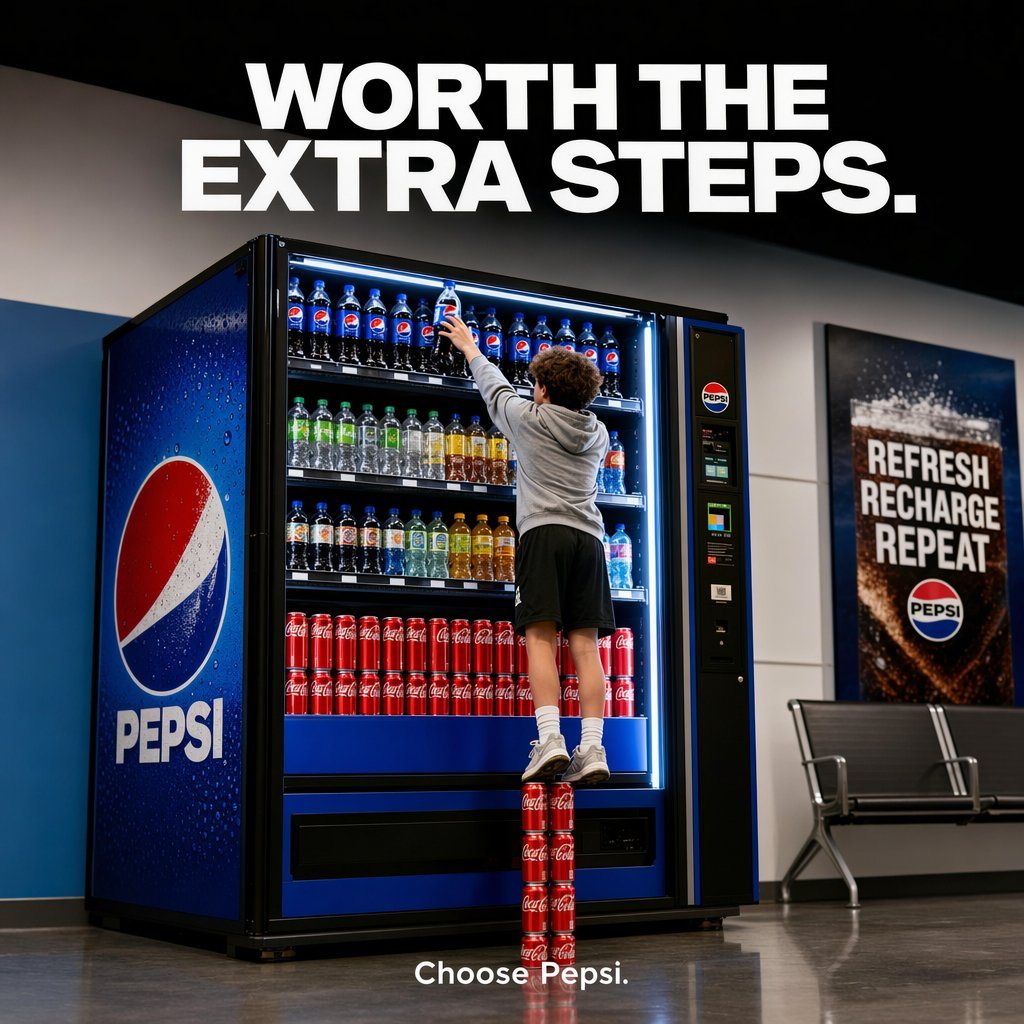
Polished Commercial Advertising Photo

A polished commercial advertising photo inside a modern transit-station or public waiting area, shot straight-on with a slightly low eye level, featuring a large illuminated Pepsi vending...

A polished commercial advertising photo inside a modern transit-station or public waiting area, shot straight-on with a slightly low eye level, featuring a large illuminated Pepsi vending...
Prompt

A polished commercial advertising photo inside a modern transit-station or public waiting area, shot straight-on with a slightly low eye level, featuring a large illuminated Pepsi vending machine on the left and center of the frame. A young man is seen from behind, wearing a light gray hoodie, black athletic shorts, white crew socks, and white sneakers, stretching upward to grab a Pepsi bottle from the very top shelf. He is standing precariously on a vertical stack of exactly 4 red Coca-Cola cans arranged one on top of another on the floor, making the visual joke that getting Pepsi is literally worth the extra steps. The vending machine is fully stocked and brightly lit with cool white interior lighting: the top shelf contains multiple Pepsi bottles, the middle shelves contain assorted clear, green, yellow, and amber bottled drinks, and the lower shelf displays rows of red Coca-Cola cans. The machine exterior is Pepsi blue with a large Pepsi globe logo and the word PEPSI on the left side panel, plus a payment/control panel on the right side of the machine. Across the top of the image, place a huge bold white all-caps sans-serif headline reading {argument name="headline text" default="WORTH THE EXTRA STEPS."} centered against a dark upper wall. At the bottom center, add small clean white sans-serif brand copy reading {argument name="tagline text" default="Choose Pepsi."}. On the right wall, include a framed Pepsi poster with bold stacked text reading “REFRESH RECHARGE REPEAT” above a Pepsi logo. Add a simple metal bench beneath the poster. Use glossy floor reflections, crisp focus, premium ad photography, realistic proportions, high dynamic range, and a clean brand-safe composition with strong contrast between Pepsi blue, Coca-Cola red, and neutral gray surroundings.

Prompt structure
  • Modelgpt-image-2
  • Use casebrand-identity
  • Stylephotorealistic, minimal, luxury
  • Aspect ratioFlexible
Best used for
  • Use casebrand-identity
  • Stylephotorealistic, minimal, luxury
  • Recommended specs1:1, 4:5, 16:9, or 9:16
  • ModelGPT Image 2
How to customize

Use this Polished Commercial Advertising Photo prompt as a base. Replace the subject, product details, environment, lighting, brand colors, and output ratio while keeping the brand-identity intent and photorealistic, minimal, luxury direction stable.

Editable variables
  • SubjectReplace the product, person, scene, interface, or object being generated.
  • Use caseKeep or rewrite the destination as brand identity, ad creative, cover image, poster, or ecommerce hero.
  • FrameChoose 1:1, 4:5, 16:9, or 9:16 based on the final placement.
  • Brand cuesAdd colors, materials, props, text-safe space, and the platform where the image will be used.
Recommended specs

Choose the frame for the destination first, then use 1K, 2K, or 4K based on output quality needs. Product images and posters usually benefit from higher resolution.

Pre-generation checklist
  • CheckSubject, lighting, composition, and frame are specific enough to review.
  • CheckText-safe space is included when the image will carry a headline or ad copy.
  • CheckResolution, credit cost, and final destination are checked before generation.
Why this prompt works

Polished Commercial Advertising Photo works because it starts from the image job, then controls subject, composition, lighting, style, and frame. It is best for brand identity while keeping the photorealistic, minimal, luxury direction stable.

Common questions
  • Can I use it directly?Yes. Replace the subject, brand cues, and frame, then generate in Image2Studio.
  • Which ratio should I use?Choose 1:1, 4:5, 16:9, or 9:16 based on the destination.




