
Image2Studio
Examples

gpt-image-2

Create A Clean

Create a clean, square split-screen commercial image for athleisure clothing with polished ad photography and realistic typography. At the top across the full width, place a large bold al...

Create a clean, square split-screen commercial image for athleisure clothing with polished ad photography and realistic typography. At the top across the full width, place a large bold al...
Prompt

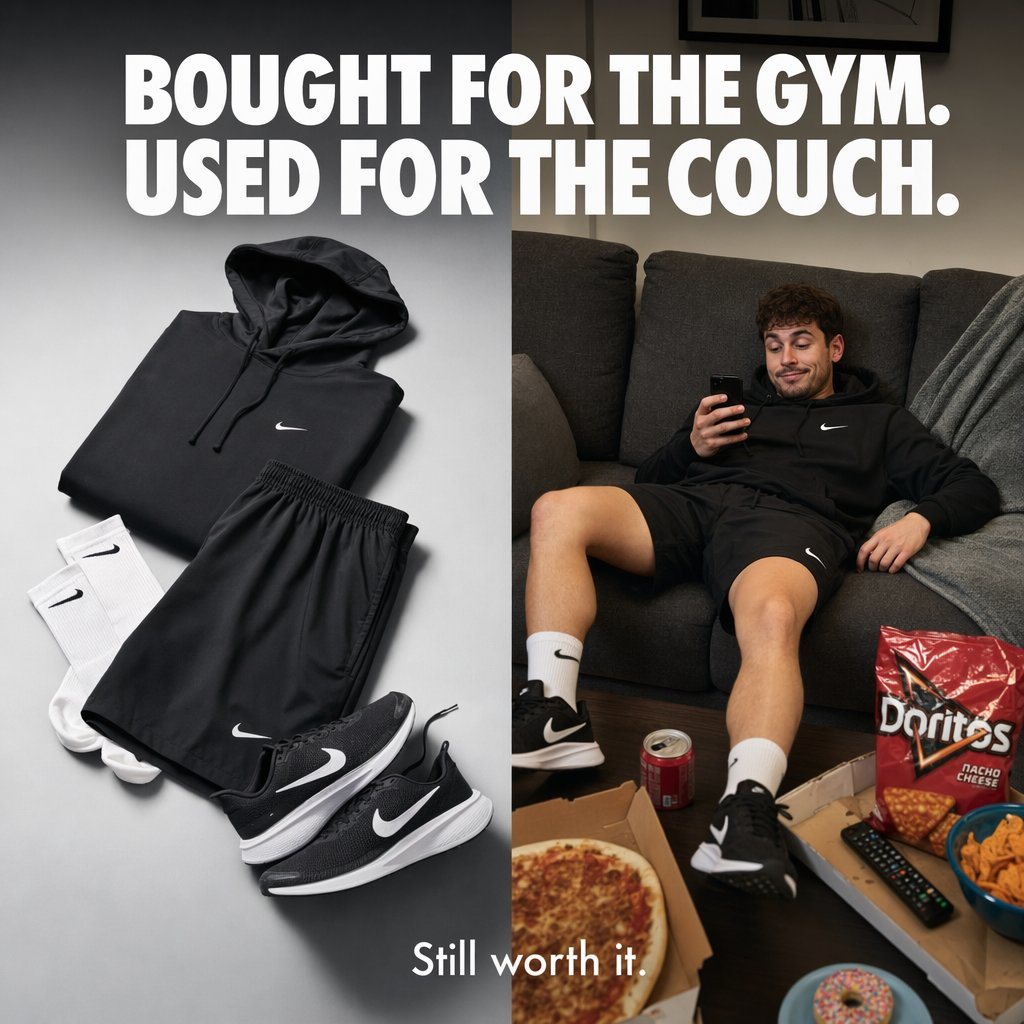
Create a clean, square split-screen commercial image for athleisure clothing with polished ad photography and realistic typography. At the top across the full width, place a large bold all-caps white headline in a heavy sans-serif font: {argument name="headline text" default="BOUGHT FOR THE GYM. USED FOR THE COUCH."} The layout is divided vertically into 2 equal panels. In the left panel, show a neatly arranged flat lay of 5 apparel items on a smooth light gray studio background with soft directional lighting and subtle shadows: 1 black hoodie with drawstrings and a small white swoosh-style chest logo, 1 pair of black athletic shorts with a small white logo near the hem, 1 pair of white crew socks with black swoosh-style logos, and 1 pair of black running shoes with white midsoles and white swoosh-style side logos. The clothing should look premium, minimal, and carefully styled like an e-commerce campaign. In the right panel, show a young man wearing the same black hoodie, black shorts, white crew socks, and black running shoes, slouched lazily on a dark charcoal fabric couch in a dim cozy living room, holding a smartphone and looking relaxed and unmotivated. In front of him on a dark coffee table are 6 visible lounge items: 1 open pizza box with a pizza, 1 red soda can, 1 large red bag of nacho cheese tortilla chips, 1 TV remote, 1 blue bowl of chips, and 1 pink-frosted sprinkled donut partly visible at the bottom edge. Add a draped gray blanket on the couch and keep the mood humorous and relatable. At the bottom center, overlay a smaller white caption in a clean sans-serif font: {argument name="tagline text" default="Still worth it."} High-end product advertising aesthetic, crisp text rendering, brand-aware lifestyle marketing, realistic materials, balanced composition, subtle contrast between aspirational fitness purchase and actual couch use.

Prompt structure
  • Modelgpt-image-2
  • Use casebrand-identity
  • Stylephotorealistic, minimal, luxury, editorial
  • Aspect ratioFlexible
Best used for
  • Use casebrand-identity
  • Stylephotorealistic, minimal, luxury, editorial
  • Recommended specs1:1, 4:5, 16:9, or 9:16
  • ModelGPT Image 2
How to customize

Use this Create A Clean prompt as a base. Replace the subject, product details, environment, lighting, brand colors, and output ratio while keeping the brand-identity intent and photorealistic, minimal, luxury, editorial direction stable.

Editable variables
  • SubjectReplace the product, person, scene, interface, or object being generated.
  • Use caseKeep or rewrite the destination as brand identity, ad creative, cover image, poster, or ecommerce hero.
  • FrameChoose 1:1, 4:5, 16:9, or 9:16 based on the final placement.
  • Brand cuesAdd colors, materials, props, text-safe space, and the platform where the image will be used.
Recommended specs

Choose the frame for the destination first, then use 1K, 2K, or 4K based on output quality needs. Product images and posters usually benefit from higher resolution.

Pre-generation checklist
  • CheckSubject, lighting, composition, and frame are specific enough to review.
  • CheckText-safe space is included when the image will carry a headline or ad copy.
  • CheckResolution, credit cost, and final destination are checked before generation.
Why this prompt works

Create A Clean works because it starts from the image job, then controls subject, composition, lighting, style, and frame. It is best for brand identity while keeping the photorealistic, minimal, luxury, editorial direction stable.

Common questions
  • Can I use it directly?Yes. Replace the subject, brand cues, and frame, then generate in Image2Studio.
  • Which ratio should I use?Choose 1:1, 4:5, 16:9, or 9:16 based on the destination.




