
Image2Studio
Examples

gpt-image-2

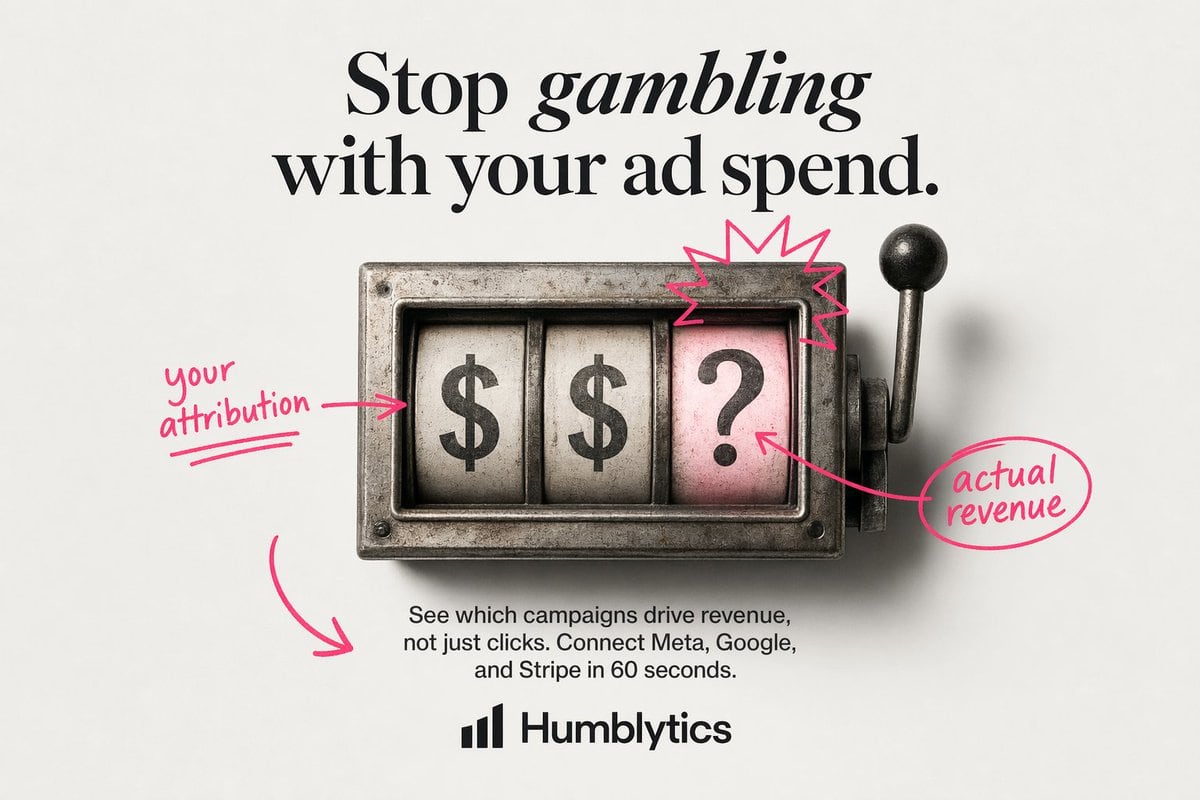
Create A Clean Minimalist Static Ad On An Off-white Light Gray Studio Ba

Create a clean minimalist static ad on an off-white light gray studio background with a centered editorial layout. At the top, place a large luxury-fashion-style serif headline in black r...

Create a clean minimalist static ad on an off-white light gray studio background with a centered editorial layout. At the top, place a large luxury-fashion-style serif headline in black r...
Prompt

Create a clean minimalist static ad on an off-white light gray studio background with a centered editorial layout. At the top, place a large luxury-fashion-style serif headline in black reading {argument name="headline text" default="Stop gambling with your ad spend."}, with the word "gambling" set in italic serif for emphasis. In the middle, show a vintage metal slot-machine window viewed straight on, slightly weathered and realistic, with 3 vertical reels inside a rectangular steel housing and a lever with a black knob on the right side. The 3 reels must display, from left to right, "$", "$", and "?". Make the rightmost reel background pale pink while the first 2 reels are aged white. Add a hand-drawn neon-pink annotation style over the image: 1 arrow-and-note on the left pointing to the first reel reading {argument name="left annotation" default="your attribution"}, 1 starburst scribble above the pink question-mark reel, 1 arrow from the question-mark reel to a circled note on the right reading {argument name="right annotation" default="actual revenue"}, and 1 large curved arrow in the lower left pointing toward the body copy area. Below the slot machine, center a short sans-serif paragraph in black reading {argument name="body text" default="See which campaigns drive revenue, not just clicks. Connect Meta, Google, and Stripe in 60 seconds."}. At the bottom center, place a simple black analytics-style bar logo icon followed by the bold sans-serif brand name {argument name="brand name" default="Humblytics"}. Use strong text fidelity, polished product-ad composition, soft studio shadows, restrained palette of black, steel gray, off-white, and hot pink, and a modern direct-response ad aesthetic.

Prompt structure
  • Modelgpt-image-2
  • Use casebrand-identity
  • Stylephotorealistic, editorial, minimal, cyberpunk
  • Aspect ratioFlexible
Best used for
  • Use casebrand-identity
  • Stylephotorealistic, editorial, minimal, cyberpunk
  • Recommended specs1:1, 4:5, 16:9, or 9:16
  • ModelGPT Image 2
How to customize

Use this Create A Clean Minimalist Static Ad On An Off-white Light Gray Studio Ba prompt as a base. Replace the subject, product details, environment, lighting, brand colors, and output ratio while keeping the brand-identity intent and photorealistic, editorial, minimal, cyberpunk direction stable.

Editable variables
  • SubjectReplace the product, person, scene, interface, or object being generated.
  • Use caseKeep or rewrite the destination as brand identity, ad creative, cover image, poster, or ecommerce hero.
  • FrameChoose 1:1, 4:5, 16:9, or 9:16 based on the final placement.
  • Brand cuesAdd colors, materials, props, text-safe space, and the platform where the image will be used.
Recommended specs

Choose the frame for the destination first, then use 1K, 2K, or 4K based on output quality needs. Product images and posters usually benefit from higher resolution.

Pre-generation checklist
  • CheckSubject, lighting, composition, and frame are specific enough to review.
  • CheckText-safe space is included when the image will carry a headline or ad copy.
  • CheckResolution, credit cost, and final destination are checked before generation.
Why this prompt works

Create A Clean Minimalist Static Ad On An Off-white Light Gray Studio Ba works because it starts from the image job, then controls subject, composition, lighting, style, and frame. It is best for brand identity while keeping the photorealistic, editorial, minimal, cyberpunk direction stable.

Common questions
  • Can I use it directly?Yes. Replace the subject, brand cues, and frame, then generate in Image2Studio.
  • Which ratio should I use?Choose 1:1, 4:5, 16:9, or 9:16 based on the destination.




