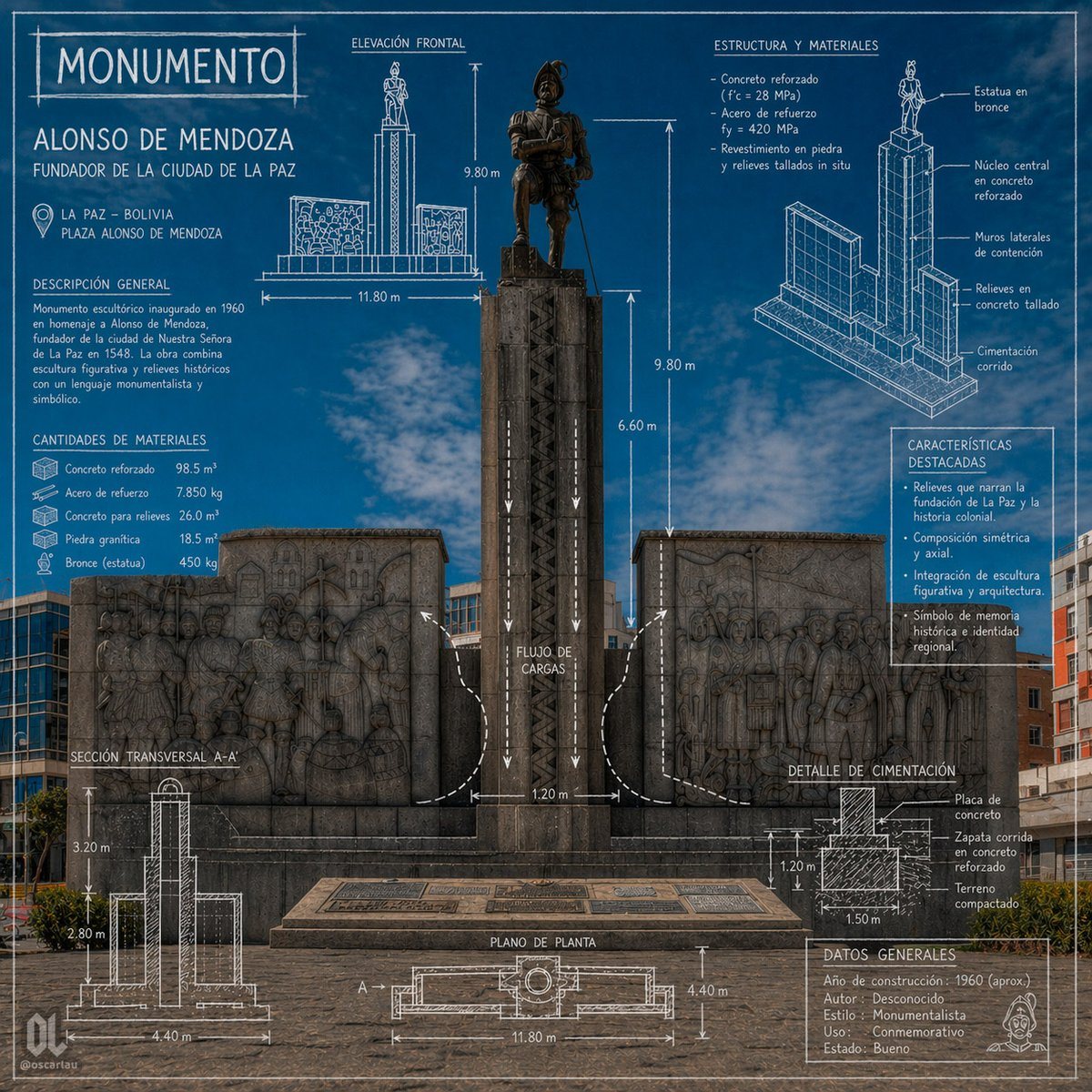
Prompt{"type":"architectural monument infographic poster","subject":{"monument_name":"MONUMENTO","person":"ALONSO DE MENDOZA","subtitle":"FUNDADOR DE LA CIUDAD DE LA PAZ","location_city":"LA PAZ – BOLIVIA","location_site":"PLAZA ALONSO DE MENDOZA","main_view":"front-facing photograph of the monument integrated with blueprint-style technical overlays","environment":"urban plaza under a vivid blue sky with light clouds, surrounding mid-rise buildings in the background, paved stone foreground"},"style":{"visual_language":"photorealistic monument photo combined with architectural drafting graphics","color_palette":"deep cobalt blue background overlay, white technical linework and labels, dark gray stone, bronze statue","mood":"formal, commemorative, informative, civic heritage poster","rendering":"sharp, high-detail, symmetrical composition, infographic presentation, blueprint aesthetics"},"monument":{"centerpiece":"tall central pedestal with a bronze statue of a historical conquistador standing on top, flanked by 2 large stone relief walls","count_flanking_reliefs":2,"materials_visible":["bronze statue","dark carved stone pedestal","stone bas-relief panels","concrete base"]},"layout":{"sections":[{"title":"MONUMENTO","position":"top left","count":1,"labels":["ALONSO DE MENDOZA","FUNDADOR DE LA CIUDAD DE LA PAZ"]},{"title":"DESCRIPCIÓN GENERAL","position":"left upper-middle","count":1,"labels":["Monumento escultórico inaugurado en 1960 en homenaje a Alonso de Mendoza, fundador de la ciudad de Nuestra Señora de La Paz en 1548. La obra combina escultura figurativa y relieves históricos con un lenguaje monumentalista y simbólico."]},{"title":"CANTIDADES DE MATERIALES","position":"left middle","count":5,"labels":["Concreto reforzado 98.5 m³","Acero de refuerzo 7.850 kg","Concreto para relieves 26.0 m³","Piedra granítica 18.5 m³","Bronce (estatua) 450 kg"]},{"title":"ELEVACIÓN FRONTAL","position":"top center","count":4,"labels":["9.80 m","11.80 m","9.80 m","6.60 m"]},{"title":"ESTRUCTURA Y MATERIALES","position":"top right","count":4,"labels":["Concreto armado (f'c = 28 MPa)","Acero de refuerzo fy = 420 MPa","Revestimiento en piedra y relieves tallados in situ","Estatua en bronce"]},{"title":"CARACTERÍSTICAS DESTACADAS","position":"right middle","count":4,"labels":["Relieves que narran la fundación de La Paz y la historia colonial.","Composición simétrica y axial.","Integración de escultura figurativa y arquitectura.","Símbolo de memoria histórica e identidad regional."]},{"title":"SECCIÓN TRANSVERSAL A-A'","position":"bottom left","count":3,"labels":["3.20 m","2.80 m","4.40 m"]},{"title":"PLANO DE PLANTA","position":"bottom center","count":3,"labels":["A'","11.80 m","4.40 m"]},{"title":"DETALLE DE CIMENTACIÓN","position":"bottom right","count":4,"labels":["Placa de concreto","Zapata corrida en concreto reforzado","Terreno compactado","1.50 m"]},{"title":"DATOS GENERALES","position":"lower right","count":5,"labels":["Año de construcción: 1960 (aprox.)","Autor: Desconocido","Estilo: Monumentalista","Uso: Conmemorativo","Estado: Bueno"]}],"centerpiece":"full monument centered vertically with overlaid arrows, dimensions, and load-flow diagram","supporting_graphics":"1 front elevation sketch, 1 exploded isometric structural diagram, 1 cross-section diagram, 1 plan view diagram, 1 foundation detail diagram, multiple arrows and measurement annotations"},"text":{"headline":"{argument name=\"headline text\" default=\"MONUMENTO\"}","subject_name":"{argument name=\"monument name\" default=\"ALONSO DE MENDOZA\"}","subtitle":"{argument name=\"subtitle\" default=\"FUNDADOR DE LA CIUDAD DE LA PAZ\"}","city":"{argument name=\"city\" default=\"LA PAZ – BOLIVIA\"}","site":"{argument name=\"site\" default=\"PLAZA ALONSO DE MENDOZA\"}"},"composition":{"aspect_ratio":"1:1","camera":"straight-on eye-level shot, centered and symmetrical","density":"information-rich poster with technical annotations surrounding the monument","branding":"small creator mark and social handle in lower corners"}}