
Image2Studio
Examples

gpt-image-2

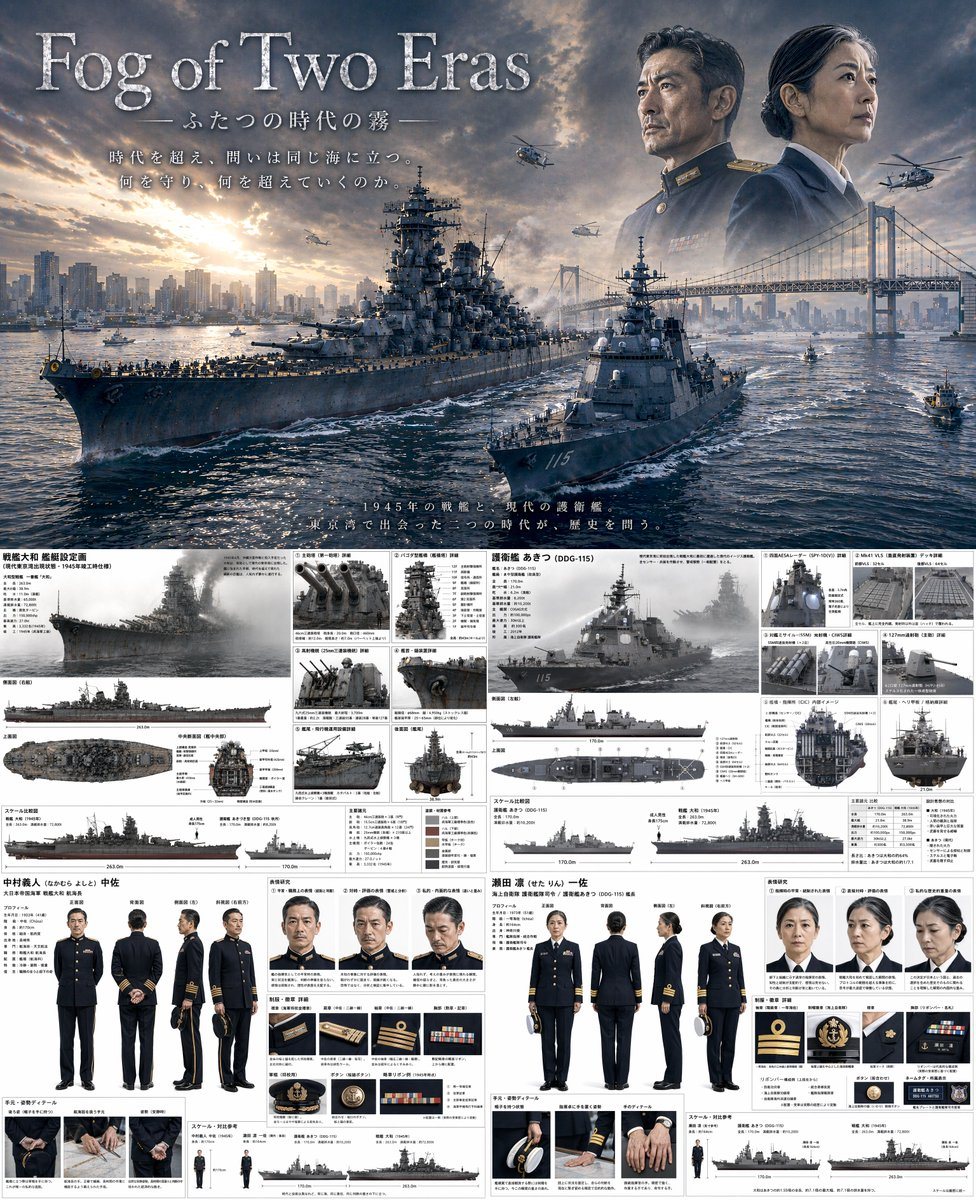
Combined Cinematic Poster And Technical Reference Sheet

Ready-to-edit combined cinematic poster and technical reference sheet image prompt.

Ready-to-edit combined cinematic poster and technical reference sheet image prompt.
Prompt

{ "type": "combined cinematic poster and technical reference sheet", "theme": "{argument name=\"theme\" default=\"time-slip military drama\"}", "layout": { "top_half": { "type": "movie poster", "title": "{argument name=\"main title\" default=\"Fog of Two Eras\"}", "subtitle": "ふたつの時代の霧", "tagline": "時代を超え、問いは同じ海に立つ。何を守り、何を超えていくのか。", "scene": "A {argument name=\"ww2 ship class\" default=\"Yamato-class battleship\"} and a {argument name=\"modern ship class\" default=\"Aegis destroyer\"} sailing side-by-side in {argument name=\"setting\" default=\"Tokyo Bay with Rainbow Bridge and city skyline\"} at sunset.", "sky_elements": "Faded portraits of a WWII naval commander and a modern female naval captain looking out over the bay, with military helicopters flying." }, "bottom_half": { "type": "split technical reference sheet", "left_column": { "subject": "WWII Battleship and Commander", "ship_details": { "title": "戦艦大和 艦艇設定画", "main_render": "1 angled side view", "orthographic_views": "3 views (side, top, front cross-section)", "detail_panels": { "count": 6, "descriptions": ["Main guns", "Pagoda mast", "AA guns", "Radar", "Catapult", "Stern"] }, "scale_chart": "1 silhouette comparison" }, "character_details": { "name": "中村義人 中佐", "turnaround": { "count": 5, "poses": ["front", "back", "side", "3/4 front", "3/4 back"] }, "expressions": { "count": 3, "types": ["neutral", "stern", "pensive"] }, "uniform_details": { "count": 6, "items": ["rank insignia", "buttons", "medals", "cap details"] }, "hand_details": { "count": 3, "poses": ["holding cap", "resting", "clenched"] } } }, "right_column": { "subject": "Modern Destroyer and Captain", "ship_details": { "title": "護衛艦 あきつ (DDG-115)", "main_render": "1 angled side view", "orthographic_views": "3 views (side, top, front cross-section)", "detail_panels": { "count": 6, "descriptions": ["Radar panels", "VLS cells", "Anti-ship missiles", "Main gun", "Bridge interior", "Helicopter deck"] }, "scale_chart": "1 silhouette comparison" }, "character_details": { "name": "瀬田 凛 一佐", "turnaround": { "count": 5, "poses": ["front", "back", "side", "3/4 front", "3/4 back"] }, "expressions": { "count": 3, "types": ["neutral", "stern", "pensive"] }, "uniform_details": { "count": 6, "items": ["rank insignia", "buttons", "ribbons", "cap details"] }, "hand_details": { "count": 3, "poses": ["holding cap", "resting", "clenched"] } } } } } }

Prompt structure
  • Modelgpt-image-2
  • Use casecampaign-poster
  • Stylecinematic, editorial
  • Aspect ratioFlexible
Best used for
  • Use casecampaign-poster
  • Stylecinematic, editorial
  • Recommended specs1:1, 4:5, 16:9, or 9:16
  • ModelGPT Image 2
How to customize

Use this Combined Cinematic Poster And Technical Reference Sheet prompt as a base. Replace the subject, product details, environment, lighting, brand colors, and output ratio while keeping the campaign-poster intent and cinematic, editorial direction stable.

Editable variables
  • SubjectReplace the product, person, scene, interface, or object being generated.
  • Use caseKeep or rewrite the destination as campaign poster, ad creative, cover image, poster, or ecommerce hero.
  • FrameChoose 1:1, 4:5, 16:9, or 9:16 based on the final placement.
  • Brand cuesAdd colors, materials, props, text-safe space, and the platform where the image will be used.
Recommended specs

Choose the frame for the destination first, then use 1K, 2K, or 4K based on output quality needs. Product images and posters usually benefit from higher resolution.

Pre-generation checklist
  • CheckSubject, lighting, composition, and frame are specific enough to review.
  • CheckText-safe space is included when the image will carry a headline or ad copy.
  • CheckResolution, credit cost, and final destination are checked before generation.
Why this prompt works

Combined Cinematic Poster And Technical Reference Sheet works because it starts from the image job, then controls subject, composition, lighting, style, and frame. It is best for campaign poster while keeping the cinematic, editorial direction stable.

Common questions
  • Can I use it directly?Yes. Replace the subject, brand cues, and frame, then generate in Image2Studio.
  • Which ratio should I use?Choose 1:1, 4:5, 16:9, or 9:16 based on the destination.




