
Image2Studio
Examples

gpt-image-2

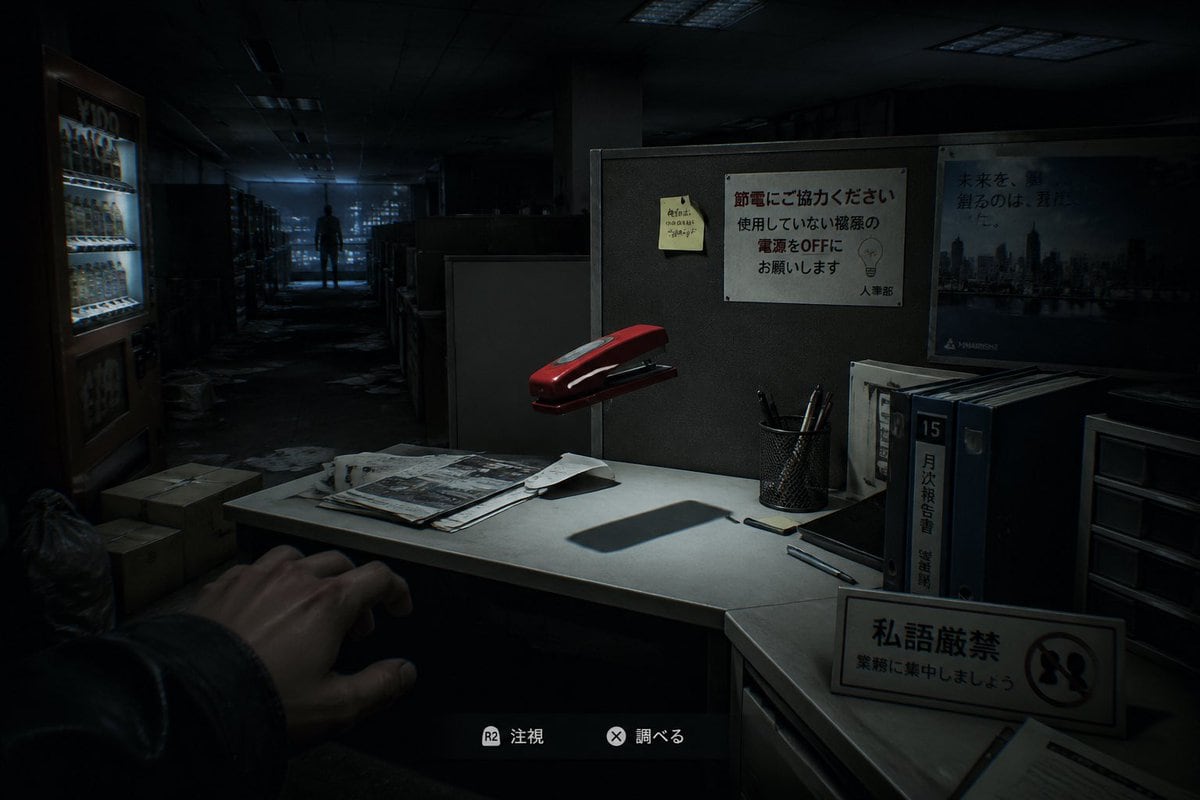
First-person Survival Horror Game Screenshot

A first-person survival horror game screenshot set in a dark abandoned Japanese office at night, viewed from the player’s eye level as if standing beside a cubicle desk. In the lower left...

A first-person survival horror game screenshot set in a dark abandoned Japanese office at night, viewed from the player’s eye level as if standing beside a cubicle desk. In the lower left...
Prompt

A first-person survival horror game screenshot set in a dark abandoned Japanese office at night, viewed from the player’s eye level as if standing beside a cubicle desk. In the lower left foreground, show 1 outstretched human hand reaching cautiously into frame. The central foreground is a small white office desk lit by a harsh focused overhead light, creating deep shadows and a tense cinematic atmosphere. On the desk place exactly 7 visible desktop elements: 1 red stapler floating slightly above or oddly hovering over the desk, 1 messy stack of papers and newspapers, 1 loose folded sheet, 1 black smartphone, 2 pens lying separately, and 1 black mesh pen cup holding several pens. Behind the desk is a gray cubicle wall with exactly 3 posted items: 1 yellow sticky note with handwritten Japanese scribbles, 1 white Japanese office notice about saving electricity with a simple lightbulb illustration, and 1 blue corporate cityscape poster with Japanese text. On the right side of the desk area place exactly 4 upright office storage items: 3 thick binders or file books, one with a prominent label reading 15 and another with Japanese vertical text, plus 1 small plastic drawer unit. In the front-right foreground place 1 freestanding desk sign with Japanese text and a prohibition symbol. In the left background show 1 brightly lit vending machine glowing cold white-blue, with a few cardboard boxes and trash bags on the floor nearby. The office extends into a long aisle of cubicles and shelves, cluttered with scattered papers on the floor, fading into darkness. In the far center background, place 1 lone human silhouette standing motionless at the end of the corridor, backlit by dim bluish window light from the distant city. Add subtle game HUD elements at the bottom center with 2 interaction prompts in Japanese, each with a controller button icon, to make it unmistakably a modern horror video game screenshot. Use realistic 3D rendering, ultra-detailed environmental storytelling, moody blue-black color grading, soft volumetric darkness, strong contrast, eerie empty office ambience, and a sense of meaningless but unsettling supernatural presence.

Prompt structure
  • Modelgpt-image-2
  • Use casecampaign-poster
  • Stylephotorealistic, cinematic, 3d-render, minimal
  • Aspect ratioFlexible
Best used for
  • Use casecampaign-poster
  • Stylephotorealistic, cinematic, 3d-render, minimal
  • Recommended specs1:1, 4:5, 16:9, or 9:16
  • ModelGPT Image 2
How to customize

Use this First-person Survival Horror Game Screenshot prompt as a base. Replace the subject, product details, environment, lighting, brand colors, and output ratio while keeping the campaign-poster intent and photorealistic, cinematic, 3d-render, minimal direction stable.

Editable variables
  • SubjectReplace the product, person, scene, interface, or object being generated.
  • Use caseKeep or rewrite the destination as campaign poster, ad creative, cover image, poster, or ecommerce hero.
  • FrameChoose 1:1, 4:5, 16:9, or 9:16 based on the final placement.
  • Brand cuesAdd colors, materials, props, text-safe space, and the platform where the image will be used.
Recommended specs

Choose the frame for the destination first, then use 1K, 2K, or 4K based on output quality needs. Product images and posters usually benefit from higher resolution.

Pre-generation checklist
  • CheckSubject, lighting, composition, and frame are specific enough to review.
  • CheckText-safe space is included when the image will carry a headline or ad copy.
  • CheckResolution, credit cost, and final destination are checked before generation.
Why this prompt works

First-person Survival Horror Game Screenshot works because it starts from the image job, then controls subject, composition, lighting, style, and frame. It is best for campaign poster while keeping the photorealistic, cinematic, 3d-render, minimal direction stable.

Common questions
  • Can I use it directly?Yes. Replace the subject, brand cues, and frame, then generate in Image2Studio.
  • Which ratio should I use?Choose 1:1, 4:5, 16:9, or 9:16 based on the destination.




