
Image2Studio
Examples

gpt-image-2

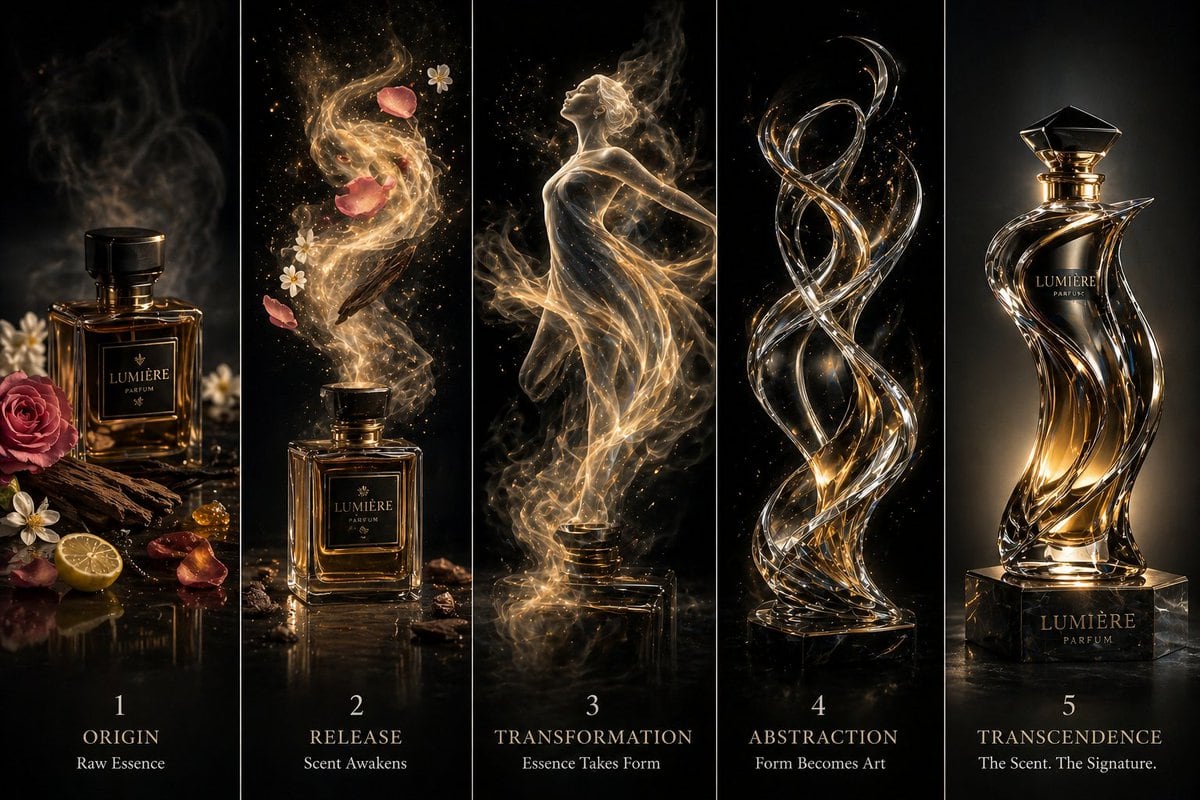
High-end Cinematic Transformation Artwork Displayed In Five Vertical Pan

A high-end cinematic transformation artwork displayed in five vertical panels, showing a luxury perfume evolving from raw essence into a sculptural masterpiece, each panel separated by th...

A high-end cinematic transformation artwork displayed in five vertical panels, showing a luxury perfume evolving from raw essence into a sculptural masterpiece, each panel separated by th...
Prompt

A high-end cinematic transformation artwork displayed in five vertical panels, showing a {argument name="subject" default="luxury perfume"} evolving from raw essence into a sculptural masterpiece, each panel separated by thin black dividers. Panel 1 (Origin): A premium glass perfume bottle resting on a dark reflective surface, surrounded by {argument name="ingredients" default="raw ingredients like rose petals, oud wood, citrus peel, and mist"}, soft studio lighting, elegant shadows. Panel 2 (Release): The perfume begins to diffuse into the air, visible fragrant mist swirling upward in fluid motion, forming soft organic shapes, glowing particles and vapor trails. Panel 3 (Transformation): The mist starts shaping into a semi-formed silhouette (abstract human figure or flowing fabric), blending liquid, vapor, and light, luminous and dreamy. Panel 4 (Abstraction): The form becomes fully abstract — flowing ribbons of scent turning into sleek glass-like curves and fluid geometry, dynamic motion frozen mid-air. Panel 5 (Transcendence): Final form — a luxurious sculptural perfume bottle or abstract glass statue inspired by the scent’s essence, polished, reflective, with glowing highlights, sitting on a minimal pedestal. Style: ultra-detailed, photorealistic to abstract progression, deep black background, {argument name="accents" default="gold and silver accents"}, soft glow, high contrast lighting, glossy reflections, cinematic luxury aesthetic, perfume ad style, 4K quality, sharp focus.

Prompt structure
  • Modelgpt-image-2
  • Use caseecommerce-product-image
  • Styleluxury, cinematic, photorealistic, minimal
  • Aspect ratioFlexible
Best used for
  • Use caseecommerce-product-image
  • Styleluxury, cinematic, photorealistic, minimal
  • Recommended specs1:1, 4:5, 16:9, or 9:16
  • ModelGPT Image 2
How to customize

Use this High-end Cinematic Transformation Artwork Displayed In Five Vertical Pan prompt as a base. Replace the subject, product details, environment, lighting, brand colors, and output ratio while keeping the ecommerce-product-image intent and luxury, cinematic, photorealistic, minimal direction stable.

Editable variables
  • SubjectReplace the product, person, scene, interface, or object being generated.
  • Use caseKeep or rewrite the destination as ecommerce product image, ad creative, cover image, poster, or ecommerce hero.
  • FrameChoose 1:1, 4:5, 16:9, or 9:16 based on the final placement.
  • Brand cuesAdd colors, materials, props, text-safe space, and the platform where the image will be used.
Recommended specs

Choose the frame for the destination first, then use 1K, 2K, or 4K based on output quality needs. Product images and posters usually benefit from higher resolution.

Pre-generation checklist
  • CheckSubject, lighting, composition, and frame are specific enough to review.
  • CheckText-safe space is included when the image will carry a headline or ad copy.
  • CheckResolution, credit cost, and final destination are checked before generation.
Why this prompt works

High-end Cinematic Transformation Artwork Displayed In Five Vertical Pan works because it starts from the image job, then controls subject, composition, lighting, style, and frame. It is best for ecommerce product image while keeping the luxury, cinematic, photorealistic, minimal direction stable.

Common questions
  • Can I use it directly?Yes. Replace the subject, brand cues, and frame, then generate in Image2Studio.
  • Which ratio should I use?Choose 1:1, 4:5, 16:9, or 9:16 based on the destination.




