
Image2Studio
Examples

gpt-image-2

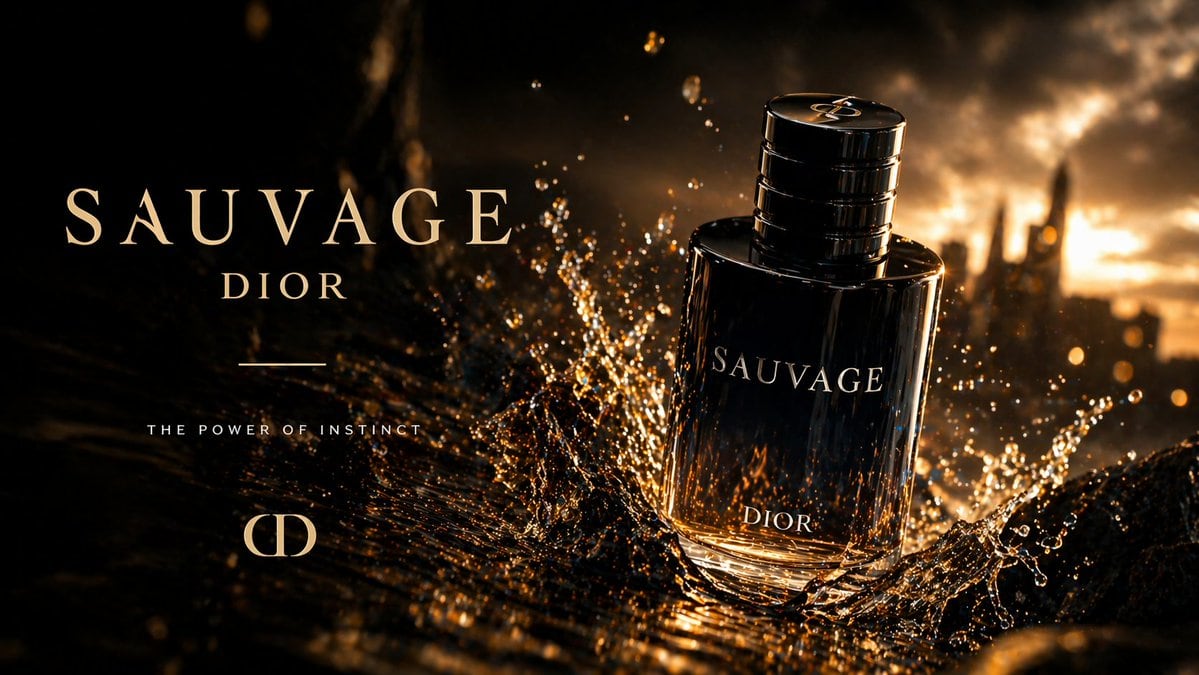
Create A Luxury Cinematic Fragrance Advertisement

Create a luxury cinematic fragrance advertisement for a dark glass men's perfume bottle labeled DIOR and SAUVAGE. The composition is a widescreen premium product shot with the bottle plac...

Create a luxury cinematic fragrance advertisement for a dark glass men's perfume bottle labeled DIOR and SAUVAGE. The composition is a widescreen premium product shot with the bottle plac...
Prompt

Create a luxury cinematic fragrance advertisement for a dark glass men's perfume bottle labeled {argument name="brand name" default="DIOR"} and {argument name="product name" default="SAUVAGE"}. The composition is a widescreen premium product shot with the bottle placed slightly right of center, standing upright on a glossy wet black surface, angled subtly toward the viewer. The bottle is deep smoky navy-black transparent glass with a reflective metallic cap featuring circular ridges, elegant serif lettering on the front, and warm amber light glowing through the base. Surround the bottle with one dramatic splash of liquid frozen in motion, with countless sparkling golden droplets and streaks exploding upward and outward around the lower half of the bottle. Use a dark, moody, high-contrast background with a blurred rocky or citylike silhouette and glowing sunset light in the distance, dominated by black, bronze, amber, and gold tones. On the left side, add refined luxury ad typography in a spacious layout: a large serif headline reading {argument name="headline text" default="SAUVAGE"}, a smaller serif brand line below reading {argument name="subheadline text" default="DIOR"}, one thin horizontal divider line beneath, and a small uppercase sans-serif tagline reading {argument name="tagline" default="THE POWER OF INSTINCT"}. Add a minimalist luxury monogram mark near the lower left. Emphasize glossy reflections, sharp bottle edges, realistic liquid physics, sparkling highlights, cinematic backlighting, shallow depth of field, and premium high-end beauty campaign styling.

Prompt structure
  • Modelgpt-image-2
  • Use caseecommerce-product-image
  • Styleluxury, cinematic, photorealistic, editorial
  • Aspect ratioFlexible
Best used for
  • Use caseecommerce-product-image
  • Styleluxury, cinematic, photorealistic, editorial
  • Recommended specs1:1, 4:5, 16:9, or 9:16
  • ModelGPT Image 2
How to customize

Use this Create A Luxury Cinematic Fragrance Advertisement prompt as a base. Replace the subject, product details, environment, lighting, brand colors, and output ratio while keeping the ecommerce-product-image intent and luxury, cinematic, photorealistic, editorial direction stable.

Editable variables
  • SubjectReplace the product, person, scene, interface, or object being generated.
  • Use caseKeep or rewrite the destination as ecommerce product image, ad creative, cover image, poster, or ecommerce hero.
  • FrameChoose 1:1, 4:5, 16:9, or 9:16 based on the final placement.
  • Brand cuesAdd colors, materials, props, text-safe space, and the platform where the image will be used.
Recommended specs

Choose the frame for the destination first, then use 1K, 2K, or 4K based on output quality needs. Product images and posters usually benefit from higher resolution.

Pre-generation checklist
  • CheckSubject, lighting, composition, and frame are specific enough to review.
  • CheckText-safe space is included when the image will carry a headline or ad copy.
  • CheckResolution, credit cost, and final destination are checked before generation.
Why this prompt works

Create A Luxury Cinematic Fragrance Advertisement works because it starts from the image job, then controls subject, composition, lighting, style, and frame. It is best for ecommerce product image while keeping the luxury, cinematic, photorealistic, editorial direction stable.

Common questions
  • Can I use it directly?Yes. Replace the subject, brand cues, and frame, then generate in Image2Studio.
  • Which ratio should I use?Choose 1:1, 4:5, 16:9, or 9:16 based on the destination.




