
Image2Studio
Examples

gpt-image-2

Create A High-converting Japanese E-commerce Product Advertisement Squar

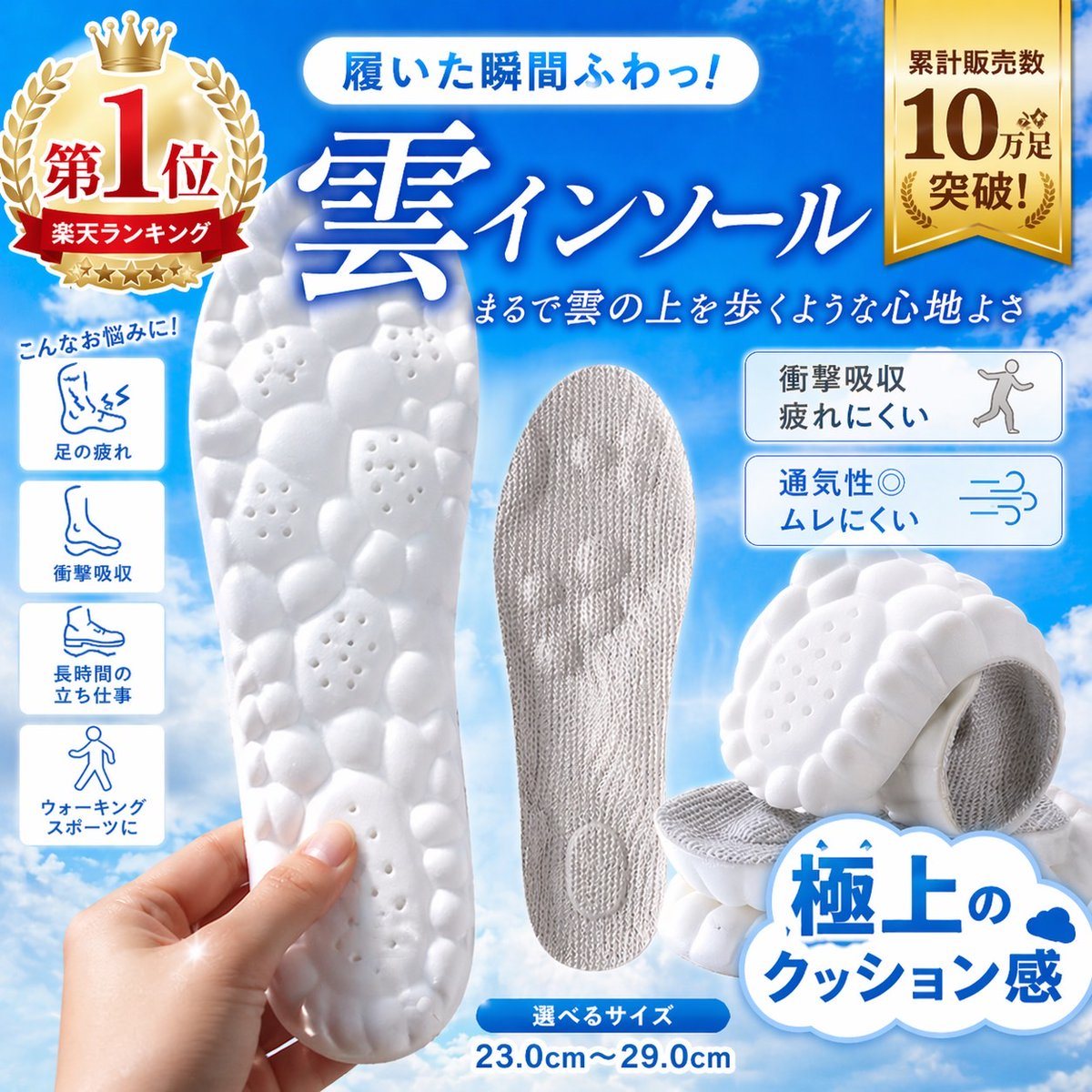
Create a high-converting Japanese e-commerce product advertisement square image for a pair of ultra-cushioned insoles, styled like a Rakuten marketplace hero banner. Bright sky-blue gradi...

Create a high-converting Japanese e-commerce product advertisement square image for a pair of ultra-cushioned insoles, styled like a Rakuten marketplace hero banner. Bright sky-blue gradi...
Prompt

Create a high-converting Japanese e-commerce product advertisement square image for a pair of ultra-cushioned insoles, styled like a Rakuten marketplace hero banner. Bright sky-blue gradient background with soft white clouds, clean glossy commercial design, energetic and premium. Large central Japanese headline in bold white calligraphic serif text with blue glow: "雲インソール". Above it, a rounded white capsule banner with blue text: "履いた瞬間ふわっ!". Below the main headline, smaller white handwritten-style Japanese subheading: "まるで雲の上を歩くような心地よさ". Show 4 insole product views total: 1 large white foam sole held vertically in a realistic human hand at lower left foreground, featuring a pebble-like bubble texture with small ventilation holes; 1 gray fabric-covered insole standing upright in the center; 2 stacked angled white insoles at lower right, emphasizing thick soft cushioning and textured underside. Add a large gold award badge at top left with crown and laurel, containing the Japanese text "第1位" and a red ribbon reading "楽天ランキング". Add a vertical gold ribbon badge at top right with the Japanese text "累計販売数 10万足 突破!". On the left side, place 4 vertically stacked rounded white icon boxes under a small blue handwritten caption "こんなお悩みに!", with simple blue line icons and labels: 1 "足の疲れ", 2 "衝撃吸収", 3 "長時間の立ち仕事", 4 "ウォーキング スポーツに". On the right side, place 2 rounded white feature boxes with blue outlines and blue-gray icon illustrations: top box text "衝撃吸収 疲れにくい" with a walking person icon; bottom box text "通気性◎ ムレにくい" with airflow lines icon. At the bottom right, add a large white cloud-shaped callout with bold blue Japanese text "極上の クッション感" and a tiny blue cloud icon. At the bottom center, place a small blue rounded label "選べるサイズ" with large blue size text underneath: "23.0cm〜29.0cm". Use crisp product-photography lighting, soft shadows, glossy highlights, vivid contrast, and a polished online shopping ad composition optimized for instant conversion.

Prompt structure
  • Modelgpt-image-2
  • Use caseecommerce-product-image
  • Stylephotorealistic, luxury, minimal
  • Aspect ratioFlexible
Best used for
  • Use caseecommerce-product-image
  • Stylephotorealistic, luxury, minimal
  • Recommended specs1:1, 4:5, 16:9, or 9:16
  • ModelGPT Image 2
How to customize

Use this Create A High-converting Japanese E-commerce Product Advertisement Squar prompt as a base. Replace the subject, product details, environment, lighting, brand colors, and output ratio while keeping the ecommerce-product-image intent and photorealistic, luxury, minimal direction stable.

Editable variables
  • SubjectReplace the product, person, scene, interface, or object being generated.
  • Use caseKeep or rewrite the destination as ecommerce product image, ad creative, cover image, poster, or ecommerce hero.
  • FrameChoose 1:1, 4:5, 16:9, or 9:16 based on the final placement.
  • Brand cuesAdd colors, materials, props, text-safe space, and the platform where the image will be used.
Recommended specs

Choose the frame for the destination first, then use 1K, 2K, or 4K based on output quality needs. Product images and posters usually benefit from higher resolution.

Pre-generation checklist
  • CheckSubject, lighting, composition, and frame are specific enough to review.
  • CheckText-safe space is included when the image will carry a headline or ad copy.
  • CheckResolution, credit cost, and final destination are checked before generation.
Why this prompt works

Create A High-converting Japanese E-commerce Product Advertisement Squar works because it starts from the image job, then controls subject, composition, lighting, style, and frame. It is best for ecommerce product image while keeping the photorealistic, luxury, minimal direction stable.

Common questions
  • Can I use it directly?Yes. Replace the subject, brand cues, and frame, then generate in Image2Studio.
  • Which ratio should I use?Choose 1:1, 4:5, 16:9, or 9:16 based on the destination.




