
Image2Studio
Examples

gpt-image-2

Create A Bold

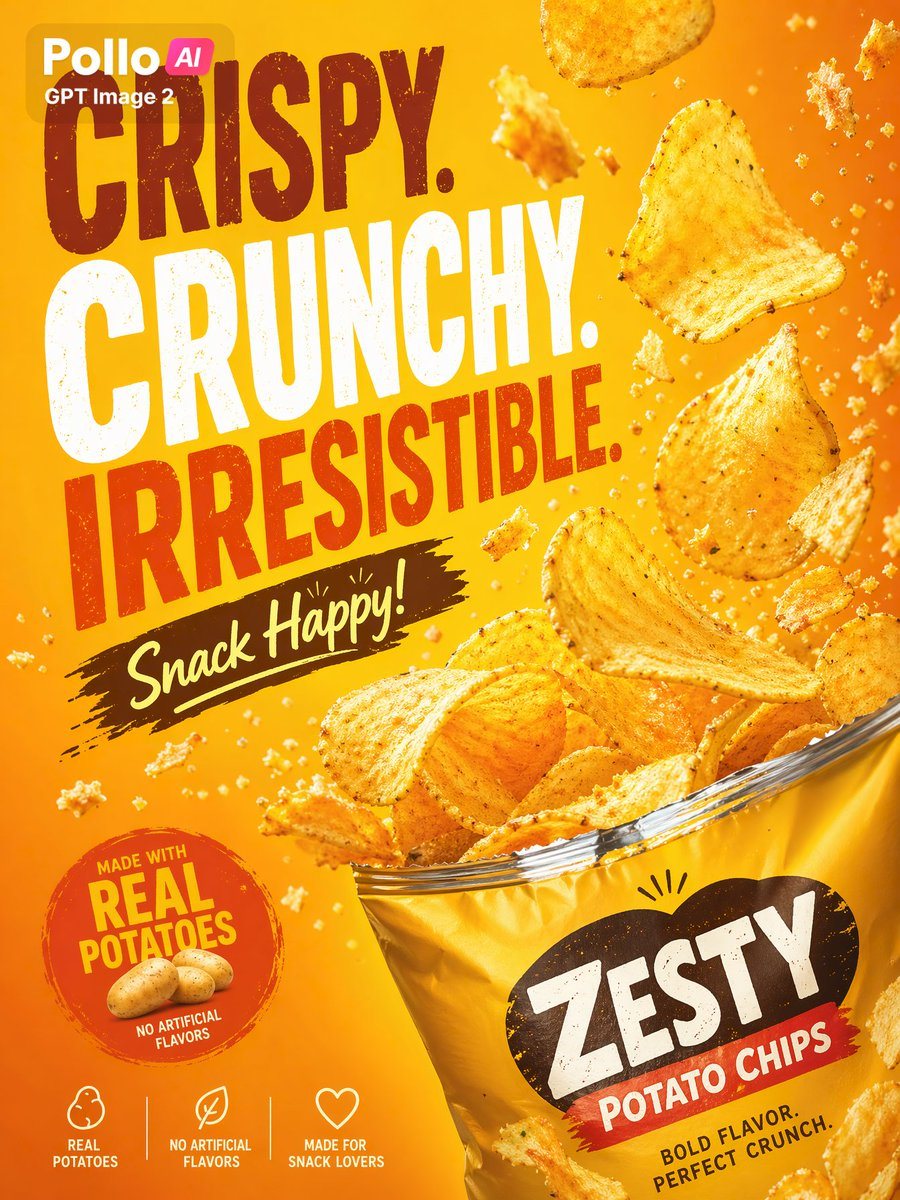
Create a bold, high-impact commercial poster for a bag of potato chips in a bright warm orange-to-golden-yellow gradient background, with a dynamic snack-advertising layout and crisp stud...

Create a bold, high-impact commercial poster for a bag of potato chips in a bright warm orange-to-golden-yellow gradient background, with a dynamic snack-advertising layout and crisp stud...
Prompt

Create a bold, high-impact commercial poster for a bag of potato chips in a bright warm orange-to-golden-yellow gradient background, with a dynamic snack-advertising layout and crisp studio lighting. The composition features one large open bag of chips in the lower right corner, tilted upward, overflowing with ridged golden potato chips, while exactly 9 clearly visible chips float around the upper and middle right area in midair with many small crumbs and seasoning flecks suspended for energy and motion. Use oversized distressed display typography stacked vertically on the left side reading exactly: “CRISPY.” on the top in dark reddish brown, “CRUNCHY.” in very large white letters, and “IRRESISTIBLE.” in saturated red-orange. Beneath that, place a dark brown brushstroke banner with handwritten cream script reading “Snack Happy!”. In the lower left corner, add one circular badge in red-orange with rough edges containing the text “MADE WITH REAL POTATOES” and smaller text “NO ARTIFICIAL FLAVORS”, plus 2 small potatoes illustrated at the bottom of the badge. Along the bottom edge, include exactly 3 simple white icon-and-text feature callouts separated evenly: “REAL POTATOES”, “NO ARTIFICIAL FLAVORS”, and “MADE FOR SNACK LOVERS”. The chip bag should be glossy metallic yellow with a large black irregular label shape on the front; inside it place the product name in big distressed white letters “{argument name="brand name" default="ZESTY"}” and below it a red banner with white text “{argument name="product type" default="POTATO CHIPS"}”, then smaller black text near the bottom right reading “{argument name="tagline text" default="BOLD FLAVOR. PERFECT CRUNCH."}”. Add a small rounded brand label in the upper left corner with the text “{argument name="headline brand" default="Pollo AI"}” and “GPT Image 2” beneath it. Emphasize appetizing texture, crunchy edges, realistic salt and seasoning specks, strong contrast, subtle grunge texture on the typography, and a polished modern supermarket-poster aesthetic ready for print or social promotion.

Prompt structure
  • Modelgpt-image-2
  • Use caseecommerce-product-image
  • Stylephotorealistic, editorial, minimal
  • Aspect ratioFlexible
Best used for
  • Use caseecommerce-product-image
  • Stylephotorealistic, editorial, minimal
  • Recommended specs1:1, 4:5, 16:9, or 9:16
  • ModelGPT Image 2
How to customize

Use this Create A Bold prompt as a base. Replace the subject, product details, environment, lighting, brand colors, and output ratio while keeping the ecommerce-product-image intent and photorealistic, editorial, minimal direction stable.

Editable variables
  • SubjectReplace the product, person, scene, interface, or object being generated.
  • Use caseKeep or rewrite the destination as ecommerce product image, ad creative, cover image, poster, or ecommerce hero.
  • FrameChoose 1:1, 4:5, 16:9, or 9:16 based on the final placement.
  • Brand cuesAdd colors, materials, props, text-safe space, and the platform where the image will be used.
Recommended specs

Choose the frame for the destination first, then use 1K, 2K, or 4K based on output quality needs. Product images and posters usually benefit from higher resolution.

Pre-generation checklist
  • CheckSubject, lighting, composition, and frame are specific enough to review.
  • CheckText-safe space is included when the image will carry a headline or ad copy.
  • CheckResolution, credit cost, and final destination are checked before generation.
Why this prompt works

Create A Bold works because it starts from the image job, then controls subject, composition, lighting, style, and frame. It is best for ecommerce product image while keeping the photorealistic, editorial, minimal direction stable.

Common questions
  • Can I use it directly?Yes. Replace the subject, brand cues, and frame, then generate in Image2Studio.
  • Which ratio should I use?Choose 1:1, 4:5, 16:9, or 9:16 based on the destination.




