
Image2Studio
Examples

gpt-image-2

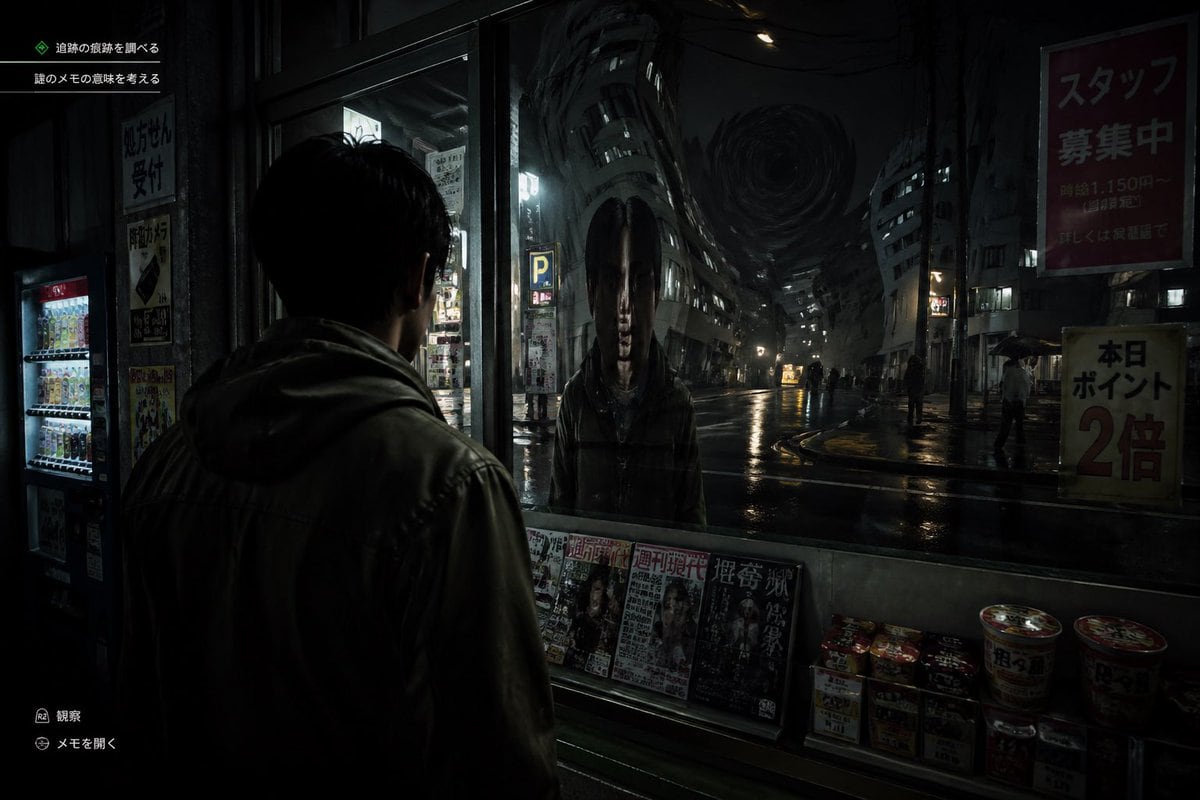
Cinematic Japanese Psychological Horror Game Screenshot At Night

A cinematic Japanese psychological horror game screenshot at night, shown from a third-person over-the-shoulder perspective behind a young man wearing a dark hooded jacket, standing under...

A cinematic Japanese psychological horror game screenshot at night, shown from a third-person over-the-shoulder perspective behind a young man wearing a dark hooded jacket, standing under...
Prompt

A cinematic Japanese psychological horror game screenshot at night, shown from a third-person over-the-shoulder perspective behind a young man wearing a dark hooded jacket, standing under a convenience store awning and staring into a large front window. In the glass, instead of a normal reflection, there is a terrifying humanoid figure with an unnaturally elongated oval head, long straight black hair hanging down both sides, a pale expressionless face, and a dark coat, standing directly opposite him. Beyond the reflection is a wet urban street in Japan with glossy rain-soaked asphalt, sparse pedestrians holding umbrellas, dim storefronts, vending machines, parking signs, and tall buildings bending inward in a surreal warped perspective toward a dark swirling vortex in the sky at the end of the street. The convenience store window ledge displays exactly 5 visible magazine covers lined up side by side and exactly 8 instant food items or cup noodles stacked on the lower right. Add subtle in-game UI text in Japanese: exactly 2 objective lines in the upper left, and exactly 2 small action prompts in the lower left. Include readable Japanese street posters and shop signs, such as a large red staff recruitment sign on the upper right and a yellow points campaign sign on the lower right. Lighting is extremely dark, moody, and realistic, with reflections, deep shadows, damp textures, and a faint cold glow from interior lights and street lamps. Style: ultra-realistic survival horror video game, unsettling, grounded, detailed, cinematic, high contrast, eerie silence, no exaggerated action, no bright colors.

Prompt structure
  • Modelgpt-image-2
  • Use caseecommerce-product-image
  • Stylephotorealistic, cinematic, editorial
  • Aspect ratioFlexible
Best used for
  • Use caseecommerce-product-image
  • Stylephotorealistic, cinematic, editorial
  • Recommended specs1:1, 4:5, 16:9, or 9:16
  • ModelGPT Image 2
How to customize

Use this Cinematic Japanese Psychological Horror Game Screenshot At Night prompt as a base. Replace the subject, product details, environment, lighting, brand colors, and output ratio while keeping the ecommerce-product-image intent and photorealistic, cinematic, editorial direction stable.

Editable variables
  • SubjectReplace the product, person, scene, interface, or object being generated.
  • Use caseKeep or rewrite the destination as ecommerce product image, ad creative, cover image, poster, or ecommerce hero.
  • FrameChoose 1:1, 4:5, 16:9, or 9:16 based on the final placement.
  • Brand cuesAdd colors, materials, props, text-safe space, and the platform where the image will be used.
Recommended specs

Choose the frame for the destination first, then use 1K, 2K, or 4K based on output quality needs. Product images and posters usually benefit from higher resolution.

Pre-generation checklist
  • CheckSubject, lighting, composition, and frame are specific enough to review.
  • CheckText-safe space is included when the image will carry a headline or ad copy.
  • CheckResolution, credit cost, and final destination are checked before generation.
Why this prompt works

Cinematic Japanese Psychological Horror Game Screenshot At Night works because it starts from the image job, then controls subject, composition, lighting, style, and frame. It is best for ecommerce product image while keeping the photorealistic, cinematic, editorial direction stable.

Common questions
  • Can I use it directly?Yes. Replace the subject, brand cues, and frame, then generate in Image2Studio.
  • Which ratio should I use?Choose 1:1, 4:5, 16:9, or 9:16 based on the destination.




