
Image2Studio
Prompts

gpt-image-2

Bright Refreshing Commercial Photography Shot Of A Young Handsome East A

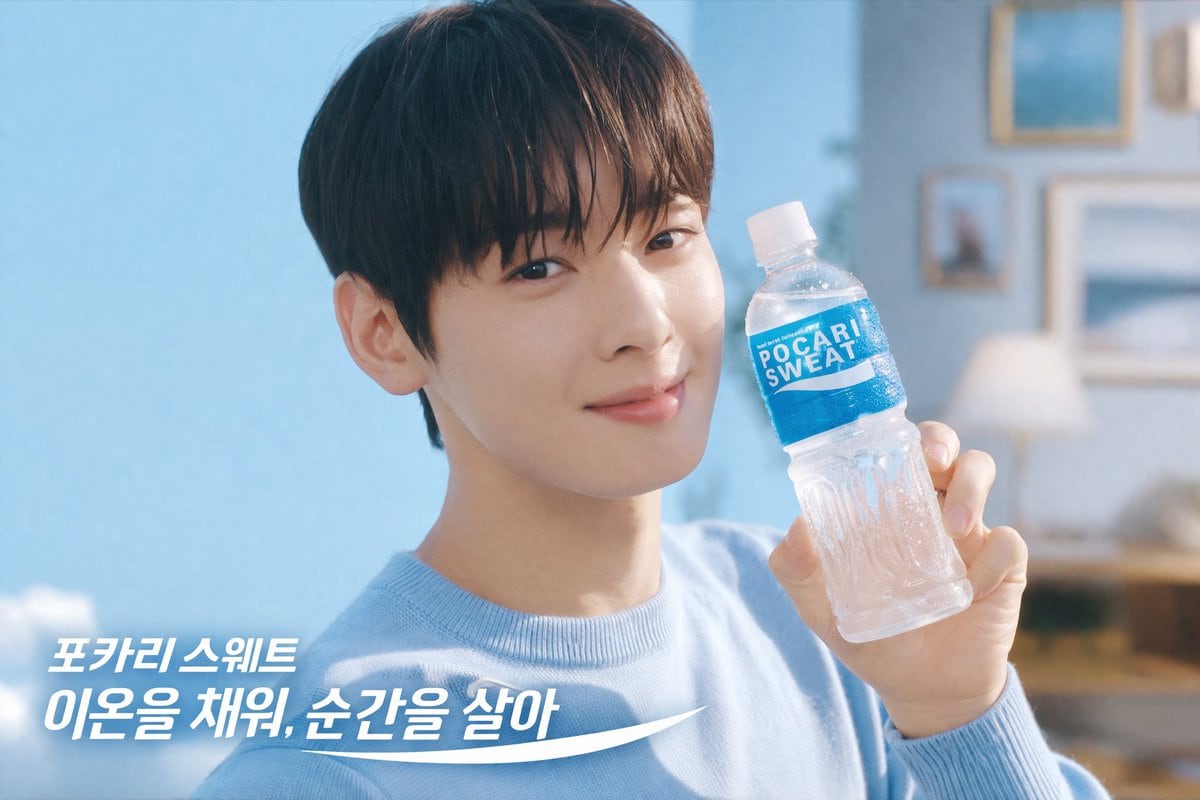
A bright, refreshing commercial photography shot of a young handsome East Asian man with dark bangs wearing a light blue crewneck sweater. He is smiling gently at the camera and holding u...

A bright, refreshing commercial photography shot of a young handsome East Asian man with dark bangs wearing a light blue crewneck sweater. He is smiling gently at the camera and holding u...
Prompt

A bright, refreshing commercial photography shot of a {argument name="subject description" default="young handsome East Asian man with dark bangs"} wearing a {argument name="clothing" default="light blue crewneck sweater"}. He is smiling gently at the camera and holding up a clear plastic water bottle with condensation and a blue label that reads "{argument name="product name" default="POCARI SWEAT"}". The background is a soft-focus, airy room with light blue walls, framed pictures, a warm lamp, and a bright blue sky visible through a window on the left. In the bottom left corner, there is white overlay text that reads "{argument name="overlay text line 1" default="포카리 스웨트"}" above a second line reading "{argument name="overlay text line 2" default="이온을 채워, 순간을 살아"}", underlined by a dynamic white swoosh graphic. The lighting is soft, natural, and inviting, emphasizing a clean and hydrating aesthetic.

Prompt structure
  • Modelgpt-image-2
  • Use caseecommerce-product-image
  • Stylephotorealistic, minimal
  • Aspect ratioFlexible
Best used for
  • Use caseecommerce-product-image
  • Stylephotorealistic, minimal
  • Recommended specs1:1, 4:5, 16:9, or 9:16
  • ModelGPT Image 2
How to customize

Use this Bright Refreshing Commercial Photography Shot Of A Young Handsome East A prompt as a base. Replace the subject, product details, environment, lighting, brand colors, and output ratio while keeping the ecommerce-product-image intent and photorealistic, minimal direction stable.

Editable variables
  • SubjectReplace the product, person, scene, interface, or object being generated.
  • Use caseKeep or rewrite the destination as ecommerce product image, ad creative, cover image, poster, or ecommerce hero.
  • FrameChoose 1:1, 4:5, 16:9, or 9:16 based on the final placement.
  • Brand cuesAdd colors, materials, props, text-safe space, and the platform where the image will be used.
Recommended specs

Choose the frame for the destination first, then use 1K, 2K, or 4K based on output quality needs. Product images and posters usually benefit from higher resolution.

Pre-generation checklist
  • CheckSubject, lighting, composition, and frame are specific enough to review.
  • CheckText-safe space is included when the image will carry a headline or ad copy.
  • CheckResolution, credit cost, and final destination are checked before generation.
Why this prompt works

Bright Refreshing Commercial Photography Shot Of A Young Handsome East A works because it starts from the image job, then controls subject, composition, lighting, style, and frame. It is best for ecommerce product image while keeping the photorealistic, minimal direction stable.

Common questions
  • Can I use it directly?Yes. Replace the subject, brand cues, and frame, then generate in Image2Studio.
  • Which ratio should I use?Choose 1:1, 4:5, 16:9, or 9:16 based on the destination.




