
Image2Studio
Examples

gpt-image-2

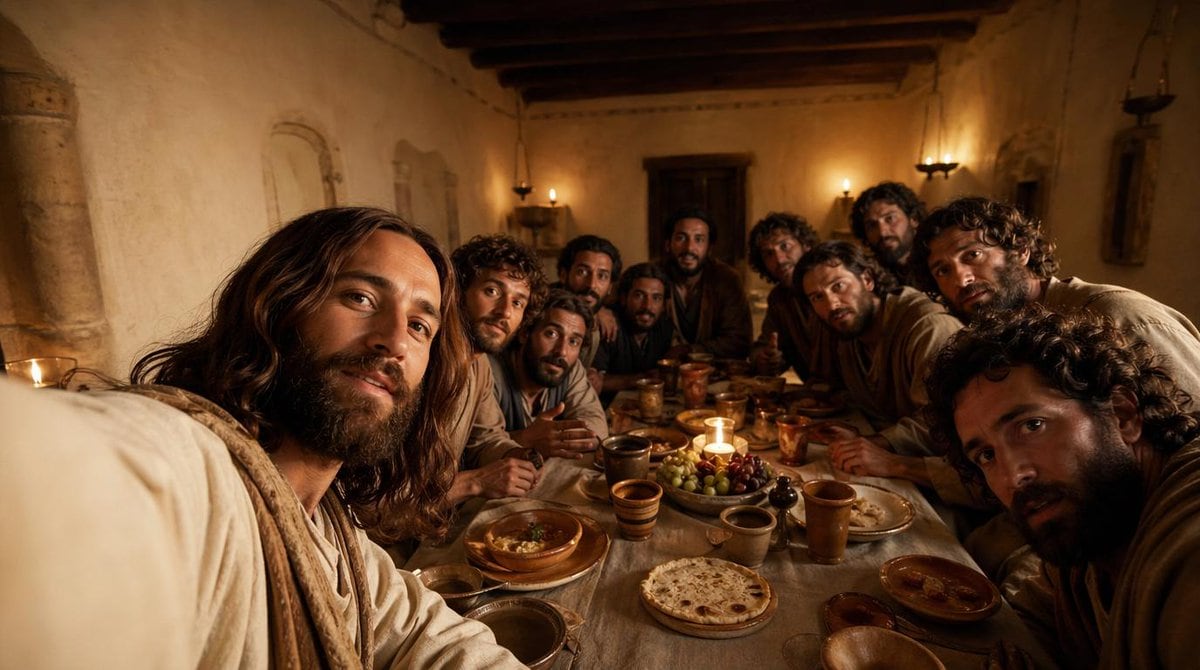
Cinematic Historically Grounded Depiction Of Jesus

A cinematic, historically grounded depiction of Jesus with his disciples during the Last Supper inside a modest ancient Middle Eastern dining room at night, shown from a close, immersive...

A cinematic, historically grounded depiction of Jesus with his disciples during the Last Supper inside a modest ancient Middle Eastern dining room at night, shown from a close, immersive...
Prompt

A cinematic, historically grounded depiction of {argument name="scene subject" default="Jesus with his disciples during the Last Supper"} inside a modest ancient Middle Eastern dining room at night, shown from a close, immersive viewpoint at table height as if the viewer is seated among them. Include exactly 13 men gathered tightly around a long narrow supper table, with the central figure reading clearly as Jesus through calm presence, shoulder-length dark brown hair, a beard, and a soft off-white robe with a light beige shawl. The 12 disciples should vary in age and appearance, with curly or wavy dark hair, beards, and earth-toned robes in cream, brown, tan, muted blue, and dusty gray, leaning inward in conversation and attention. The room should have rough plaster walls, dark exposed wooden ceiling beams, a heavy wooden door at the back, simple wall niches, and small oil lamps or candle sconces casting warm amber light. On the table, show rustic period-appropriate food and vessels: round flatbread, grapes, olives, shallow bowls, clay plates, ceramic cups, and copper or earthenware goblets, with one small candle near the center creating a focal glow. Composition should be wide and intimate, slightly crowded at the foreground edges, with several figures partially cropped to enhance realism and immersion. Lighting should be low, golden, and dramatic, with soft shadows, a reverent mood, realistic skin tones, natural fabric folds, and rich cinematic contrast. Render in a photorealistic style with ultra-detailed textures, subtle depth of field, and the emotional tone of a historical biblical film still.

Prompt structure
  • Modelgpt-image-2
  • Use casefood-menu-visual
  • Stylecinematic, photorealistic, 3d-render, minimal
  • Aspect ratioFlexible
Best used for
  • Use casefood-menu-visual
  • Stylecinematic, photorealistic, 3d-render, minimal
  • Recommended specs1:1, 4:5, 16:9, or 9:16
  • ModelGPT Image 2
How to customize

Use this Cinematic Historically Grounded Depiction Of Jesus prompt as a base. Replace the subject, product details, environment, lighting, brand colors, and output ratio while keeping the food-menu-visual intent and cinematic, photorealistic, 3d-render, minimal direction stable.

Editable variables
  • SubjectReplace the product, person, scene, interface, or object being generated.
  • Use caseKeep or rewrite the destination as food menu visual, ad creative, cover image, poster, or ecommerce hero.
  • FrameChoose 1:1, 4:5, 16:9, or 9:16 based on the final placement.
  • Brand cuesAdd colors, materials, props, text-safe space, and the platform where the image will be used.
Recommended specs

Choose the frame for the destination first, then use 1K, 2K, or 4K based on output quality needs. Product images and posters usually benefit from higher resolution.

Pre-generation checklist
  • CheckSubject, lighting, composition, and frame are specific enough to review.
  • CheckText-safe space is included when the image will carry a headline or ad copy.
  • CheckResolution, credit cost, and final destination are checked before generation.
Why this prompt works

Cinematic Historically Grounded Depiction Of Jesus works because it starts from the image job, then controls subject, composition, lighting, style, and frame. It is best for food menu visual while keeping the cinematic, photorealistic, 3d-render, minimal direction stable.

Common questions
  • Can I use it directly?Yes. Replace the subject, brand cues, and frame, then generate in Image2Studio.
  • Which ratio should I use?Choose 1:1, 4:5, 16:9, or 9:16 based on the destination.




