
Image2Studio
Examples

gpt-image-2

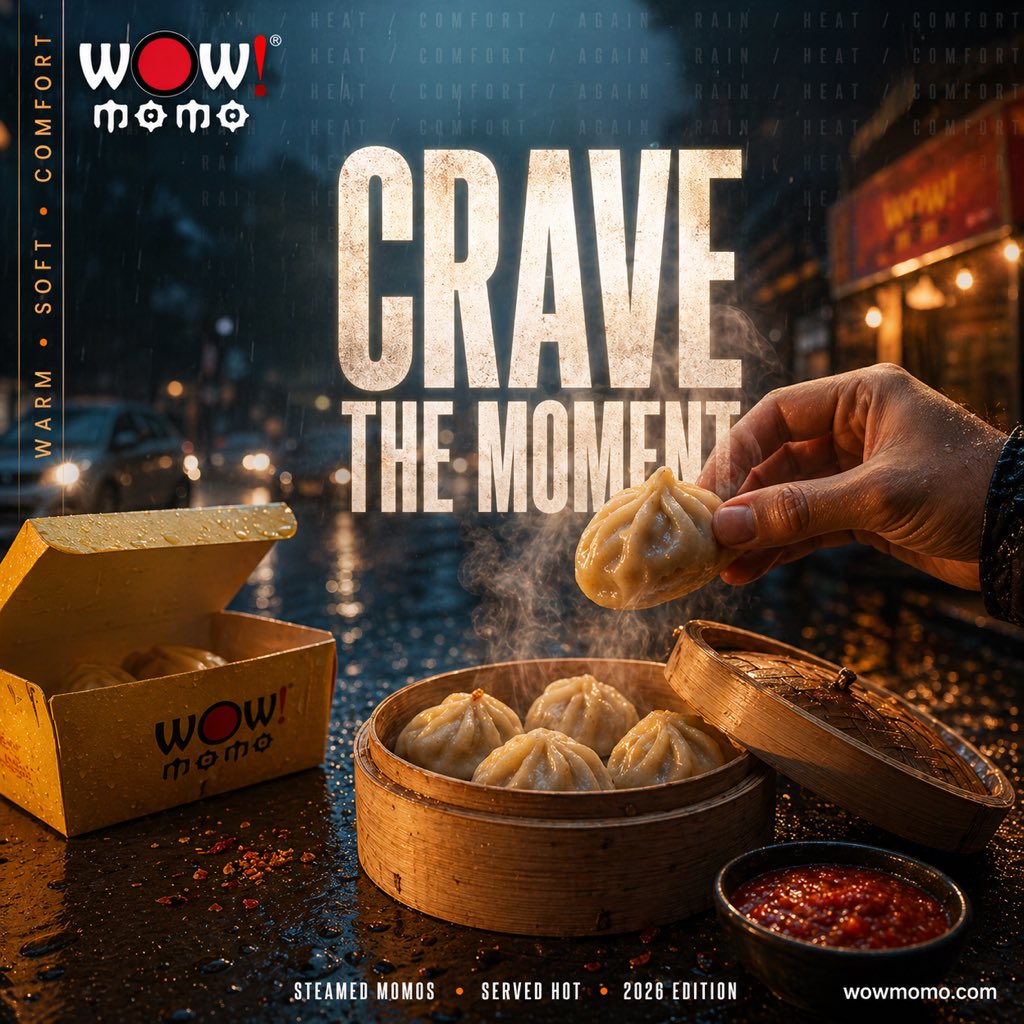
Cinematic Street Food Advertisement At Night In A Rainy City Street

A cinematic street food advertisement at night in a rainy city street, shot in a dramatic close-up food photography style with shallow depth of field. In the foreground, a bamboo steamer...

A cinematic street food advertisement at night in a rainy city street, shot in a dramatic close-up food photography style with shallow depth of field. In the foreground, a bamboo steamer...
Prompt

A cinematic street food advertisement at night in a rainy city street, shot in a dramatic close-up food photography style with shallow depth of field. In the foreground, a bamboo steamer basket sits on a wet reflective table, filled with exactly 4 plump steamed momos, while a human hand from the right side lifts a fifth momo above the basket. Thick steam rises visibly from the dumplings. To the right front, place a small black bowl of glossy red chili sauce. To the left, include an open yellow takeaway box with the stylized WOW! momo logo printed in black and red, with one momo visible inside. The tabletop is covered with rain droplets, scattered chili flakes, and warm reflections. In the background, show a blurred urban street with car headlights, storefront glow, and falling rain, creating a moody blue-and-amber contrast. Add large distressed bold condensed white typography in the center reading {argument name="headline text" default="CRAVE THE MOMENT"}. At the top left, place the WOW! momo logo. Along the left vertical edge, add the words {argument name="side text" default="WARM • SOFT • COMFORT"} in a narrow vertical layout. Across the top background, faintly repeat the atmospheric words {argument name="background text" default="HEAT / COMFORT / AGAIN / RAIN"}. At the bottom center, add a small footer line reading {argument name="footer text" default="STEAMED MOMOS • SERVED HOT • 2026 EDITION"}, and place {argument name="website" default="wowmomo.com"} at the bottom right. Ultra-detailed commercial food ad, photorealistic, high contrast, warm steam against cool rainy night, glossy textures, cinematic lighting, premium brand campaign aesthetic.

Prompt structure
  • Modelgpt-image-2
  • Use casefood-menu-visual
  • Stylecinematic, photorealistic, editorial, luxury
  • Aspect ratioFlexible
Best used for
  • Use casefood-menu-visual
  • Stylecinematic, photorealistic, editorial, luxury
  • Recommended specs1:1, 4:5, 16:9, or 9:16
  • ModelGPT Image 2
How to customize

Use this Cinematic Street Food Advertisement At Night In A Rainy City Street prompt as a base. Replace the subject, product details, environment, lighting, brand colors, and output ratio while keeping the food-menu-visual intent and cinematic, photorealistic, editorial, luxury direction stable.

Editable variables
  • SubjectReplace the product, person, scene, interface, or object being generated.
  • Use caseKeep or rewrite the destination as food menu visual, ad creative, cover image, poster, or ecommerce hero.
  • FrameChoose 1:1, 4:5, 16:9, or 9:16 based on the final placement.
  • Brand cuesAdd colors, materials, props, text-safe space, and the platform where the image will be used.
Recommended specs

Choose the frame for the destination first, then use 1K, 2K, or 4K based on output quality needs. Product images and posters usually benefit from higher resolution.

Pre-generation checklist
  • CheckSubject, lighting, composition, and frame are specific enough to review.
  • CheckText-safe space is included when the image will carry a headline or ad copy.
  • CheckResolution, credit cost, and final destination are checked before generation.
Why this prompt works

Cinematic Street Food Advertisement At Night In A Rainy City Street works because it starts from the image job, then controls subject, composition, lighting, style, and frame. It is best for food menu visual while keeping the cinematic, photorealistic, editorial, luxury direction stable.

Common questions
  • Can I use it directly?Yes. Replace the subject, brand cues, and frame, then generate in Image2Studio.
  • Which ratio should I use?Choose 1:1, 4:5, 16:9, or 9:16 based on the destination.




