
Image2Studio
Examples

gpt-image-2

Using The Provided Reference Image Of The Melon Slices In A Glass Bowl

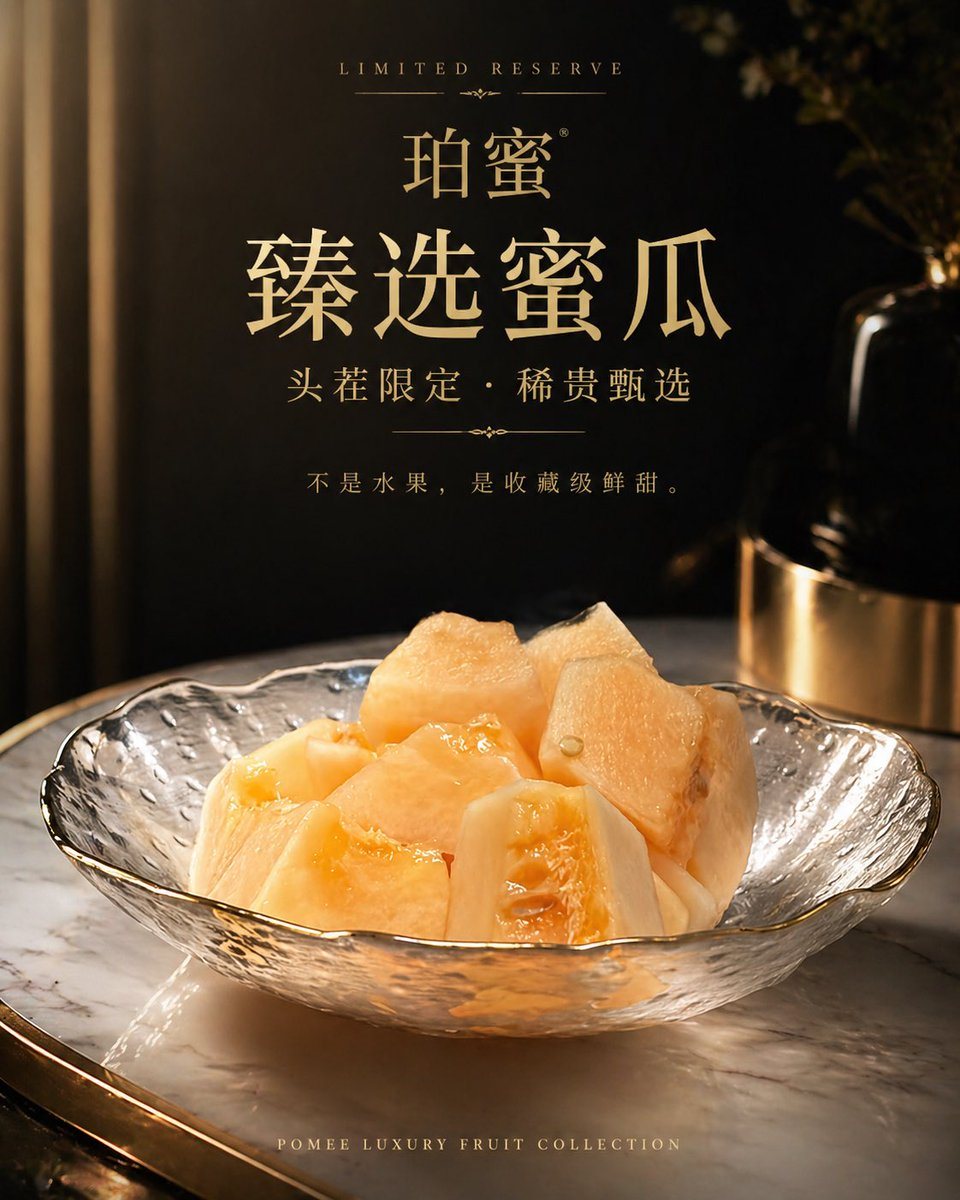
Using the provided reference image of the melon slices in a glass bowl, transform it into a premium luxury product advertisement poster. Keep the same fruit and bowl as the hero subject,...

Using the provided reference image of the melon slices in a glass bowl, transform it into a premium luxury product advertisement poster. Keep the same fruit and bowl as the hero subject,...
Prompt

Using the provided reference image of the melon slices in a glass bowl, transform it into a premium luxury product advertisement poster. Keep the same fruit and bowl as the hero subject, but restage it with dramatic warm golden lighting, a dark black-and-gold upscale interior background, and a polished marble tabletop. Improve the fruit styling so it looks fresher, juicier, and more expensive, with refined commercial food photography retouching. Compose it as a vertical poster with elegant centered typography in metallic gold. Include 6 text elements: small top line “LIMITED RESERVE”, brand line “珀蜜”, large main headline “臻选蜜瓜”, subheadline “头茬限定・稀贵甄选”, body copy “不是水果,是收藏级鲜甜。”, and small bottom line “POMEE LUXURY FRUIT COLLECTION”. Overall mood: high-end, exclusive, sophisticated, like a luxury perfume or jewelry campaign but for fruit.

Prompt structure
  • Modelgpt-image-2
  • Use casefood-menu-visual
  • Styleluxury, photorealistic, cinematic
  • Aspect ratioFlexible
Best used for
  • Use casefood-menu-visual
  • Styleluxury, photorealistic, cinematic
  • Recommended specs1:1, 4:5, 16:9, or 9:16
  • ModelGPT Image 2
How to customize

Use this Using The Provided Reference Image Of The Melon Slices In A Glass Bowl prompt as a base. Replace the subject, product details, environment, lighting, brand colors, and output ratio while keeping the food-menu-visual intent and luxury, photorealistic, cinematic direction stable.

Editable variables
  • SubjectReplace the product, person, scene, interface, or object being generated.
  • Use caseKeep or rewrite the destination as food menu visual, ad creative, cover image, poster, or ecommerce hero.
  • FrameChoose 1:1, 4:5, 16:9, or 9:16 based on the final placement.
  • Brand cuesAdd colors, materials, props, text-safe space, and the platform where the image will be used.
Recommended specs

Choose the frame for the destination first, then use 1K, 2K, or 4K based on output quality needs. Product images and posters usually benefit from higher resolution.

Pre-generation checklist
  • CheckSubject, lighting, composition, and frame are specific enough to review.
  • CheckText-safe space is included when the image will carry a headline or ad copy.
  • CheckResolution, credit cost, and final destination are checked before generation.
Why this prompt works

Using The Provided Reference Image Of The Melon Slices In A Glass Bowl works because it starts from the image job, then controls subject, composition, lighting, style, and frame. It is best for food menu visual while keeping the luxury, photorealistic, cinematic direction stable.

Common questions
  • Can I use it directly?Yes. Replace the subject, brand cues, and frame, then generate in Image2Studio.
  • Which ratio should I use?Choose 1:1, 4:5, 16:9, or 9:16 based on the destination.




