
Image2Studio
Prompts

gpt-image-2

Using The Provided Reference Image Of The Udon Meal

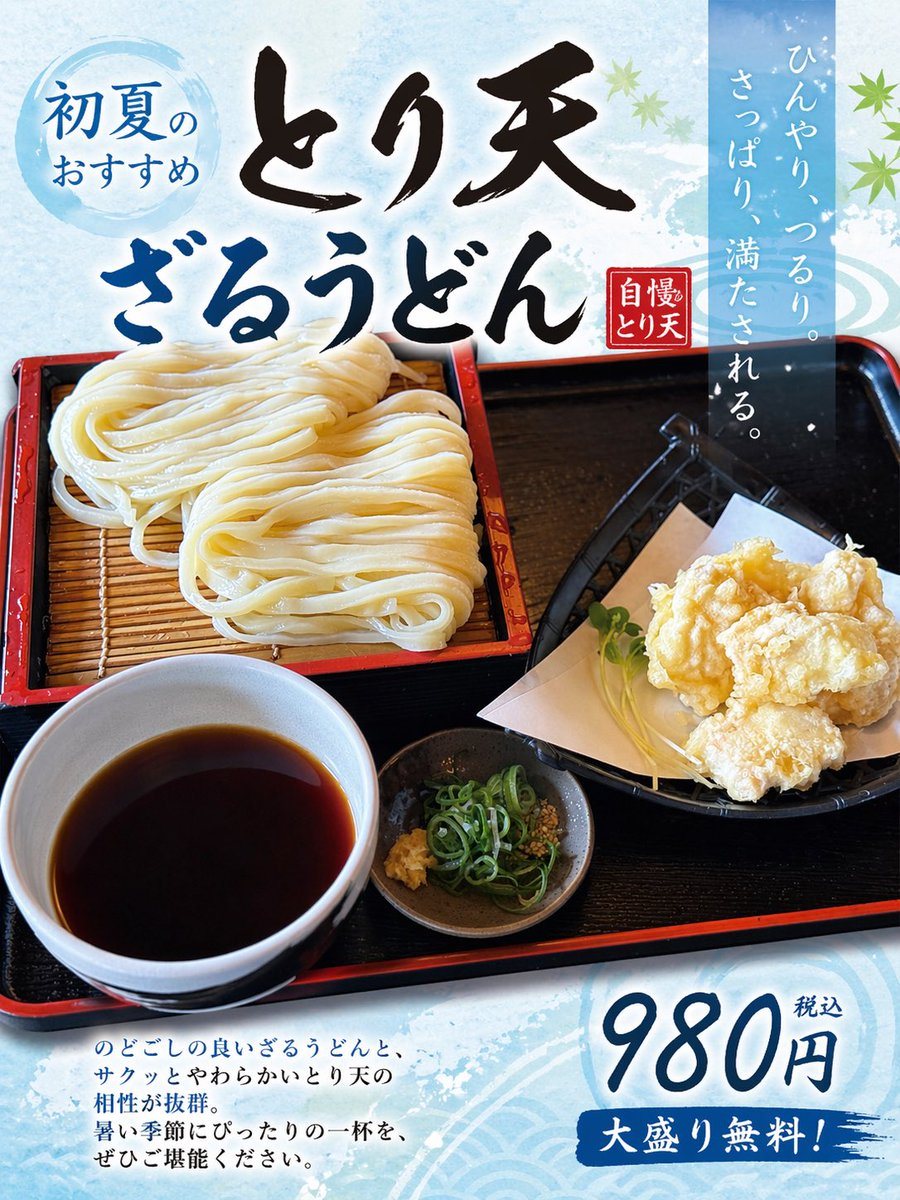
Using the provided reference image of the udon meal, turn it into a clean, print-ready Japanese restaurant promotional poster while keeping the food photo itself as the main hero image. E...

Using the provided reference image of the udon meal, turn it into a clean, print-ready Japanese restaurant promotional poster while keeping the food photo itself as the main hero image. E...
Prompt

Using the provided reference image of the udon meal, turn it into a clean, print-ready Japanese restaurant promotional poster while keeping the food photo itself as the main hero image. Expand the composition vertically into a portrait flyer layout, add a light icy-blue seasonal background with subtle watercolor texture and faint wave motifs, and overlay decorative green maple leaves for an early-summer feel. Add 5 text elements in Japanese: a blue circular badge at the upper left reading "初夏のおすすめ", a large bold brush-calligraphy headline across the top in 2 lines reading "とり天" and "ざるうどん", a small red vertical seal near the headline reading "自慢のとり天", a tall translucent blue vertical copy block at the upper right reading "ひんやり、つるり。さっぱり、満たされる。", and a price block at the lower right reading "980円 税込" with a blue brushstroke banner below that says "大盛り無料!". Add a short 4-line Japanese body copy paragraph at the lower left describing the dish in a menu-poster style. Preserve the original meal arrangement and realistic photography, but enhance it slightly for advertising: brighter, more appetizing, crisp, and high contrast. Make the overall design look like a polished restaurant poster created from a casual food photo.

Prompt structure
  • Modelgpt-image-2
  • Use casefood-menu-visual
  • Stylephotorealistic, editorial, minimal, watercolor
  • Aspect ratioFlexible
Best used for
  • Use casefood-menu-visual
  • Stylephotorealistic, editorial, minimal, watercolor
  • Recommended specs1:1, 4:5, 16:9, or 9:16
  • ModelGPT Image 2
How to customize

Use this Using The Provided Reference Image Of The Udon Meal prompt as a base. Replace the subject, product details, environment, lighting, brand colors, and output ratio while keeping the food-menu-visual intent and photorealistic, editorial, minimal, watercolor direction stable.

Editable variables
  • SubjectReplace the product, person, scene, interface, or object being generated.
  • Use caseKeep or rewrite the destination as food menu visual, ad creative, cover image, poster, or ecommerce hero.
  • FrameChoose 1:1, 4:5, 16:9, or 9:16 based on the final placement.
  • Brand cuesAdd colors, materials, props, text-safe space, and the platform where the image will be used.
Recommended specs

Choose the frame for the destination first, then use 1K, 2K, or 4K based on output quality needs. Product images and posters usually benefit from higher resolution.

Pre-generation checklist
  • CheckSubject, lighting, composition, and frame are specific enough to review.
  • CheckText-safe space is included when the image will carry a headline or ad copy.
  • CheckResolution, credit cost, and final destination are checked before generation.
Why this prompt works

Using The Provided Reference Image Of The Udon Meal works because it starts from the image job, then controls subject, composition, lighting, style, and frame. It is best for food menu visual while keeping the photorealistic, editorial, minimal, watercolor direction stable.

Common questions
  • Can I use it directly?Yes. Replace the subject, brand cues, and frame, then generate in Image2Studio.
  • Which ratio should I use?Choose 1:1, 4:5, 16:9, or 9:16 based on the destination.




