
Image2Studio
Prompts

gpt-image-2

Photorealistic Daytime Street-corner Exterior Of A Modern BURGER KING Fa

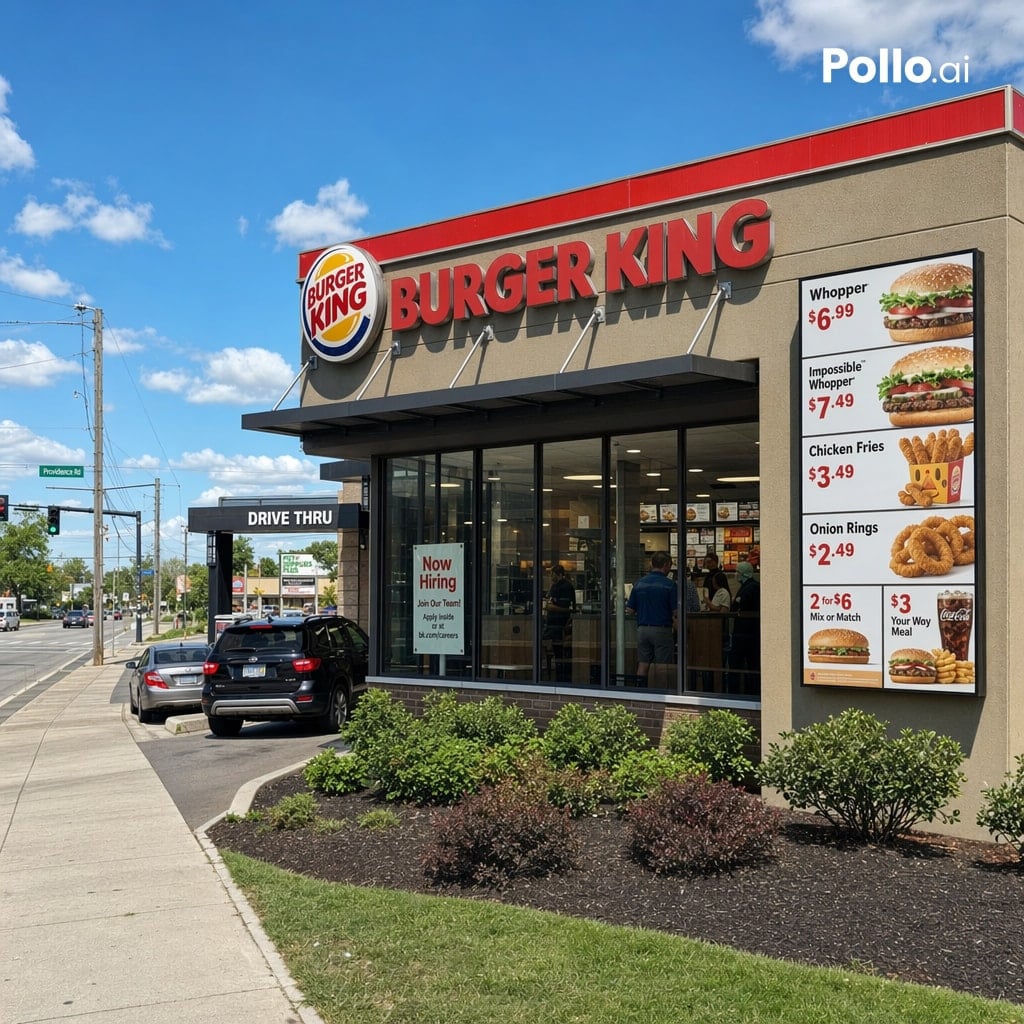
A photorealistic daytime street-corner exterior of a modern BURGER KING fast-food restaurant, viewed from a front-left angle under a bright blue sky with scattered white clouds. The build...

A photorealistic daytime street-corner exterior of a modern BURGER KING fast-food restaurant, viewed from a front-left angle under a bright blue sky with scattered white clouds. The build...
Prompt

A photorealistic daytime street-corner exterior of a modern {argument name="restaurant brand" default="BURGER KING"} fast-food restaurant, viewed from a front-left angle under a bright blue sky with scattered white clouds. The building has a beige stucco facade with a bold red trim band along the roofline, a large round brand logo near the upper left of the front wall, and oversized red channel letters spelling {argument name="main sign text" default="BURGER KING"} across the top. On the right side of the facade, show one tall vertical menu billboard with 6 visible product panels and prices: Whopper $6.99, Impossible Whopper $7.49, Chicken Fries $3.49, Onion Rings $2.49, a 2 for $6 Mix or Match panel, and a $3 Your Way Meal panel with fries and drink. Include a black drive-thru canopy on the left side with the text {argument name="drive thru sign" default="DRIVE THRU"}, and 2 cars in the lane, one dark SUV closer to camera and one silver sedan ahead. The front corner should have floor-to-ceiling glass windows revealing a lit interior with a few customers and menu boards faintly visible. Place 1 hiring poster in the front window reading {argument name="window poster text" default="Now Hiring"}. Add neatly maintained landscaping with 5 shrubs in dark mulch beds along the building edge, a concrete sidewalk in the foreground, a grassy strip, utility poles, traffic lights, and a suburban roadside intersection extending into the left background. Natural midday lighting, crisp shadows, commercial real-estate photography look, ultra-clean signage, highly legible text, realistic reflections on glass, sharp architectural details, and a subtle white {argument name="watermark text" default="Pollo.ai"} watermark in the top-right corner.

Prompt structure
  • Modelgpt-image-2
  • Use casefood-menu-visual
  • Stylephotorealistic, minimal
  • Aspect ratioFlexible
Best used for
  • Use casefood-menu-visual
  • Stylephotorealistic, minimal
  • Recommended specs1:1, 4:5, 16:9, or 9:16
  • ModelGPT Image 2
How to customize

Use this Photorealistic Daytime Street-corner Exterior Of A Modern BURGER KING Fa prompt as a base. Replace the subject, product details, environment, lighting, brand colors, and output ratio while keeping the food-menu-visual intent and photorealistic, minimal direction stable.

Editable variables
  • SubjectReplace the product, person, scene, interface, or object being generated.
  • Use caseKeep or rewrite the destination as food menu visual, ad creative, cover image, poster, or ecommerce hero.
  • FrameChoose 1:1, 4:5, 16:9, or 9:16 based on the final placement.
  • Brand cuesAdd colors, materials, props, text-safe space, and the platform where the image will be used.
Recommended specs

Choose the frame for the destination first, then use 1K, 2K, or 4K based on output quality needs. Product images and posters usually benefit from higher resolution.

Pre-generation checklist
  • CheckSubject, lighting, composition, and frame are specific enough to review.
  • CheckText-safe space is included when the image will carry a headline or ad copy.
  • CheckResolution, credit cost, and final destination are checked before generation.
Why this prompt works

Photorealistic Daytime Street-corner Exterior Of A Modern BURGER KING Fa works because it starts from the image job, then controls subject, composition, lighting, style, and frame. It is best for food menu visual while keeping the photorealistic, minimal direction stable.

Common questions
  • Can I use it directly?Yes. Replace the subject, brand cues, and frame, then generate in Image2Studio.
  • Which ratio should I use?Choose 1:1, 4:5, 16:9, or 9:16 based on the destination.




