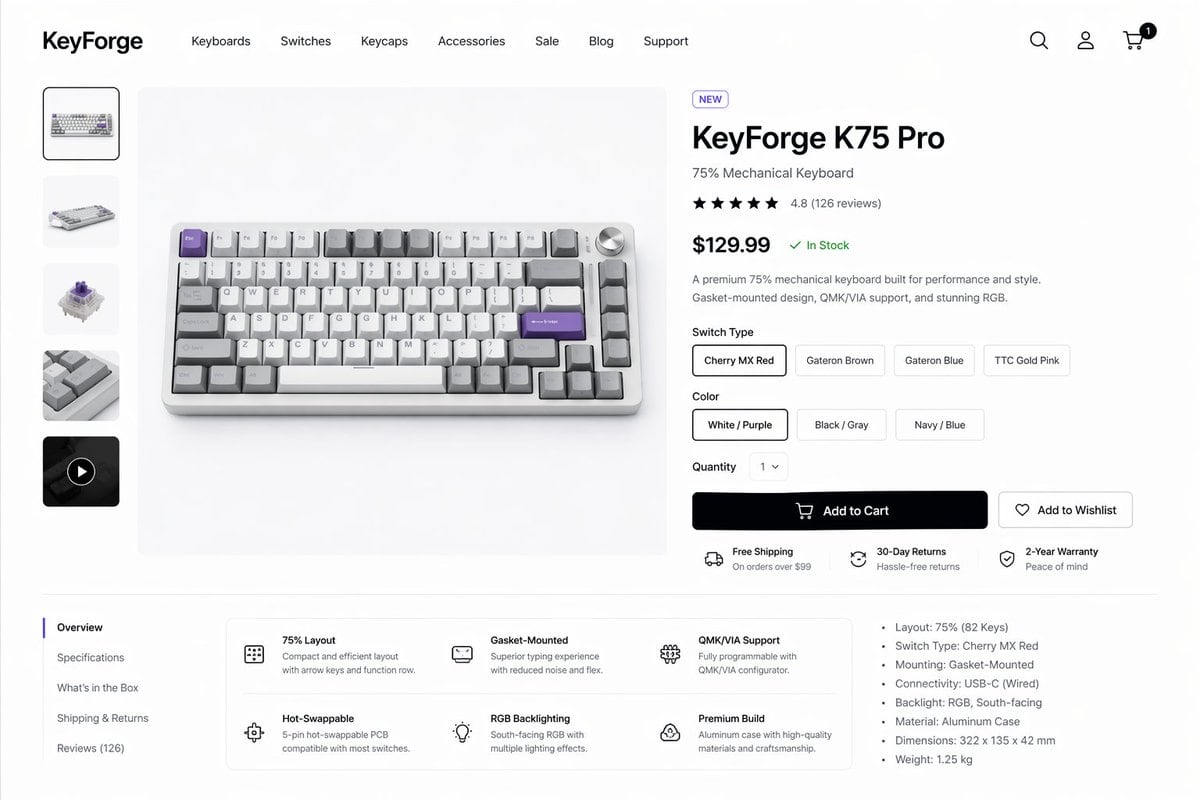
PromptCreate a clean modern e-commerce product detail page for a premium mechanical keyboard brand called {argument name="brand name" default="KeyForge"}, presented as a high-fidelity desktop website mockup on a white background with subtle light-gray dividers and generous spacing. The layout is a single unified storefront scene with a top navigation bar, a left product thumbnail rail, a large center product hero image, and a right-side purchase information panel. In the header, place the bold wordmark on the far left, then 7 navigation items reading “Keyboards”, “Switches”, “Keycaps”, “Accessories”, “Sale”, “Blog”, and “Support”, and on the far right 3 icons for search, account, and cart, with a small black notification badge showing “1” on the cart. The main product shown in the center is a compact 75% mechanical keyboard photographed from a slightly elevated front angle on a pale gray stage, with an aluminum case in silver, white and gray keycaps, several accent keys in lavender purple, and a silver volume knob at the top right. The left vertical gallery contains exactly 5 thumbnails: 1 selected front product shot, 1 angled keyboard view, 1 mechanical switch close-up, 1 keycap texture close-up, and 1 dark video thumbnail with a circular play icon. The right product panel includes a small pill badge reading “NEW”, a large bold product name {argument name="product name" default="KeyForge K75 Pro"}, a subtitle “75% Mechanical Keyboard”, a 5-star rating row with 4.8 and “(126 reviews)”, a large bold price {argument name="price" default="$129.99"} followed by a green “In Stock” status, and a short two-sentence description about premium performance, gasket-mounted design, QMK/VIA support, and RGB. Under that, include a “Switch Type” selector with exactly 4 pill buttons labeled “Cherry MX Red”, “Gateron Brown”, “Gateron Blue”, and “TTC Gold Pink”, with the first selected; a “Color” selector with exactly 3 pill buttons labeled “White / Purple”, “Black / Gray”, and “Navy / Blue”, with the first selected; a “Quantity” dropdown set to “1”; one large black primary button labeled “Add to Cart” with a cart icon; and one outlined secondary button labeled “Add to Wishlist” with a heart icon. Beneath the buttons, show exactly 3 horizontal service highlights with small icons: “Free Shipping” with subtext “On orders over $99”, “30-Day Returns” with subtext “Hassle-free returns”, and “2-Year Warranty” with subtext “Peace of mind”. In the lower content area, create a two-column section separated by light lines. On the left is a vertical tab list with exactly 5 items: “Overview” selected, then “Specifications”, “What’s in the Box”, “Shipping & Returns”, and “Reviews (126)”. To the right of the tabs, place a rounded white feature card grid with exactly 6 feature blocks in 2 rows of 3, each with a simple line icon, bold title, and short explanatory text: “75% Layout”, “Gasket-Mounted”, “QMK/VIA Support”, “Hot-Swappable”, “RGB Backlighting”, and “Premium Build”. On the far right of this lower area, add a specifications bullet list with exactly 7 bullets: “Layout: 75% (82 Keys)”, “Switch Type: Cherry MX Red”, “Mounting: Gasket-Mounted”, “Connectivity: USB-C (Wired)”, “Backlight: RGB, South-facing”, “Material: Aluminum Case”, and “Dimensions: 322 x 135 x 42 mm”, plus an additional final bullet “Weight: 1.25 kg”. Use a refined minimalist product-design aesthetic, realistic UI spacing, clean sans-serif typography similar to Inter or SF Pro, soft shadows, subtle rounded corners, monochrome icons, and polished startup-style consumer electronics presentation.
How to customizeUse this Create A Clean Modern E-commerce Product Detail Page prompt as a base. Replace the subject, product details, environment, lighting, brand colors, and output ratio while keeping the product-hero-shot intent and minimal, luxury, editorial, photorealistic direction stable.
Why this prompt worksCreate A Clean Modern E-commerce Product Detail Page works because it starts from the image job, then controls subject, composition, lighting, style, and frame. It is best for product hero shot while keeping the minimal, luxury, editorial, photorealistic direction stable.