
Image2Studio
Examples

gpt-image-2

High-end Food Product Photograph Of A Loaded Pizza Slice Centered Agains

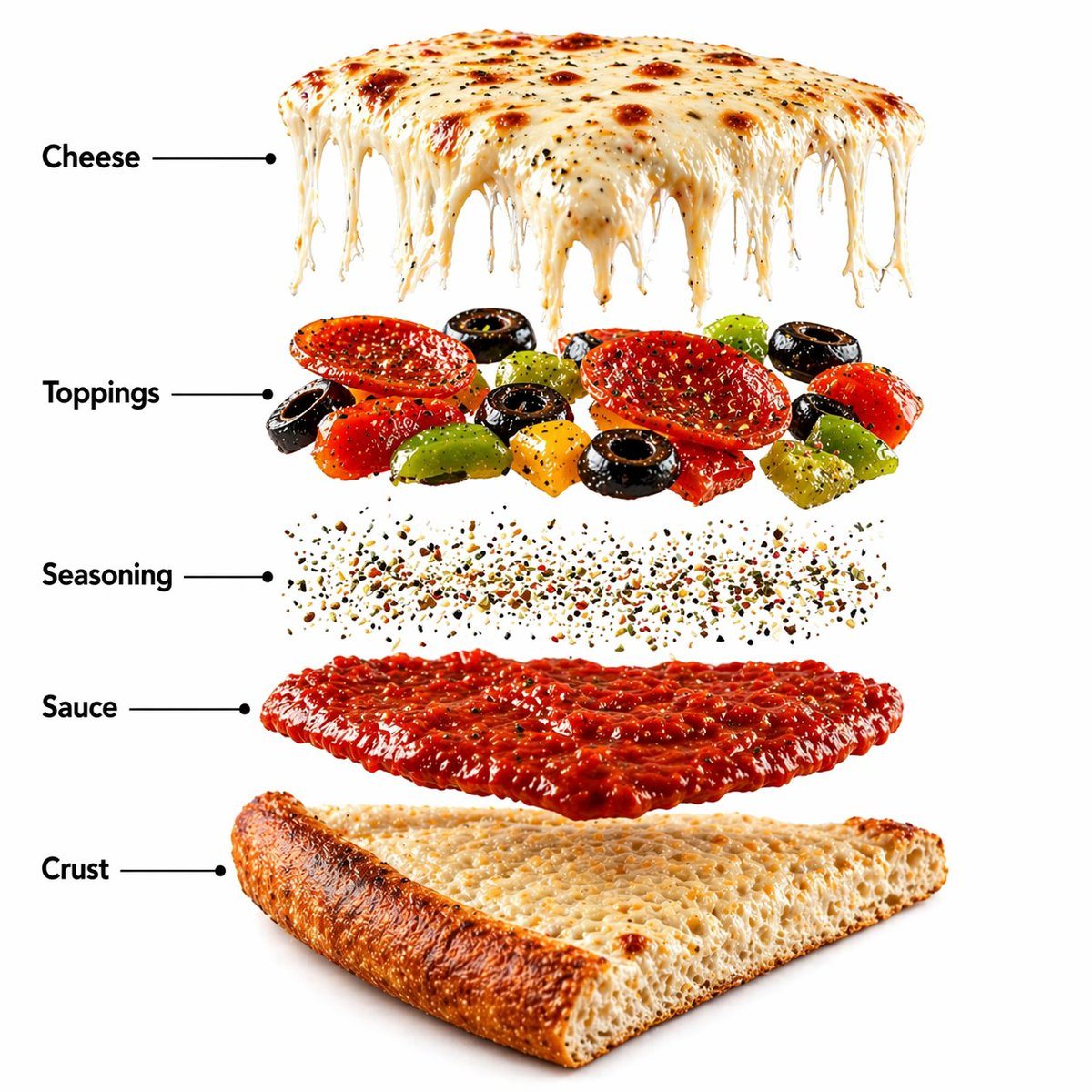
A high-end food product photograph of a loaded pizza slice centered against a warm rustic wooden-toned background. The slice features a thick golden crust with a crispy edge, stretchy mel...

A high-end food product photograph of a loaded pizza slice centered against a warm rustic wooden-toned background. The slice features a thick golden crust with a crispy edge, stretchy mel...
Prompt

A high-end food product photograph of a loaded pizza slice centered against a warm rustic wooden-toned background. The slice features a thick golden crust with a crispy edge, stretchy melted mozzarella cheese with visible pull strands, rich tomato sauce underneath, and toppings including pepperoni slices, black olives, capsicum, and herbs. The textures are highly detailed with glossy melted cheese, slightly oily toppings, and realistic baked crust texture. Soft cinematic lighting creates depth and subtle shadows. Ultra-sharp focus, premium food advertisement style, hyper realistic, 8K.\n\nCreate a hyper-realistic exploded vertical infographic composition of a gourmet pizza slice.\nTop → Bottom structure:\nMelted Cheese Layer (stretchy, glossy mozzarella with pull texture)\n→ Toppings Layer (pepperoni, olives, capsicum with natural detail)\n→ Herb Seasoning (oregano flakes and spice particles lightly scattered)\n→ Tomato Sauce Layer (rich red smooth sauce with slight gloss)\n→ Dough Crust Base (thick baked crust with crispy edge texture)\nAll layers must be perfectly centered, evenly spaced, and aligned vertically. Use a warm rustic background with soft studio lighting and realistic shadows beneath each floating layer. The composition should feel like a premium food campaign combined with a clean infographic layout.\nAdd clean infographic labels with thin pointer lines using these exact labels:\n“Cheese”\n“Toppings”\n“Seasoning”\n“Sauce”\n“Crust”\n\nUltra-detailed food texture, DSLR macro quality, hyper realistic, premium advertisement aesthetic, 8K.

Prompt structure
  • Modelgpt-image-2
  • Use caseproduct-hero-shot
  • Stylephotorealistic, luxury, minimal, cinematic
  • Aspect ratioFlexible
Best used for
  • Use caseproduct-hero-shot
  • Stylephotorealistic, luxury, minimal, cinematic
  • Recommended specs1:1, 4:5, 16:9, or 9:16
  • ModelGPT Image 2
How to customize

Use this High-end Food Product Photograph Of A Loaded Pizza Slice Centered Agains prompt as a base. Replace the subject, product details, environment, lighting, brand colors, and output ratio while keeping the product-hero-shot intent and photorealistic, luxury, minimal, cinematic direction stable.

Editable variables
  • SubjectReplace the product, person, scene, interface, or object being generated.
  • Use caseKeep or rewrite the destination as product hero shot, ad creative, cover image, poster, or ecommerce hero.
  • FrameChoose 1:1, 4:5, 16:9, or 9:16 based on the final placement.
  • Brand cuesAdd colors, materials, props, text-safe space, and the platform where the image will be used.
Recommended specs

Choose the frame for the destination first, then use 1K, 2K, or 4K based on output quality needs. Product images and posters usually benefit from higher resolution.

Pre-generation checklist
  • CheckSubject, lighting, composition, and frame are specific enough to review.
  • CheckText-safe space is included when the image will carry a headline or ad copy.
  • CheckResolution, credit cost, and final destination are checked before generation.
Why this prompt works

High-end Food Product Photograph Of A Loaded Pizza Slice Centered Agains works because it starts from the image job, then controls subject, composition, lighting, style, and frame. It is best for product hero shot while keeping the photorealistic, luxury, minimal, cinematic direction stable.

Common questions
  • Can I use it directly?Yes. Replace the subject, brand cues, and frame, then generate in Image2Studio.
  • Which ratio should I use?Choose 1:1, 4:5, 16:9, or 9:16 based on the destination.




