
Image2Studio
Examples

gpt-image-2

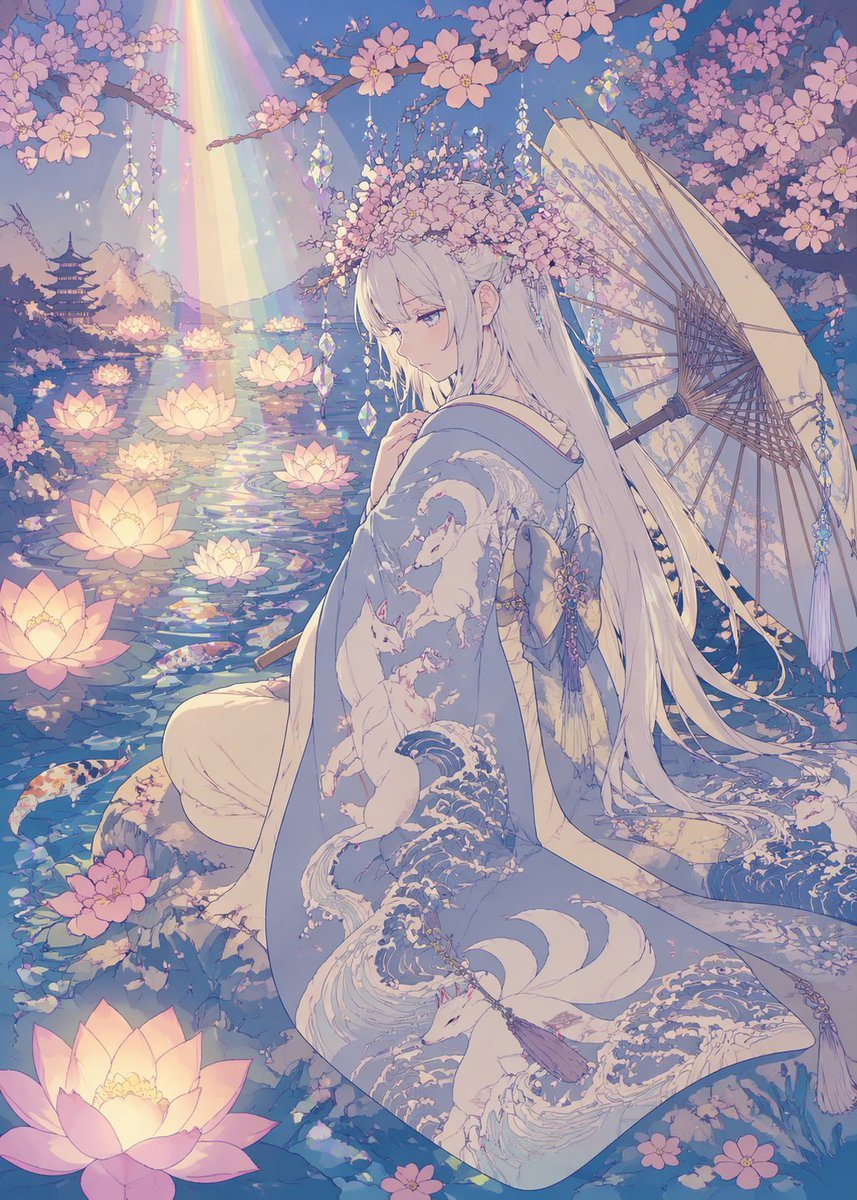
Dreamy Pastel Anime Illustration Of A Serene Young Woman In A Moonlit Sp

A dreamy pastel anime illustration of a serene young woman in a moonlit spring garden beside a pond, rendered in delicate Japanese fantasy style with flat anime coloring, no shadows, ultr...

A dreamy pastel anime illustration of a serene young woman in a moonlit spring garden beside a pond, rendered in delicate Japanese fantasy style with flat anime coloring, no shadows, ultr...
Prompt

A dreamy pastel anime illustration of a serene young woman in a moonlit spring garden beside a pond, rendered in delicate Japanese fantasy style with flat anime coloring, no shadows, ultra-clean linework, and no grainy texture. She is seated in three-quarter back view at the water’s edge, turning her face slightly toward the viewer with a calm, melancholic expression. She has very long straight {argument name="hair color" default="silver-white"} hair with soft bangs and floral ornaments woven into a blossom crown. She wears an elegant flowing kimono in pale blue and cream, richly patterned with stylized waves and white foxes, with layered fabric pooling around her. A large traditional paper parasol rests behind her on the right side, partly open, with dangling crystal-like ornaments. Surround her with dense blooming cherry blossom branches overhead and scattered petals in the foreground. The pond is filled with exactly 10 glowing lotus flowers floating on reflective water and exactly 4 visible koi fish swimming near the surface. In the distant left background, include a small multi-tier pagoda silhouette across the water. From the upper left, a soft rainbow beam of light descends diagonally onto the pond, creating iridescent reflections. Hang several faceted crystal ornaments from the branches so they sparkle in the light. Use a palette dominated by lavender, blush pink, pale blue, ivory, and soft gold. The atmosphere should feel ethereal, romantic, tranquil, and magical, with intricate decorative detail, luminous water reflections, and a polished vertical composition.

Prompt structure
  • Modelgpt-image-2
  • Use casesocial-media-post
  • Styleanime, luxury, minimal, watercolor
  • Aspect ratioFlexible
Best used for
  • Use casesocial-media-post
  • Styleanime, luxury, minimal, watercolor
  • Recommended specs1:1, 4:5, 16:9, or 9:16
  • ModelGPT Image 2
How to customize

Use this Dreamy Pastel Anime Illustration Of A Serene Young Woman In A Moonlit Sp prompt as a base. Replace the subject, product details, environment, lighting, brand colors, and output ratio while keeping the social-media-post intent and anime, luxury, minimal, watercolor direction stable.

Editable variables
  • SubjectReplace the product, person, scene, interface, or object being generated.
  • Use caseKeep or rewrite the destination as social media post, ad creative, cover image, poster, or ecommerce hero.
  • FrameChoose 1:1, 4:5, 16:9, or 9:16 based on the final placement.
  • Brand cuesAdd colors, materials, props, text-safe space, and the platform where the image will be used.
Recommended specs

Choose the frame for the destination first, then use 1K, 2K, or 4K based on output quality needs. Product images and posters usually benefit from higher resolution.

Pre-generation checklist
  • CheckSubject, lighting, composition, and frame are specific enough to review.
  • CheckText-safe space is included when the image will carry a headline or ad copy.
  • CheckResolution, credit cost, and final destination are checked before generation.
Why this prompt works

Dreamy Pastel Anime Illustration Of A Serene Young Woman In A Moonlit Sp works because it starts from the image job, then controls subject, composition, lighting, style, and frame. It is best for social media post while keeping the anime, luxury, minimal, watercolor direction stable.

Common questions
  • Can I use it directly?Yes. Replace the subject, brand cues, and frame, then generate in Image2Studio.
  • Which ratio should I use?Choose 1:1, 4:5, 16:9, or 9:16 based on the destination.




