
Image2Studio
Examples

gpt-image-2

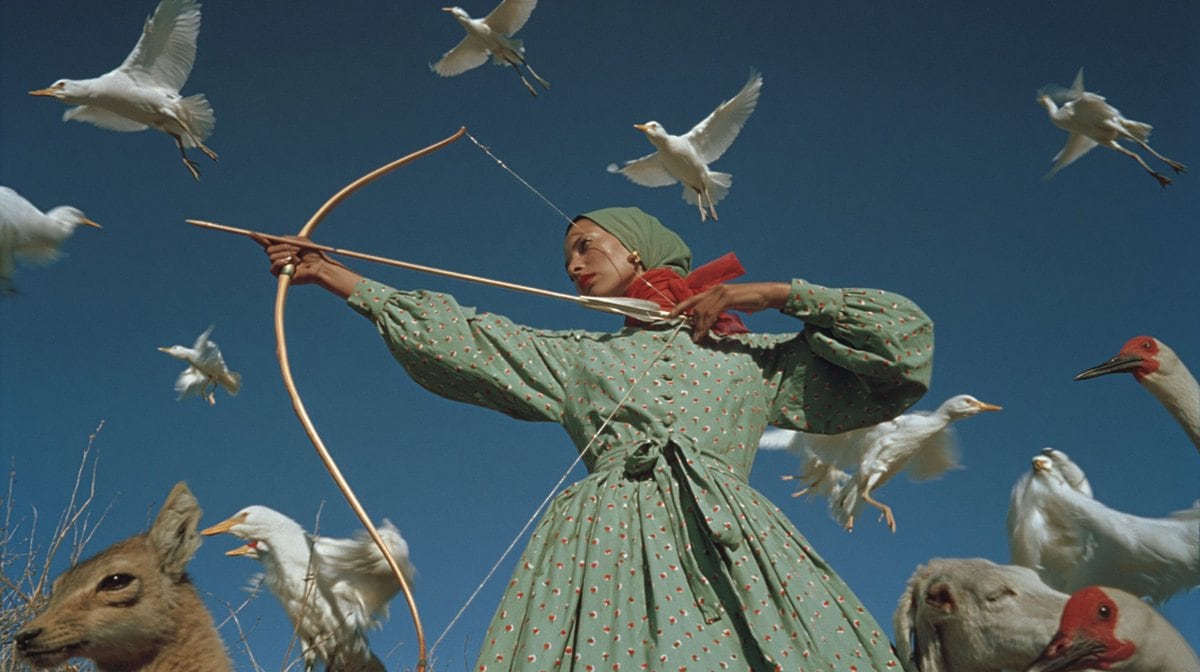
Surreal Cinematic Outdoor Portrait Of A Masked Archer Standing In A Dry

A surreal cinematic outdoor portrait of a masked archer standing in a dry field under a deep clear blue sky, framed from about the knees up in a wide horizontal composition. The central f...

A surreal cinematic outdoor portrait of a masked archer standing in a dry field under a deep clear blue sky, framed from about the knees up in a wide horizontal composition. The central f...
Prompt

A surreal cinematic outdoor portrait of a masked archer standing in a dry field under a deep clear blue sky, framed from about the knees up in a wide horizontal composition. The central figure is a woman-like person in a vintage prairie-style dress and matching headscarf, aiming a simple wooden longbow toward the left side of the frame with an arrow drawn back to the cheek. Her face is fully obscured by a soft rectangular blur or blocky censorship patch, creating an uncanny anonymous effect. The dress is sage green with long puffed sleeves, a gathered waist tied with a sash, and a tiny repeating red-and-white floral dot pattern. A red cloth or scarf is wrapped around the lower face and neck beneath the green head covering. Surrounding her are 12 animals total: 8 white birds flying across the sky at different distances, 2 larger white birds standing on the ground at the right side, 1 deer head entering from the lower left foreground, and 1 sheep or goat head entering from the lower right foreground. Add 1 red-headed crane-like bird at the far right edge, visible in profile. The image should feel dreamlike, strange, and symbolic rather than realistic, with crisp midday sunlight, rich saturated colors, soft film grain, and a slightly vintage editorial-photography look. Use low-angle perspective, dynamic diagonal lines from the bow and arrow, and layered animal placement to create tension and motion. Dry grasses appear at the bottom edge, but the background is mostly open sky. Highly detailed fabric folds, natural bird wing positions, and a balanced surreal composition.

Prompt structure
  • Modelgpt-image-2
  • Use casesocial-media-post
  • Stylecinematic, photorealistic, editorial, minimal
  • Aspect ratioFlexible
Best used for
  • Use casesocial-media-post
  • Stylecinematic, photorealistic, editorial, minimal
  • Recommended specs1:1, 4:5, 16:9, or 9:16
  • ModelGPT Image 2
How to customize

Use this Surreal Cinematic Outdoor Portrait Of A Masked Archer Standing In A Dry prompt as a base. Replace the subject, product details, environment, lighting, brand colors, and output ratio while keeping the social-media-post intent and cinematic, photorealistic, editorial, minimal direction stable.

Editable variables
  • SubjectReplace the product, person, scene, interface, or object being generated.
  • Use caseKeep or rewrite the destination as social media post, ad creative, cover image, poster, or ecommerce hero.
  • FrameChoose 1:1, 4:5, 16:9, or 9:16 based on the final placement.
  • Brand cuesAdd colors, materials, props, text-safe space, and the platform where the image will be used.
Recommended specs

Choose the frame for the destination first, then use 1K, 2K, or 4K based on output quality needs. Product images and posters usually benefit from higher resolution.

Pre-generation checklist
  • CheckSubject, lighting, composition, and frame are specific enough to review.
  • CheckText-safe space is included when the image will carry a headline or ad copy.
  • CheckResolution, credit cost, and final destination are checked before generation.
Why this prompt works

Surreal Cinematic Outdoor Portrait Of A Masked Archer Standing In A Dry works because it starts from the image job, then controls subject, composition, lighting, style, and frame. It is best for social media post while keeping the cinematic, photorealistic, editorial, minimal direction stable.

Common questions
  • Can I use it directly?Yes. Replace the subject, brand cues, and frame, then generate in Image2Studio.
  • Which ratio should I use?Choose 1:1, 4:5, 16:9, or 9:16 based on the destination.




