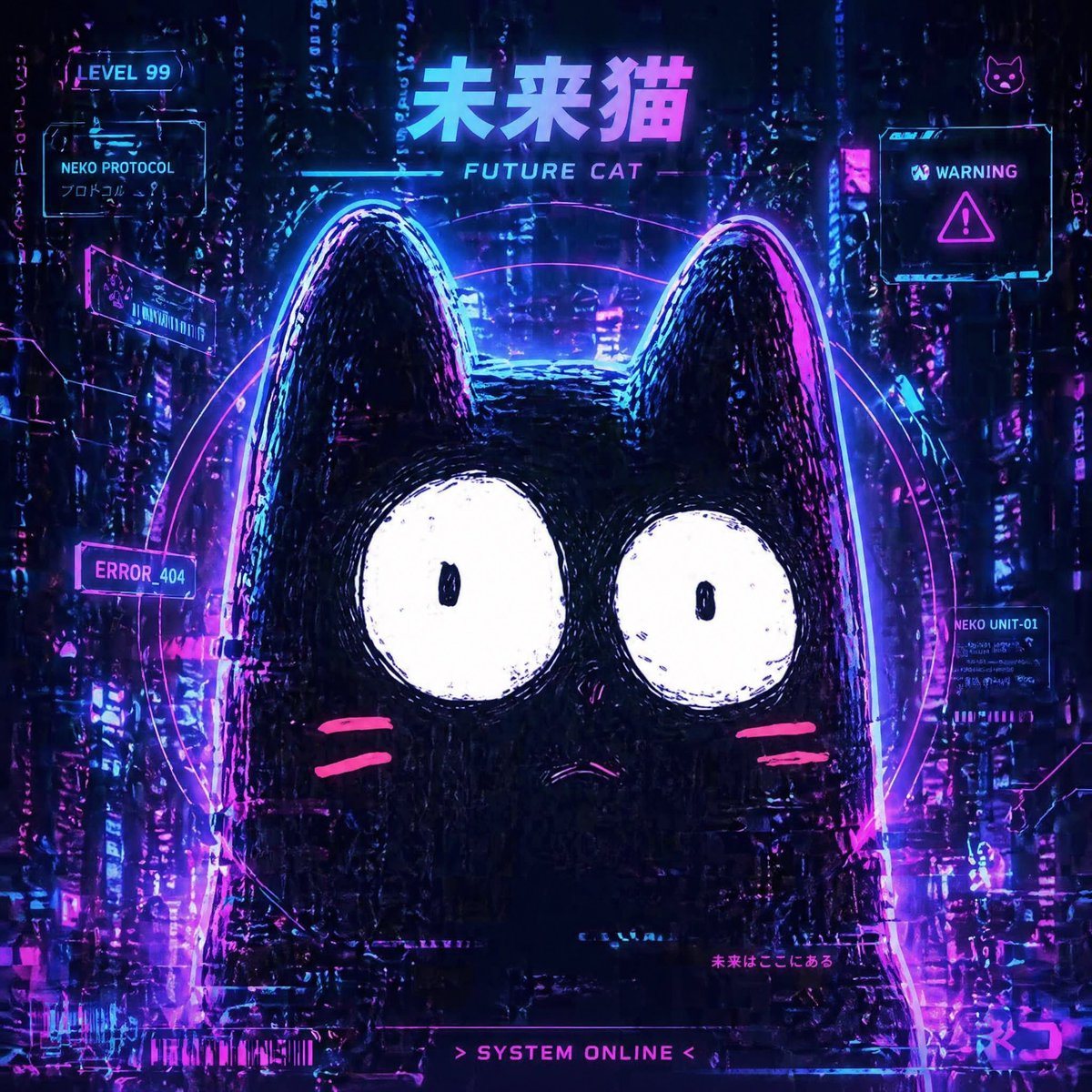
PromptA cyberpunk neon poster-style illustration of a cute futuristic black cat mascot centered in a dark rainy high-tech city. The cat is a simple rounded silhouette with two tall ears, huge white circular eyes with tiny black pupils, a tiny worried mouth, and two hot-pink whisker marks on each cheek. Behind the cat is a glowing circular holographic halo made of layered magenta and cyan rings. The background is a dense futuristic cityscape filled with vertical light streaks, holographic glitches, data noise, reflections, and luminous signage in electric blue, purple, and pink. At the top center, large glowing text reads "未来猫" with smaller text below reading "FUTURE CAT". Include exactly 7 interface panels and HUD elements around the cat: 1 top-left badge reading "LEVEL 99", 1 upper-left panel reading "NEKO PROTOCOL" with smaller Japanese text below, 1 left-mid slanted panel with tiny unreadable techno glyphs, 1 left-lower panel reading "ERROR_404", 1 top-right warning panel reading "WARNING" with a triangular alert icon, 1 right-lower panel reading "NEKO UNIT-01", and 1 bottom-center status strip reading "> SYSTEM ONLINE <". Also add 2 small cat icons, one near the top-right corner and one embedded in the right-side UI area. Add faint small Japanese microtext near the lower right area. Style is glossy synthwave cyberpunk, anime-game UI fusion, poster composition, high contrast, moody nighttime atmosphere, heavy glow bloom, chromatic aberration, glitch texture, holographic reflections, wet neon ambiance, ultra-detailed background with the mascot remaining bold and graphic in the foreground. Square composition.
Prompt structure- Modelgpt-image-2
- Use casesocial-media-post
- Stylecyberpunk, anime, minimal, watercolor
- Aspect ratioFlexible
Best used for- Use casesocial-media-post
- Stylecyberpunk, anime, minimal, watercolor
- Recommended specs1:1, 4:5, 16:9, or 9:16
- ModelGPT Image 2
How to customizeUse this Cyberpunk Neon Poster-style Illustration Of A Cute Futuristic Black Cat prompt as a base. Replace the subject, product details, environment, lighting, brand colors, and output ratio while keeping the social-media-post intent and cyberpunk, anime, minimal, watercolor direction stable.
Editable variables- SubjectReplace the product, person, scene, interface, or object being generated.
- Use caseKeep or rewrite the destination as social media post, ad creative, cover image, poster, or ecommerce hero.
- FrameChoose 1:1, 4:5, 16:9, or 9:16 based on the final placement.
- Brand cuesAdd colors, materials, props, text-safe space, and the platform where the image will be used.
Recommended specsChoose the frame for the destination first, then use 1K, 2K, or 4K based on output quality needs. Product images and posters usually benefit from higher resolution.
Pre-generation checklist- CheckSubject, lighting, composition, and frame are specific enough to review.
- CheckText-safe space is included when the image will carry a headline or ad copy.
- CheckResolution, credit cost, and final destination are checked before generation.
Why this prompt worksCyberpunk Neon Poster-style Illustration Of A Cute Futuristic Black Cat works because it starts from the image job, then controls subject, composition, lighting, style, and frame. It is best for social media post while keeping the cyberpunk, anime, minimal, watercolor direction stable.
Common questions- Can I use it directly?Yes. Replace the subject, brand cues, and frame, then generate in Image2Studio.
- Which ratio should I use?Choose 1:1, 4:5, 16:9, or 9:16 based on the destination.