
Image2Studio
Prompts

gpt-image-2

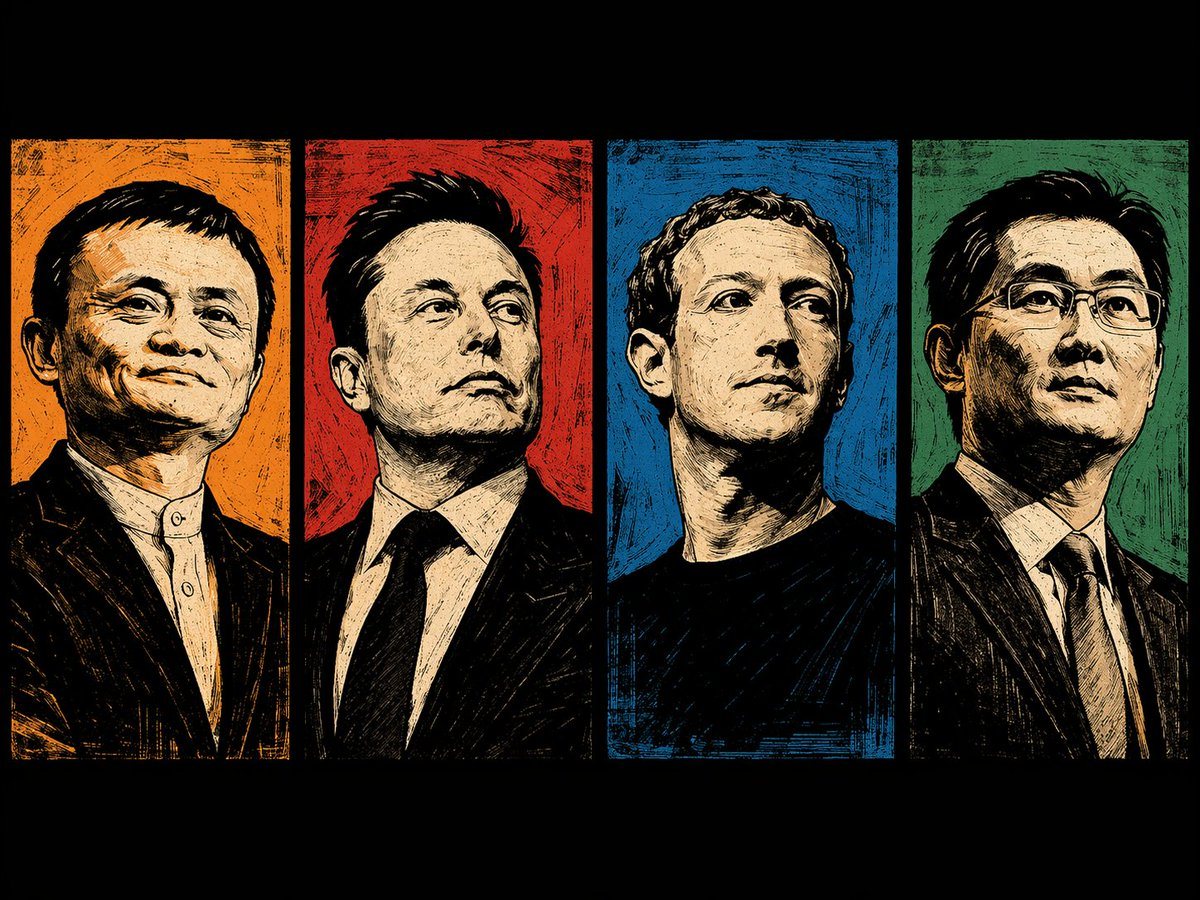
四联木刻版画风格肖像壁纸

生成一张四联分屏壁纸,以高对比度的版画风格呈现独特的肖像。

Copy this GPT Image 2 prompt for social media post and social ads with Editorial styling. Use it in Image2Studio to generate, edit, and save.
Prompt

A desktop wallpaper featuring a horizontal four-panel split layout with thick black borders. It showcases half-body portraits in a high-contrast {argument name="art style" default="woodcut printmaking"} style with thick black lines and cross-hatching, conveying a confident and elite mood. From left to right: {argument name="subject 1" default="Jack Ma"} against a textured orange background; {argument name="subject 2" default="Elon Musk"} in a suit against a textured red background; {argument name="subject 3" default="Mark Zuckerberg"} in a black shirt against a textured blue background; and {argument name="subject 4" default="Pony Ma"} wearing glasses and a suit against a textured green background. The subjects are rendered in monochromatic beige tones, contrasting sharply with the vibrant background of each pane.

Prompt structure
  • Modelgpt-image-2
  • Use casesocial-media-post
  • Styleeditorial
  • Aspect ratioFlexible
Best used for
  • Use casesocial-media-post
  • Styleeditorial
  • Recommended specs1:1, 4:5, 16:9, or 9:16
  • ModelGPT Image 2
How to customize

Use this 四联木刻版画风格肖像壁纸 prompt as a base. Replace the subject, product details, environment, lighting, brand colors, and output ratio while keeping the social-media-post intent and editorial direction stable.

Editable variables
  • SubjectReplace the product, person, scene, interface, or object being generated.
  • Use caseKeep or rewrite the destination as social media post, ad creative, cover image, poster, or ecommerce hero.
  • FrameChoose 1:1, 4:5, 16:9, or 9:16 based on the final placement.
  • Brand cuesAdd colors, materials, props, text-safe space, and the platform where the image will be used.
Recommended specs

Choose the frame for the destination first, then use 1K, 2K, or 4K based on output quality needs. Product images and posters usually benefit from higher resolution.

Pre-generation checklist
  • CheckSubject, lighting, composition, and frame are specific enough to review.
  • CheckText-safe space is included when the image will carry a headline or ad copy.
  • CheckResolution, credit cost, and final destination are checked before generation.
Why this prompt works

四联木刻版画风格肖像壁纸 works because it starts from the image job, then controls subject, composition, lighting, style, and frame. It is best for social media post while keeping the editorial direction stable.

Common questions
  • Can I use it directly?Yes. Replace the subject, brand cues, and frame, then generate in Image2Studio.
  • Which ratio should I use?Choose 1:1, 4:5, 16:9, or 9:16 based on the destination.